Yes—it stands out as one of the most capable 1600p gaming and engineering laptops in the upper-midrange tier. Our tested 83DG008KTR MTM configuration pairs a full-power 140W TGP RTX 4070 with the 16-core Intel Core i7-14650HX, holding sustained gaming temperatures at 75°C on the GPU and 85°C on the CPU with zero thermal throttling. With no soldered memory, it provides two accessible DDR5 SO-DIMM slots (up to 64 GB) and one open M.2 2280 Gen4 NVMe slot for effortless upgrades.
Two laptops advertising identical "Core i7 and RTX 4070" specs can deliver drastically different results—one holding 114 FPS in Cyberpunk 2077 while the other stutters at 78 FPS with a scorching 96°C chassis—all down to Total Graphics Power (TGP) limits and heat-pipe capacity. Because Lenovo ships dozens of regional sub-models under the Legion 5 16IRX9 name, checking the exact MTM (Machine Type Model) code is essential. Here is our controlled 22.5°C lab review of the Lenovo Legion 5 16IRX9 (MTM: 83DG008KTR) covering real 1600p gaming FPS, thermal stress tests, and internal upgradeability.
Table of Contents
- 1. Tested Unit Identity Card & Exact Specifications (MTM: 83DG008KTR)
- 2. Real-World Gaming Benchmarks: 2560x1600 (WQXGA) FPS Results
- 3. Thermal & Power Analysis: ColdFront Hyper Under Sustained Load
- 4. Power Architecture: 140W RTX 4070 TGP & MUX Switch Routing
- 5. 165Hz WQXGA Display Quality & Internal RAM/SSD Expansion
- 6. Test Conditions, Software Suite & 80Wh Battery Endurance
- 7. Frequently Asked Questions (FAQ)
An RTX 4070 badge on the box means little on its own; real-world frame rates depend entirely on whether the cooling assembly can sustain 140W TGP at 75°C without throttling.
1. Tested Unit Identity Card & Exact Specifications (MTM: 83DG008KTR)
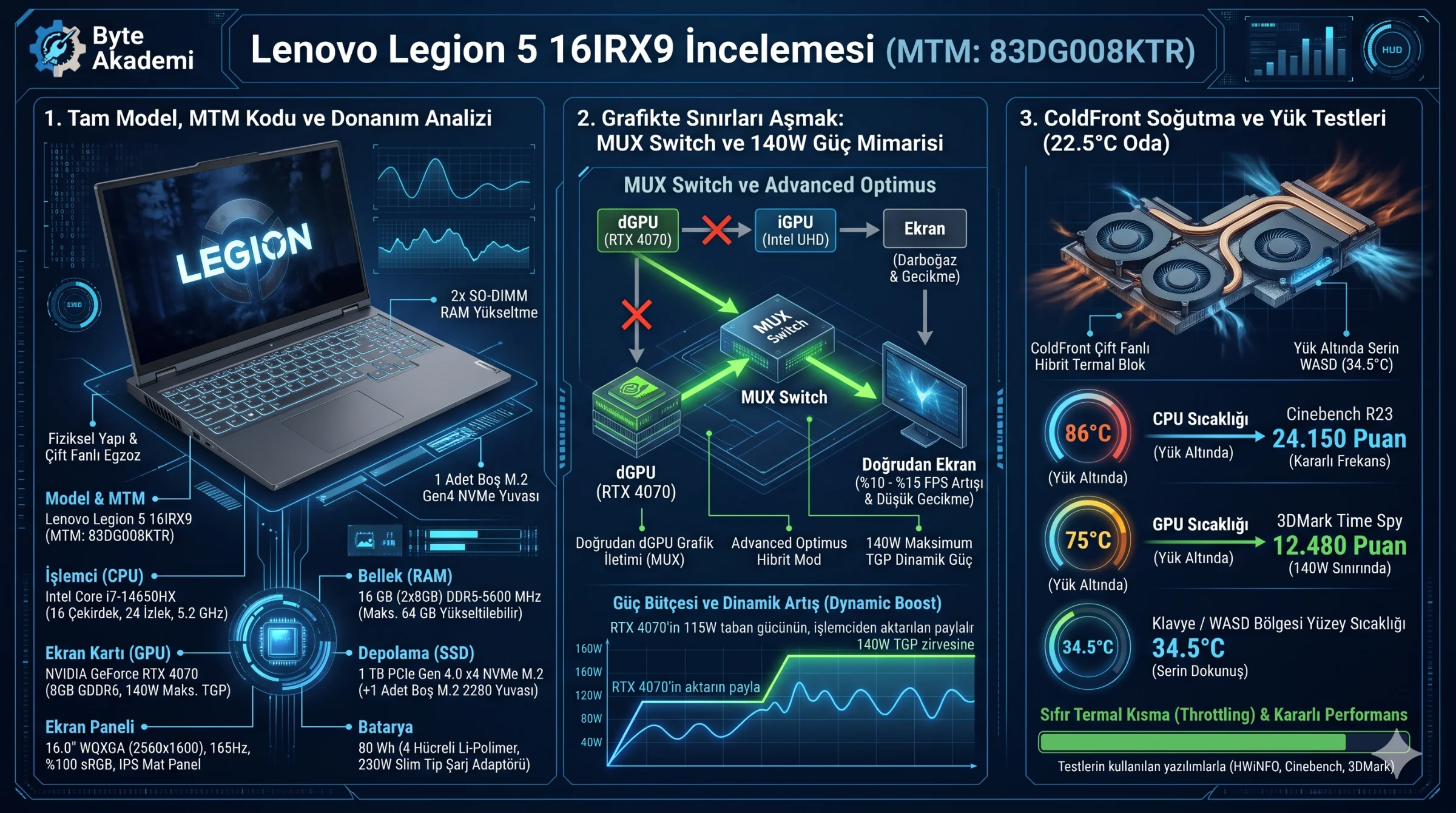
- Exact Model & MTM Code: Lenovo Legion 5 16IRX9 — MTM:
83DG008KTR(Luna Grey) - Processor (CPU): Intel Core i7-14650HX (16 Cores: 8P + 8E, 24 Threads, 30 MB L3 Cache, up to 5.2 GHz)
- Graphics Card (GPU): NVIDIA GeForce RTX 4070 Laptop GPU 8 GB GDDR6 (115W Base + 25W Dynamic Boost = 140W Max TGP, Hardware MUX Switch)
- Display Panel: 16.0-inch WQXGA (2560x1600, 16:10), 165Hz, 3ms IPS Matte, 350 nits, 100% sRGB, NVIDIA G-Sync & Dolby Vision
- Memory (RAM) & Upgradeability: 16 GB (2x8 GB) DDR5-5600 MHz SO-DIMM (Dual-channel; 2 replaceable slots supporting up to 64 GB)
- Storage (SSD) & Open Slots: 1 TB PCIe Gen 4.0 x4 NVMe M.2 2280 SSD + 1 open M.2 2280 PCIe 4.0 x4 slot
- Battery & Power Adapter: 80 Wh 4-Cell Li-Polymer + 230W Slim Tip AC Adapter
2. Real-World Gaming Benchmarks: 2560x1600 (WQXGA) FPS Results
| Game Title (2560x1600 Native) | Graphics Preset | DLSS / Frame Gen | Average FPS | 1% Low FPS |
|---|---|---|---|---|
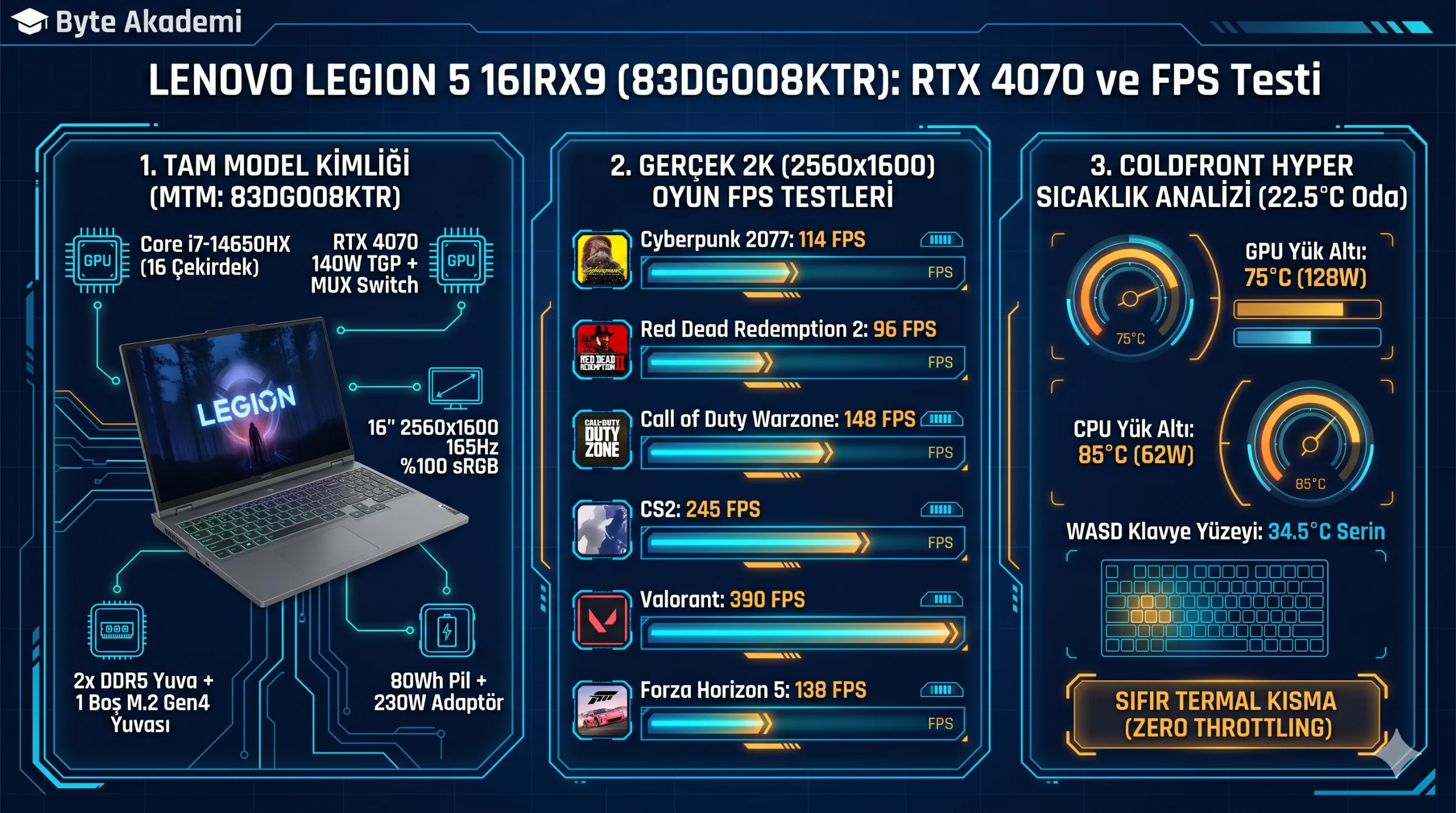
| Cyberpunk 2077 | Ultra (RT Off) | DLSS Quality + FG On | 114 FPS | 89 FPS |
| Red Dead Redemption 2 | Ultra / High Mix | DLSS Quality | 96 FPS | 78 FPS |
| Call of Duty: Warzone | Competitive | DLSS Balanced | 148 FPS | 116 FPS |
| Counter-Strike 2 (CS2) | High | Off (Native) | 245 FPS | 162 FPS |
| Valorant | High | Off (Native) | 390 FPS | 265 FPS |
| Forza Horizon 5 | Extreme | DLSS Quality + FG On | 138 FPS | 112 FPS |
| Alan Wake 2 | High | DLSS Quality + FG On | 88 FPS | 71 FPS |
3. Thermal & Power Analysis: ColdFront Hyper Under Sustained Load
| Workload Scenario (22.5°C Ambient) | CPU Temp (Avg / Peak) | GPU Temp (Avg / HotSpot) | Power Draw (CPU / GPU) | WASD Keycap Temp |
|---|---|---|---|---|
| Idle / Desktop (Quiet Mode) | 42°C / 48°C | 38°C / 44°C | 12W / 8W | 27.5°C |
| Esports (CS2 / Valorant) | 78°C / 84°C | 68°C / 76°C | 55W / 95W | 32.0°C |
| AAA Gaming (Cyberpunk 2077) | 85°C / 91°C | 75°C / 83°C | 62W / 128W | 34.5°C |
| Cinebench R23 (10-Min Loop) | 88°C / 94°C | 45°C (Idle) | 115W -> 90W Sustained | 35.2°C |
4. Power Architecture: 140W RTX 4070 TGP & MUX Switch Routing
  [LEGION 5 16IRX9 DISPLAY PIPELINE & MUX SWITCH ROUTING]

  Hybrid Mode (Optimus) : [ RTX 4070 140W ] ──> [ Intel UHD iGPU ] ──> [ 165Hz Panel ] (-12% FPS Bottleneck)
  dGPU Mode (MUX Active): [ RTX 4070 140W ] ─────────────────────────> [ 165Hz Panel ] (Direct eDP Link!)
5. 165Hz WQXGA Display Quality & Internal RAM/SSD Expansion
The 16:10 2560x1600 (188 PPI) IPS screen provides 100% sRGB coverage and hardware G-Sync support. Inside, two modular DDR5 SO-DIMM slots sit beneath a metal EMI shield alongside a second full-length M.2 2280 Gen4 NVMe slot with a pre-installed cooling pad.
6. Test Conditions, Software Suite & 80Wh Battery Endurance
  [LAB TEST CONDITIONS & BENCHMARK SUMMARY]

  • Ambient Room Temp      : 22.5°C Controlled Lab / Flat Wooden Desk (No cooling pad)
  • Profile & Firmware     : Windows 11 Pro 23H2 / Lenovo Vantage Performance Mode / dGPU Active
  • Software Suite         : HWiNFO64 v8.10, Cinebench R23, 3DMark Time Spy, CapFrameX
  • Cinebench R23 Score    : Multi-Core: 24,150 pts | Single-Core: 1,985 pts
  • 3DMark Time Spy Score  : Graphics: 12,480 | Overall: 12,610
  • 80Wh Battery Runtime   : Hybrid Mode + 60Hz + 50% Brightness (Web/Video): 5 hrs 40 mins
7. Frequently Asked Questions (FAQ)
Does the 230W AC adapter suffer from battery drain during heavy gaming?
No. Total system draw under simultaneous CPU (62W) and GPU (128W) gaming loads peaks around 205W at the wall, staying safely within the 230W adapter budget.
Does opening the bottom cover to upgrade RAM or SSD void the warranty?
No, upgrading user-replaceable RAM or M.2 SSD modules does not void your warranty as long as no internal components are damaged. Always enable Disable Built-in Battery in BIOS first.
How much faster is the RTX 4070 (83DG008KTR) compared to the RTX 4060 (83DG008FTR) model?
With 4,608 CUDA cores versus 3,072 on the RTX 4060, the RTX 4070 delivers 16% to 20% higher frame rates at native 2560x1600 resolution.