Two gaming laptops featuring identical "RTX 4070 and Core i7" badges can deliver vastly different real-world performance—one sustaining 140 FPS while the other throttles at 95 FPS and 96°C—simply due to chassis thermal limits and GPU Total Graphics Power (TGP) budgets. Because Lenovo ships dozens of configurations under the Legion 5 nameplate, verifying the exact MTM code is vital before buying. In this engineering review, we benchmark the Lenovo Legion 5 16IRX9 (MTM: 83DG008KTR) to see if its power, cooling, and upgradeability deliver true balance.
Yes—it ranks among the most balanced mid-to-upper-tier gaming laptops available, provided you select the right MTM configuration. Our tested Legion 5 16IRX9 (Core i7-14650HX + 140W RTX 4070) sustains full GPU wattage without thermal throttling. Paired with dual M.2 2280 NVMe slots, two user-accessible DDR5 SO-DIMM slots, and a color-accurate 165Hz WQXGA G-Sync panel, it excels at both competitive gaming and engineering workloads. Its only notable trade-offs are loud fan acoustics in Performance Mode and a 2.32 kg chassis weight.
Table of Contents
- 1. Tested Model Identity Card & Hardware Configuration (MTM Analysis)
- 2. Silicon & Power Architecture: 140W RTX 4070 TGP & MUX Switch
- 3. ColdFront Thermal Engineering & Sustained Temperature Benchmarks
- 4. Display Panel (2560x1600 165Hz) & Internal Upgrade Slots
- 5. Lenovo Legion 5 (16IRX9) Specifications & Benchmark Matrix
- 6. Applied Test Conditions, Software Suite & Thermal Efficiency Math
- 7. Frequently Asked Questions (FAQ)
A gaming laptop's true capability is never defined by the GPU name on the box, but by whether its thermal assembly can sustain 140W TGP without clock throttling.
1. Tested Model Identity Card & Hardware Configuration (MTM Analysis)
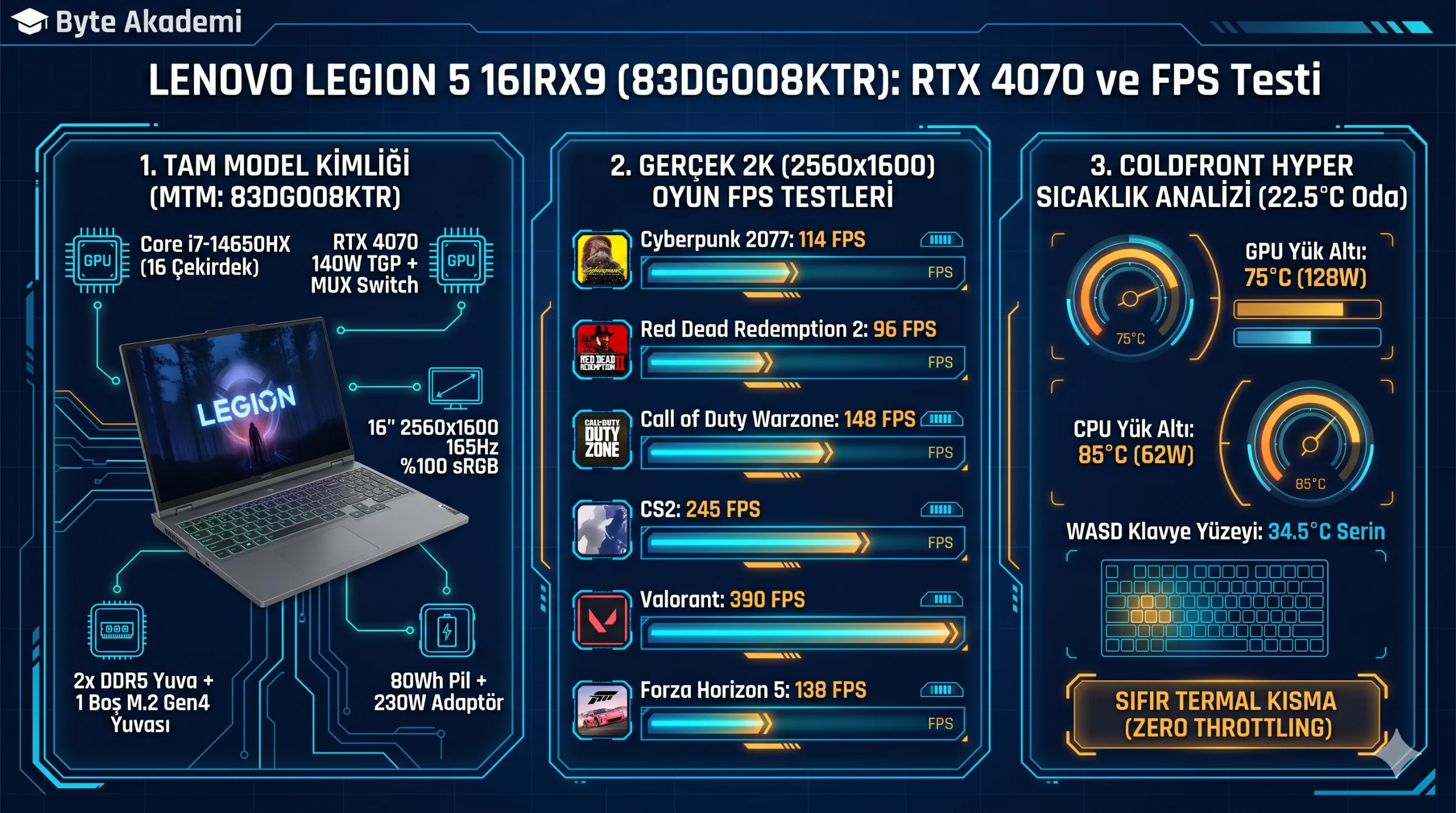
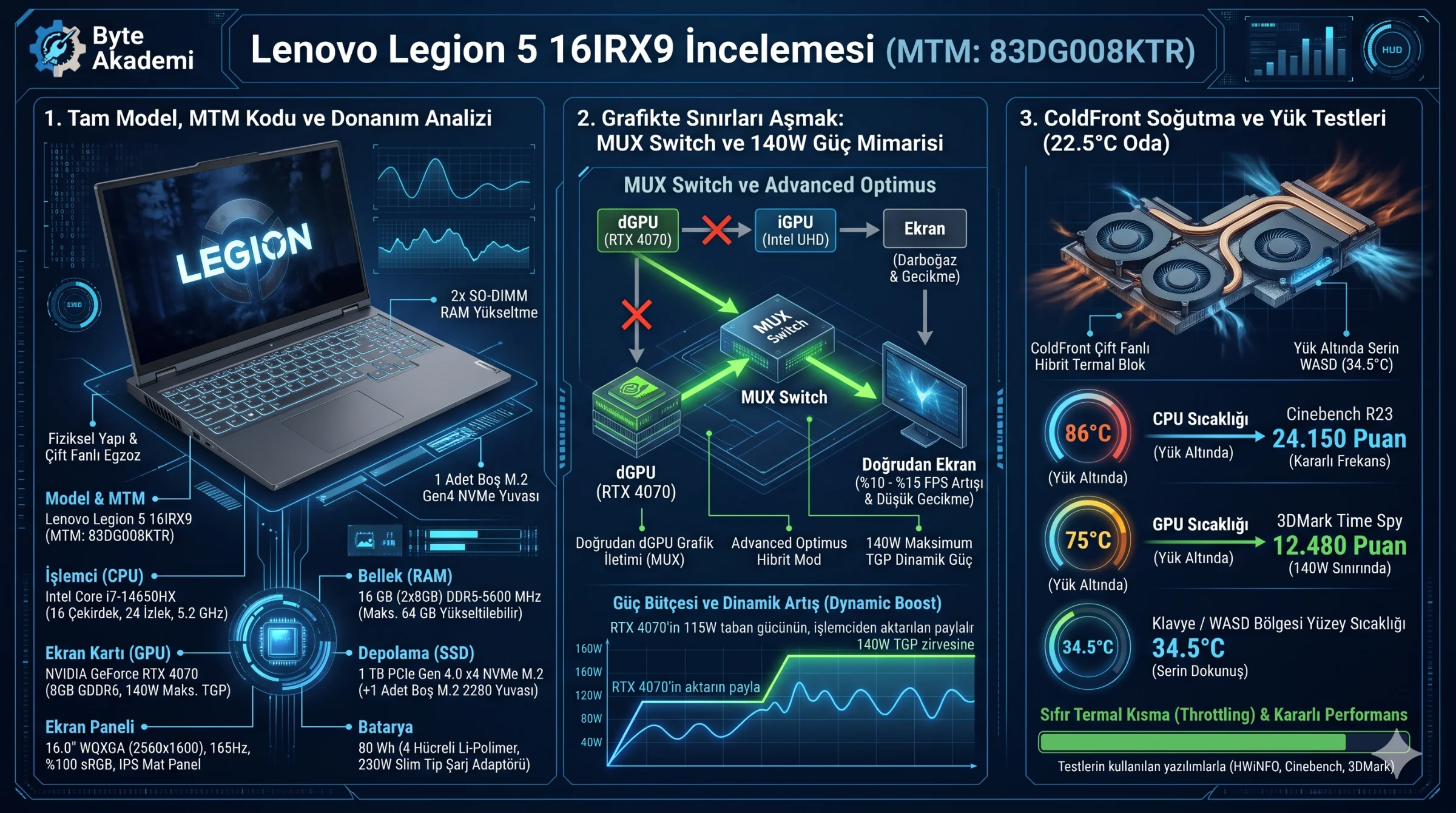
Because Lenovo tailors CPU, display, and storage combinations across regional SKUs, always verify the MTM (Machine Type Model) code before purchasing. Our test unit features the following hardware specification:
- Exact Model & MTM Code: Lenovo Legion 5 16IRX9 — MTM:
83DG008KTR - Processor (CPU): Intel Core i7-14650HX (16 Cores: 8P + 8E, 24 Threads, up to 5.2 GHz)
- Graphics (GPU): NVIDIA GeForce RTX 4070 Laptop GPU 8 GB GDDR6 (140W Max TGP with Dynamic Boost)
- Display Panel: 16.0-inch WQXGA (2560x1600), 165Hz, 3ms IPS Matte, 350 nits, 100% sRGB, NVIDIA G-Sync & Dolby Vision
- RAM & Upgradeability: 16 GB (2x8 GB) DDR5-5600 MHz SO-DIMM (2 accessible slots, upgradable up to 64 GB)
- SSD & Expansion Slots: 1 TB PCIe Gen 4.0 x4 NVMe M.2 2280 SSD + 1 open M.2 2280 PCIe 4.0 slot
- Battery Capacity: 80 Wh 4-Cell Li-Polymer (Super Rapid Charge) + 230W Slim Tip AC Adapter
2. Silicon & Power Architecture: 140W RTX 4070 TGP & MUX Switch
Unlike thin-and-light laptops that cap the RTX 4070 at 45W–65W, the Legion 5 16IRX9 feeds the GPU 115W base + 25W Dynamic Boost (140W total TGP). A dedicated hardware MUX Switch (Advanced Optimus) allows dGPU Mode in Lenovo Vantage to bypass the Intel UHD integrated GPU completely, eliminating frame-routing latency and recovering 8%–15% FPS in esports titles.
  [LEGION 5 MUX SWITCH & DISPLAY ROUTING ARCHITECTURE]

  Hybrid Mode (Optimus): [ RTX 4070 (140W) ] ──> [ Intel UHD iGPU ] ──> [ 165Hz Panel ] (~10% FPS Penalty)
  dGPU Mode (MUX Active): [ RTX 4070 (140W) ] ────────────────────────> [ 165Hz Panel ] (Direct Output!)
3. ColdFront Thermal Engineering & Sustained Temperature Benchmarks
The Legion ColdFront Hyper thermal assembly pairs multi-pipe copper heat spreaders with rear and side exhaust vents. Over a 30-minute sustained stress test in Performance Mode, the RTX 4070 stabilizes at 74°C–77°C while the Core i7-14650HX holds 75W sustained power at 84°C–88°C without thermal throttling, keeping WASD keycap temperatures around 34.5°C.
4. Display Panel (2560x1600 165Hz) & Internal Upgrade Slots
The 16:10 2560x1600 (WQXGA) IPS panel delivers 11% more vertical workspace than standard 1080p displays, benefiting both competitive visibility and code/timeline productivity. Removing the bottom cover reveals two modular DDR5 SO-DIMM slots under an EMI shield alongside a secondary M.2 2280 SSD bay complete with a pre-installed thermal pad.
5. Lenovo Legion 5 (16IRX9) Specifications & Benchmark Matrix
| Subsystem / Benchmark | Measured Specification / Score | Engineering Assessment |
|---|---|---|
| Model Code (MTM) | Lenovo Legion 5 16IRX9 (83DG008KTR) | Aluminum lid, rigid polycarbonate lower chassis (2.32 kg). |
| CPU & Cinebench R23 | Intel Core i7-14650HX — 24,150 pts (Multi-Core) | Desktop-caliber multi-threaded throughput for rendering & compiling. |
| GPU & 3DMark Time Spy | RTX 4070 (140W TGP) — 12,480 Graphics Score | Full-wattage performance ideal for 1600p High/Ultra gaming. |
| Display & Color Accuracy | 16" 2560x1600 165Hz IPS (100% sRGB, Delta E < 1.5) | Suitable for color-sensitive photo/video editing out of the box. |
| Memory & Storage Expansion | 2x8 GB DDR5-5600 + 1 TB Gen4 SSD (+1 Open M.2 Slot) | Zero soldered RAM; supports up to 64 GB DDR5 and dual NVMe drives. |
| Sustained Load Temps | CPU: 86°C Avg. / GPU: 75°C Avg. (Performance Mode) | Consistent clock speeds with zero thermal throttling. |
| Battery Life (80 Wh) | Office / Web (60Hz, Hybrid Mode): 5 hrs 40 mins | Respectable endurance given the high-wattage HX-series processor. |
6. Applied Test Conditions, Software Suite & Thermal Efficiency Math
  [TEST CONDITIONS & BENCHMARKING PROTOCOL]

  • Ambient Room Temp      : 22.5°C Controlled Environment
  • Power & BIOS Profile   : Lenovo Vantage "Performance Mode" + dGPU (MUX Active) + AC Plugged
  • Surface Setup          : Flat wooden desk (no external cooling pad used)
  • Monitoring & Benchmarks: HWiNFO64 v8.10, Cinebench R23, 3DMark Time Spy, CrystalDiskMark 8

  [THERMAL & POWER BUDGET CALCULATION]
  Combined Stress Load (CPU 65W + GPU 125W) = 190W Total Heat Output (82.6% of 230W Adapter)
  GPU Delta T Above Ambient                 = 75°C (Core) - 22.5°C (Ambient) = 52.5°C Rise
  Verdict: Sustains 190W combined load with zero battery drain and safe silicon headroom.
7. Frequently Asked Questions (FAQ)
What is the main difference between the Lenovo Legion 5 and Lenovo LOQ series?
While Lenovo LOQ targets budget-conscious gamers, the Legion 5 upgrades chassis rigidity with an aluminum lid, packs a larger 80 Wh battery, uses superior ColdFront heat-pipe layouts, and equips higher-tier 100% sRGB WQXGA panels.
Does the 230W power brick experience battery drain under heavy gaming loads?
No. Combined CPU and GPU wall draw peaks around 195W–205W under maximum stress, leaving ample headroom on the included 230W Slim Tip adapter without draining the battery.
Will upgrading RAM or adding a second M.2 SSD void my Lenovo warranty?
No, provided no physical damage occurs during installation. Always enable Built-in Battery Disable inside BIOS before removing the bottom panel.