Yes—when you select the right sub-model (MTM code), the Lenovo Legion 5 series is one of the most balanced upper-midrange laptops on the market. With full-wattage GPU TGP limits, a hardware MUX Switch, dual M.2 NVMe SSD slots, and two replaceable DDR5 SO-DIMM memory slots, it is an ideal choice for 1080p/1600p gamers, engineering students, CAD professionals, and software developers. However, users who prioritize ultra-light portability, 8–10 hours of unplugged battery life, or whisper-quiet operation under heavy load should look elsewhere.
Buying a laptop based solely on the "Legion 5" series name or a generic "Core i7 / Ryzen 7 + RTX" store title can easily lead to a mismatched purchase. Lenovo produces the Legion 5 across multiple generations (Gen 7, Gen 8, Gen 9), screen aspect ratios (15.6-inch 16:9 and 16-inch 16:10), and regional MTM configurations. One sub-model may ship with a dim 45% NTSC screen, while another features a factory-calibrated 100% sRGB WQXGA (2560x1600) panel. This guide breaks down the engineering architecture of the Lenovo Legion 5, identifies which user profiles it serves best, and outlines the exact specifications to verify before buying.
Table of Contents
- 1. Where the Legion 5 Fits in Lenovo's Laptop Lineup
- 2. Power (TGP) & Thermal Architecture: Why It Beats Entry-Level Models
- 3. Who Should Buy the Lenovo Legion 5 (And Who Should Avoid It)?
- 4. Internal Upgradeability: RAM and M.2 SSD Slot Layout
- 5. Decoding Lenovo Naming Conventions (IRX9, AHP9, ARP9) & Panels
- 6. Technical Comparison: Lenovo LOQ vs. Legion 5 vs. Legion Pro 5
- 7. 5-Step Engineering Checklist Before You Buy
- 8. Frequently Asked Questions (FAQ)
A laptop's longevity is defined not merely by the CPU and GPU names on the spec sheet, but by a thermal assembly capable of sustaining full TGP wattage and a modular motherboard built for future upgrades.
1. Where the Legion 5 Fits in Lenovo's Laptop Lineup
Lenovo divides its gaming and high-performance notebooks into three distinct tiers: budget-oriented IdeaPad Gaming / Lenovo LOQ at the entry level, Legion 5 / Legion Slim 5 in the balanced midrange, and Legion Pro 5 / Pro 7 / Legion 9 at the enthusiast flagship tier.
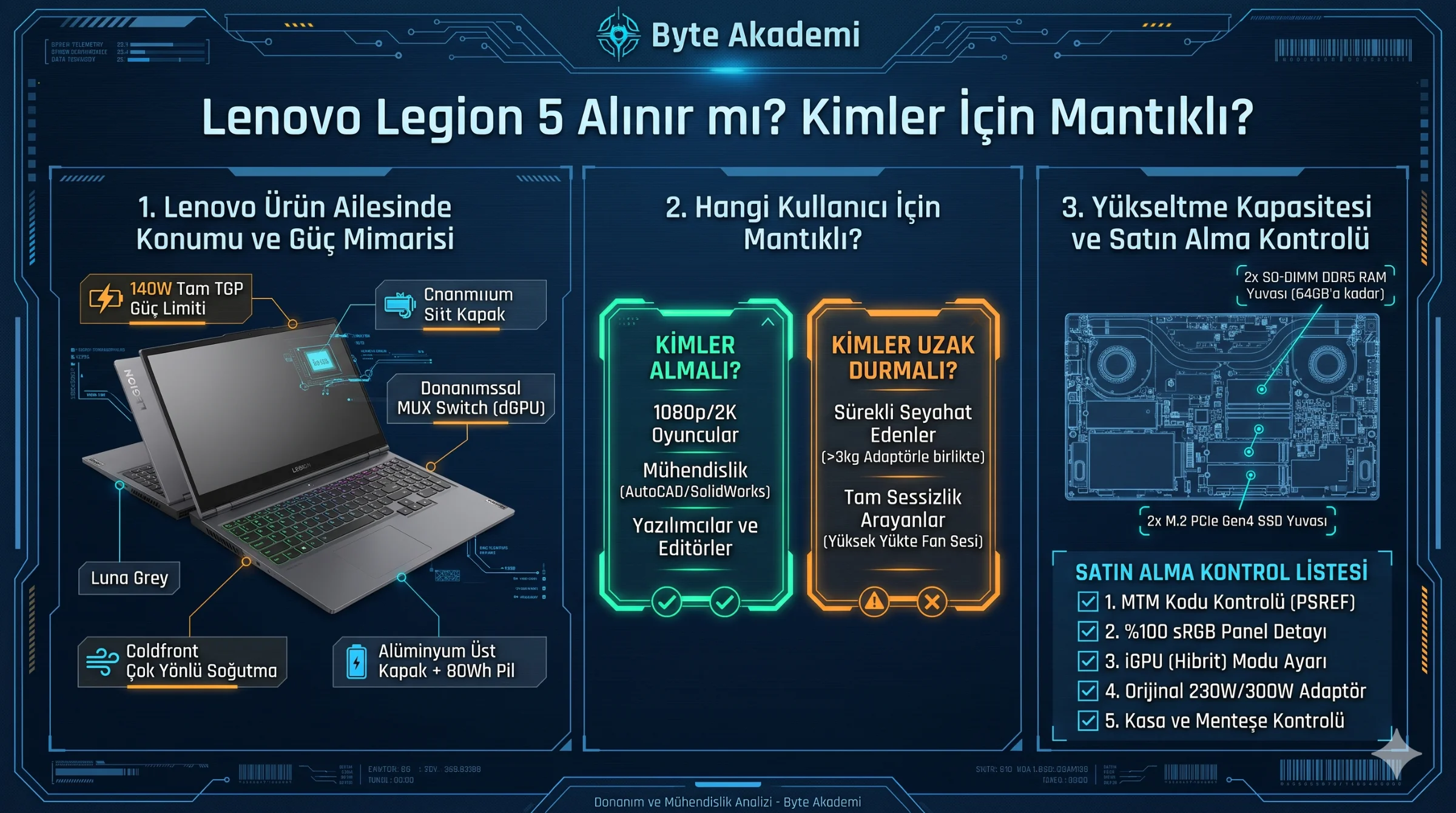
The Legion 5 occupies the sweet spot of this hierarchy. Whereas entry-level LOQ models cut costs with all-plastic enclosures, smaller heat pipes, and 60Wh batteries on many SKUs, the Legion 5 steps up to an anodized aluminum lid, a wider ColdFront thermal module, and typically an 80Wh battery pack—without reaching the bulk or price premium of the flagship Pro 7 series.
2. Power (TGP) & Thermal Architecture: Why It Beats Entry-Level Models
In mobile hardware, a graphics card's real-world performance is governed by its TGP (Total Graphics Power) ceiling rather than its marketing name alone. A power-limited 45W or 65W GPU in a thin chassis will consistently trail a full-wattage GPU in sustained workloads.
In recent Legion 5 generations (such as the 16IRX9 and 16APH9), NVIDIA GeForce RTX 4060 and RTX 4070 laptop GPUs are configured for up to 115W base + 25W Dynamic Boost (140W maximum TGP). Two core architectural features support this power budget:
- Hardware MUX Switch (Advanced Optimus): Standard laptops route discrete GPU frames through the processor's integrated graphics (iGPU) before reaching the display, introducing latency and reducing frame rates in CPU-bound games. The physical MUX Switch on the Legion 5 bypasses the iGPU completely, establishing a direct connection from the NVIDIA GPU to the internal panel.
- ColdFront Multi-Zone Cooling: Copper heat spreaders cover not only the CPU and GPU silicon dies, but also the GDDR6 VRAM chips and VRM power stages. Primary exhaust is directed out the rear vents rather than blasting hot air onto your mouse hand.
  [DISPLAY SIGNAL PATH: STANDARD OPTIMUS vs. LEGION 5 MUX SWITCH]

  Hybrid Mode (Optimus) : [ Discrete GPU ] ──> [ Processor iGPU ] ──> [ Laptop Display ] (Added Latency)
  dGPU Mode (MUX Active): [ Discrete GPU ] ─────────────────────────> [ Laptop Display ] (Direct Link)
3. Who Should Buy the Lenovo Legion 5 (And Who Should Avoid It)?
Ideal User Profiles
- 1080p and 1600p (2K) Gamers: Unthrottled GPU power limits and high-refresh G-Sync panels make it equally capable in high-FPS competitive shooters and demanding AAA titles.
- Engineering & Architecture Students / Professionals: CAD, 3D modeling, and simulation suites (AutoCAD, SolidWorks, Revit, ANSYS, MATLAB) rely heavily on sustained single-core turbo clocks and discrete GPU acceleration.
- Software Developers & Data Scientists: Upgradable dual-channel DDR5 memory (up to 32 GB or 64 GB) prevents bottlenecks when running Docker containers, virtual machines, or local CUDA workloads.
- Content Creators & Video Editors: Configurations equipped with the 100% sRGB WQXGA (2560x1600) panel provide accurate color reproduction without requiring an external monitor.
Who Should Look Elsewhere?
- Frequent Travelers Needing All-Day Battery: High-wattage H and HX processors prioritize raw compute over idle efficiency. Combined with the 230W/300W power brick, total carry weight exceeds 3 kg.
- Users Requiring Silent Acoustics Under Load: Dissipating 140W GPU and 65W–90W CPU heat loads requires high fan RPMs in Performance Mode.
- General Office & Web Users: If your workflow never utilizes a dedicated GPU, a lighter Lenovo ThinkPad, ThinkBook, or IdeaPad Slim Ultrabook offers superior portability and battery endurance.
4. Internal Upgradeability: RAM and M.2 SSD Slot Layout
While many modern laptops solder memory directly to the motherboard, standard Legion 5 models retain a modular internal layout (always verify compact Slim sub-models via their MTM code):
- Memory Slots: Beneath a removable metal EMI shield sit 2 SO-DIMM slots. Systems shipping with 16 GB (2x8 GB) can be upgraded to 32 GB (2x16 GB) or 64 GB (2x32 GB) DDR5.
- Storage Bays: The motherboard provides 2 M.2 PCIe NVMe SSD slots. One bay houses the factory boot drive, leaving the second M.2 slot open for instant storage expansion without wiping your operating system.
Before removing the bottom cover to install RAM or an M.2 SSD, boot into BIOS and select Configuration > Disable Built-in Battery. This safely cuts power to the motherboard circuits without requiring you to pry loose the delicate physical battery cable connector.
5. Decoding Lenovo Naming Conventions (IRX9, AHP9, ARP9) & Panels
- Legion 5 16IRX9:
16denotes the 16-inch (16:10) screen,Iindicates an Intel processor,RXmarks high-performance HX-class silicon, and9identifies Gen 9 hardware. - Legion 5 16APH9 / 16AHP9:
Aindicates an AMD Ryzen HS processor platform, which typically offers better unplugged battery efficiency than desktop-derived HX chips. - The Ryzen 7435HS / 7235HS Caveat (ARP8 / ARP9): Sub-models built around the AMD Ryzen 7 7435HS or Ryzen 5 7235HS lack an integrated GPU (iGPU). Because the discrete NVIDIA GPU must stay active even on battery power, unplugged runtime is significantly shorter.
- Display Panel Tiers: Entry-level 15.6-inch 120Hz/144Hz 250-nit panels often cover only 45% NTSC (~62% sRGB). Always verify that your chosen MTM code specifies 100% sRGB and at least 300–350 nits brightness (typically the 165Hz or 240Hz WQHD/WQXGA panels).
6. Technical Comparison: Lenovo LOQ vs. Legion 5 vs. Legion Pro 5
| Technical Criterion | Lenovo LOQ 15 Series | Lenovo Legion 5 (Gen 8 / 9) | Lenovo Legion Pro 5 |
|---|---|---|---|
| Target Audience | Budget-conscious entry/midrange gamers | Gamers & engineers seeking full TGP and balanced build quality | Enthusiasts running sustained heavy CPU + GPU loads |
| Chassis Construction | All-plastic PC-ABS body | Aluminum lid + reinforced polymer base | Aluminum lid + deeper thermal exhaust assembly |
| Typical GPU TGP Limit | 95W – 115W (SKU dependent) | Full TGP (up to 140W on RTX 4060/4070) | Full TGP (140W+) with higher combined cross-load budget |
| Display Options | 15.6" FHD (1920x1080) 144Hz | 15.6" FHD/WQHD or 16" WQXGA (2560x1600) 165Hz/240Hz 100% sRGB | 16" WQXGA (2560x1600) 165Hz/240Hz up to 500 nits HDR400 |
| Battery Capacity | Typically 60 Wh | Typically 80 Wh | 80 Wh |
7. 5-Step Engineering Checklist Before You Buy
- Look Up the Exact MTM Code: Copy the 10-character MTM code (e.g.,
83DG...) from the retailer listing and verify it on Lenovo's official PSREF database. - Confirm 100% sRGB Coverage: Ensure the panel specification lists
100% sRGBrather than45% NTSC. - Check for an Integrated GPU (iGPU): If you need unplugged battery life for classes or meetings, avoid iGPU-less processors like the Ryzen 7 7435HS.
- Verify AC Adapter Wattage: Confirm the box includes a 230W or 300W Slim Tip adapter to prevent battery drain under combined load.
- Inspect Factory RAM Configuration: Prefer dual-channel (2x8 GB or 2x16 GB) configurations over single-stick setups for optimal 1% Low FPS stability.
8. Frequently Asked Questions (FAQ)
1. Is the Lenovo Legion 5 worth the price jump over the Lenovo LOQ?
Yes, if your budget allows. The Legion 5 offers an aluminum top cover, a more robust cooling module, an 80Wh battery (versus 60Wh on most LOQ models), higher GPU TGP ceilings, and superior 16:10 WQXGA display options.
2. Is the Legion 5 suitable for engineering students (AutoCAD, SolidWorks, coding)?
Absolutely. Its combination of high-wattage multi-core processors, full-TGP NVIDIA graphics, and understated chassis styling makes it a reliable mobile workstation for university and office environments.
3. Will keeping the Legion 5 plugged in all the time ruin the battery?
Not if you enable Conservation Mode inside Lenovo Vantage or Lenovo Legion Toolkit. This caps the battery charge at 75%–80% and powers the laptop directly from the AC adapter, preventing high-voltage lithium cell degradation.
4. Does opening the bottom panel to upgrade RAM or SSD void the warranty?
Upgrading user-accessible RAM or M.2 SSD slots does not void your warranty provided you do not cause physical or electrical damage to internal components during installation.
5. Should I choose the RTX 4060 or RTX 4070 version of the Legion 5?
Both GPUs carry 8 GB of GDDR6 VRAM and run at up to 140W TGP in the Legion 5. At 2560x1600 resolution, the RTX 4070 is roughly 15%–20% faster thanks to its higher CUDA core count. If the price gap is under 15%, pick the RTX 4070; otherwise, the RTX 4060 delivers better value per dollar.
6. What software should I install first on a FreeDOS Legion 5?
After installing Windows 11 and running Windows Update, install Lenovo Vantage (or Lenovo Legion Toolkit) to update BIOS firmware, chipset drivers, and thermal power profiles.