Pressing the power button after a sudden blackout or grid flicker only to be met with complete silence, a faint burnt electronics smell, or fans twitching once before dying triggers immediate dread: did the surge destroy your GPU, CPU, and irreplaceable files? When grid power restores, wall outlets often deliver transient voltage spikes far above nominal 120V/230V AC. Fortunately, modern PC power architectures feature sacrificial protection stages designed to absorb the blow.
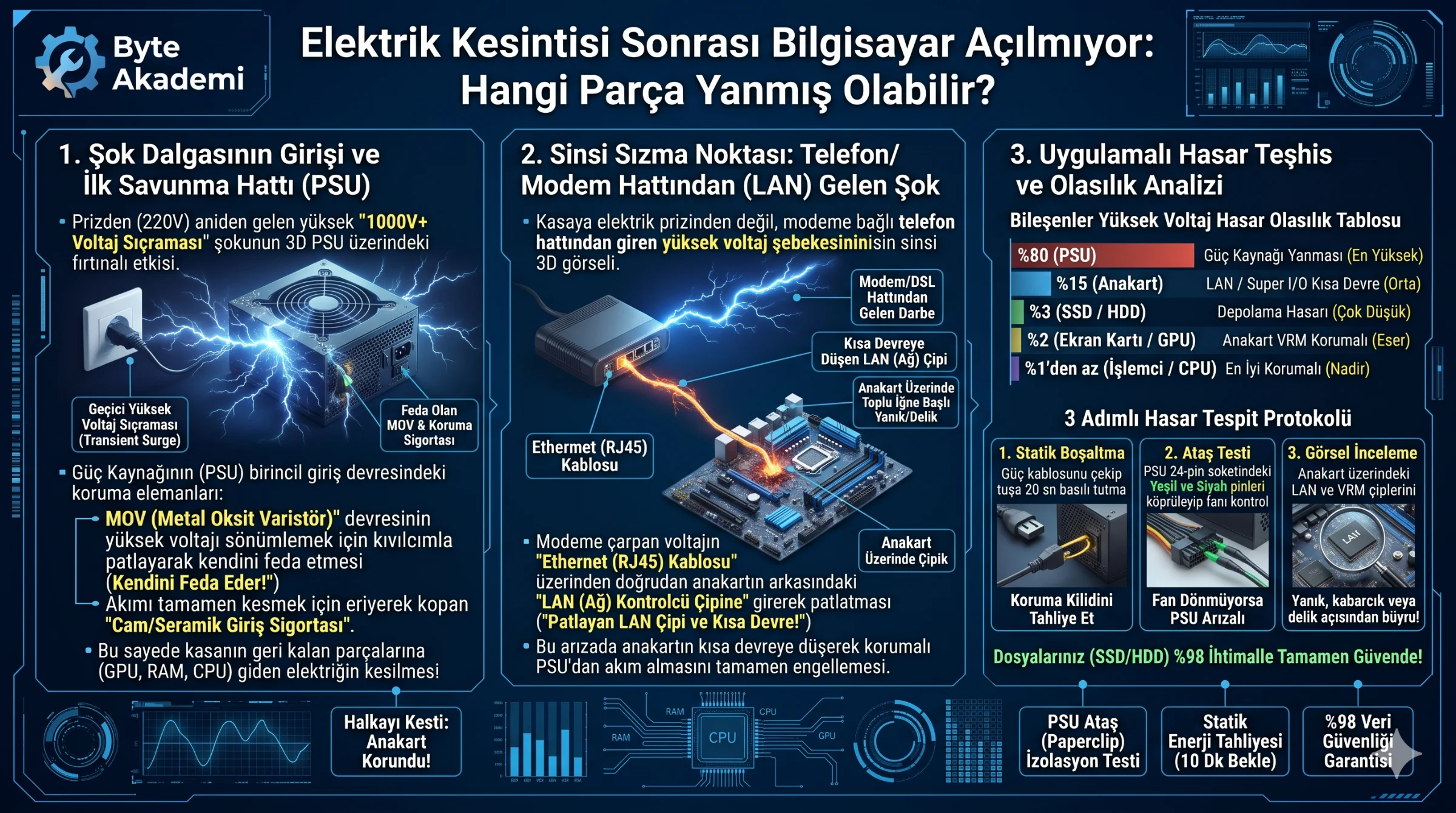
Roughly 80% of the time, the sole casualty is the Power Supply Unit (PSU). Quality PSUs feature a primary-side MOV (Metal Oxide Varistor) and input fuse that intentionally blow to absorb high-voltage spikes, saving your motherboard, GPU, and SSDs. If the PSU is intact—or if the surge entered via your router—the second most likely culprit is a shorted motherboard Ethernet (LAN) controller chip or Super I/O controller. Storage drives, RAM, and processors survive in over 97% of surge incidents.
Table of Contents
- 1. The Real Culprit: Transient Voltage Surge Physics Upon Power Restoration
- 2. First Line of Defense: How a PSU Sacrifices Itself via MOV & Fuse
- 3. The Hidden Backdoor: Surges Entering Through Modem & Ethernet Cables
- 4. Component Surge Damage Probability & Data Safety Matrix
- 5. Applied Diagnosis: 3-Step Isolation Protocol to Pinpoint Burned Parts
- 6. Frequently Asked Questions (FAQ)
Hardware rarely dies when power cuts out; it dies in the microsecond power returns with a transient voltage surge—and a quality PSU's MOV circuit sacrifices itself so your motherboard and data survive.
1. The Real Culprit: Transient Voltage Surge Physics Upon Power Restoration
Sudden power loss itself does not fry silicon; the destructive event is the transient voltage surge generated when utility transformers re-energize, briefly spiking line voltage to 600V–1,500V for microseconds before settling back to standard AC levels.
  [HIGH-VOLTAGE SURGE PROPAGATION & CONTAINMENT MAP]

  Wall Outlet (600V+ Spike!) ──> [ PSU Primary Stage (MOV & Fuse) ] ──(SACRIFICES ITSELF)──X
                                         │ (Only leaks if PSU lacks protection!)
                                         ▼
                               [ Motherboard VRM & Super I/O ] ────(Shorts / Burns)────X
                                         │
  Modem / Router Line ─────────> [ Motherboard LAN Chip ] ─────────(Bypasses PSU completely!)
2. First Line of Defense: How a PSU Sacrifices Itself via MOV & Fuse
Inside any reputable 80+ certified PSU, the primary AC input stage incorporates a Metal Oxide Varistor (MOV) paired with a ceramic fuse. Under normal voltage, the MOV remains passive; the nanosecond voltage exceeds safe limits, its resistance drops to near zero, shunting surge energy to ground and intentionally burning out while blowing the input fuse to sever all power to downstream hardware.
3. The Hidden Backdoor: Surges Entering Through Modem & Ethernet Cables
Even with a surge-protected power strip, lightning or grid transients frequently travel along coaxial/DSL lines into your router and straight down the Ethernet (RJ45) cable into your motherboard's LAN chip—blowing the transceiver and locking the board's +3.3V/+5VSB rail into a permanent short circuit.
4. Component Surge Damage Probability & Data Safety Matrix
| Hardware Component | Failure Probability | Physical Symptom | Data Safety & Recovery |
|---|---|---|---|
| PSU (Power Supply) | ~80% (Highest) | Completely dead, burnt odor, fails paperclip jump test | Zero data loss; replacing PSU restores full operation. |
| Motherboard (LAN / Super I/O) | ~15% (Moderate) | PSU passes jump test but board refuses to trigger | Zero data loss; requires board replacement or IC repair. |
| Storage (NVMe SSD / HDD) | ~3% (Low) | PC boots to BIOS but drive is undetected | Only files actively being written at blackout risk corruption. |
| GPU & System RAM | 1% – 2% (Very Low) | Motherboard VGA or DRAM Debug LED stays lit | Protected behind multi-stage PSU and motherboard VRMs. |
| Processor (CPU) | Under 1% | Solid red CPU Debug LED | Motherboard VRM MOSFETs fail first, shielding the CPU die. |
5. Applied Diagnosis: 3-Step Isolation Protocol to Pinpoint Burned Parts
  [3-STEP POST-OUTAGE HARDWARE ISOLATION PROTOCOL]

  STEP 1 (Clear Protection Latch):
  Unplug AC power and Ethernet cables. Hold the case power button for 20 seconds,
  wait 10 minutes for PSU OVP/UVP latches to reset, and test again.

  STEP 2 (PSU Paperclip Test):
  Disconnect all PSU cables from the motherboard. Bridge Green (PS_ON#) and Black (GND)
  on the 24-pin ATX plug with an insulated paperclip. If the fan stays dead, the PSU is fried.

  STEP 3 (Inspect Motherboard LAN IC):
  If the PSU fan spins on its own but fails when plugged into the board, inspect the small
  square Ethernet controller IC near the rear RJ45 port for pinhole burn marks.
6. Frequently Asked Questions (FAQ)
My PC smelled like burnt electronics after an outage but still booted—is it safe to use?
No. A burnt odor indicates a ruptured capacitor or blown sacrificial MOV inside the PSU. Continuing to run an unprotected PSU risks passing the next minor voltage fluctuation straight into your motherboard and GPU.
Why did my PC fry even though it was plugged into a surge protector?
Surge protectors degrade over time as their internal MOVs absorb small spikes, eventually losing protection capacity—and standard power strips cannot block surges traveling through Ethernet cables.
Are my files and photos on my NVMe SSD lost if the PC won't power on?
Almost never. NVMe SSDs store data in non-volatile NAND flash behind multiple voltage regulators; installing your drive into a repaired or replacement system recovers your files intact.