1. What Is ChatGPT and How Does It Work Under the Hood?
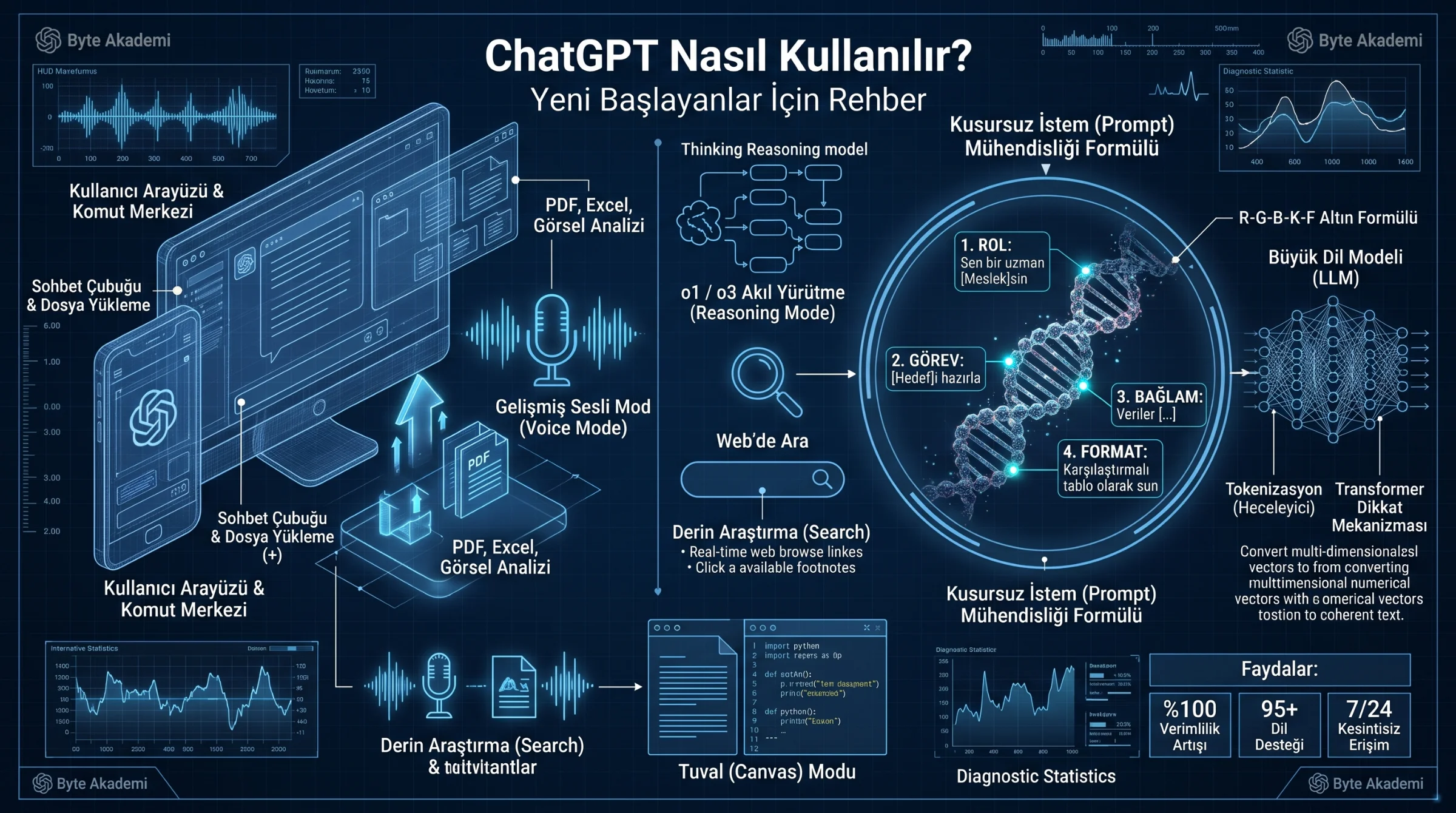
Developed by OpenAI, ChatGPT (Chat Generative Pre-trained Transformer) is an advanced Large Language Model (LLM) capable of understanding human language, writing code, analyzing spreadsheets, generating images, and solving complex reasoning problems. While many beginners treat ChatGPT like a traditional search engine, its underlying architecture is fundamentally different: instead of fetching pre-existing web pages, ChatGPT constructs answers word-by-word in real time by calculating probabilistic semantic relationships across billions of parameters.
Every time you type a question into the prompt bar, three computational steps occur in milliseconds:
- Tokenization: The model breaks your text down into chunks of characters or syllables called "Tokens" (roughly 1,000 tokens equal 750 English words) and converts them into multi-dimensional mathematical vectors.
- Self-Attention (Transformer Architecture): The neural network weighs how every word in your prompt relates to every other word, allowing it to grasp nuance, tone, and technical context.
- Probabilistic Generation: Guided by your instructions, the model predicts and streams the most accurate sequence of tokens to form a coherent response.
On Google, typing fragmented keywords like "best laptop programming 2026" works well. On ChatGPT, brief keywords yield vague answers. Treat ChatGPT like a highly skilled human specialist sitting across from you: assign it a role, provide background context, and specify the exact output format you want.
The difference between a generic AI response and an expert-grade solution lies in treating ChatGPT not like a 3-word search engine, but like a senior collaborator guided by structured Role, Context, and Format prompts.
2. Step-by-Step Setup: Navigating the Interface Like a Pro
Getting started with ChatGPT is free and syncs seamlessly across desktop browsers, iOS, and Android apps:
- Step 1 (Account Creation): Visit the official portal at chatgpt.com and click Sign Up. You can register using an email address or sign in instantly with your Google, Microsoft, or Apple account.
- Step 2 (The Prompt Bar & File Uploads): Click the "+" (Attachment) icon inside the message bar to upload PDF documents, Excel spreadsheets (.xlsx/.csv), Word files, or photos for instant summarization and data extraction.
- Step 3 (Web Search & Deep Research): Toggle the "Search" (Globe) icon to allow ChatGPT to browse live internet sources and return up-to-date facts complete with clickable citation links.
- Step 4 (Canvas Mode for Writing & Coding): When drafting articles or software code, activate Canvas to open a side-by-side workspace where you can highlight specific paragraphs or lines of code for targeted inline edits.
- Step 5 (Advanced Voice Mode): Tap the waveform icon on the right side of the prompt bar to engage in natural, real-time spoken conversations—ideal for brainstorming on the go or practicing a foreign language.
3. The Golden Formula: The 5-Part Prompt Engineering Framework
An instruction given to an AI is called a "Prompt." While beginners write one-line requests like "Write a cover letter," power users apply the R-C-T-C-F (Role + Context + Task + Constraints + Format) framework:
// THE 5-PART MASTER PROMPT TEMPLATE — COPY & CUSTOMIZE!

1. [ROLE]        : "Act as a senior [Profession/Title] with 15 years of industry experience."
2. [CONTEXT]     : "My target audience is [Audience]. Here is the background situation: [...]"
3. [TASK]        : "Create a comprehensive, step-by-step [Deliverable] focused on [Topic]."
4. [CONSTRAINTS] : "Avoid generic filler or clichés. Keep the tone concise and under [X] words."
5. [FORMAT]      : "Present the final output using a comparison table followed by bulleted action items."
4. Choosing the Right ChatGPT Mode for Your Task (Comparison Table)
| Task Category | Recommended Mode / Tool | Core Capability | Best Real-World Use Case |
|---|---|---|---|
| Everyday Writing, Translation & Brainstorming | Standard Flagship Model (GPT-4o) | High-speed multimodal text, vision, and audio generation. | Drafting emails, summarizing meeting notes, translating documents. |
| Complex Math, Coding & Engineering Logic | Reasoning Models (o1 / o3 Thinking Mode) | Performs internal Chain-of-Thought verification before answering. | Debugging complex software architectures, solving physics/math proofs. |
| Live Facts, News & Market Citations | Web Search & Deep Research | Scans live web pages and compiles cited multi-source reports. | Market competitor analysis, verifying current regulations and prices. |
| Spreadsheet Crunching & Charts | Data Analysis (File Upload) | Writes and executes Python code in a secure sandbox to analyze data. | Turning raw CSV sales logs into visual charts and financial forecasts. |
| Long-Form Editing & UI Prototyping | Canvas Workspace | Splits the screen into a live document/code editor with inline tools. | Polishing blog posts, building and previewing interactive HTML/JS apps. |
5. Custom Instructions, Memory & Essential Safety Rules
To save time, open your profile menu and select "Customize ChatGPT" (Custom Instructions). Here you can permanently tell ChatGPT your profession and preferred formatting style (e.g., "Always answer concisely using markdown tables and skip introductory fluff") so it remembers your preferences across every new chat.
1. Verify Against Hallucinations: LLMs predict plausible-sounding words and can occasionally fabricate citations or niche technical specs. For medical, legal, or engineering decisions, always enable Web Search and verify the linked source.
2. Protect Sensitive Data: Never paste private passwords, API keys, or confidential corporate records into public prompts. You can opt out of model training anytime under Settings > Data Controls > "Improve the model for everyone" (Off).
3. Iterate Conversationally: Treat your first prompt as a rough draft. Follow up with commands like "Make section 2 more technical and add a worked calculation example" to refine the output.