Hello there, fellow developer and technology builder! For years, working with Large Language Models meant facing a frustrating architectural trade-off: you either chose a lightweight model that responded instantly but stumbled on complex multi-step logic, or you chose a massive frontier model that solved hard math problems while making you wait 20 seconds per response.
To eliminate that compromise, Google DeepMind engineered the ultimate multimodal workhorse: Gemini 3.8 Flash. Blending the blistering throughput of the Flash series with a massive 2-Million-Token context window, native Python Sandbox execution, and a configurable Hybrid Thinking Budget, Gemini 3.8 Flash delivers frontier-grade reasoning at a fraction of the latency and cost. Grab a coffee, and let's explore the Speculative Decoding physics, Google AI Studio calibration, and copy-paste Python templates that will supercharge your workflow!
1. Under the Hood: Speculative Decoding & Dynamic "Thinking Budgets"
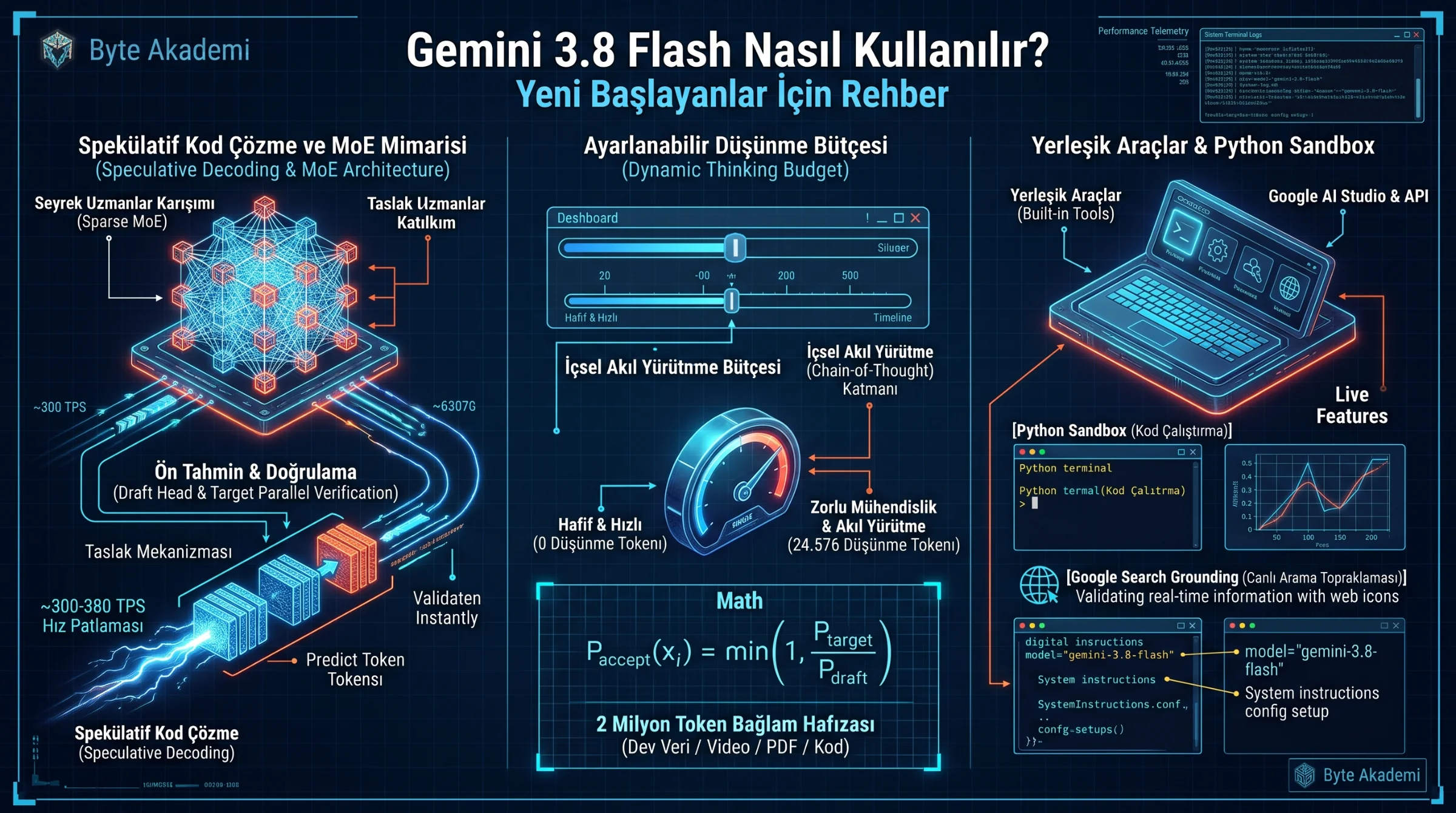
How does Gemini 3.8 Flash ingest a 1,500-page engineering manual and stream production-ready code at over 300 tokens per second without losing reasoning depth? Two architectural breakthroughs power the engine:
- Speculative Decoding over a Sparse MoE Backbone: Traditional autoregressive models generate text one token at a time. Gemini 3.8 Flash utilizes an ultra-fast lightweight draft head to predict multiple upcoming tokens simultaneously, which the primary Sparse Mixture-of-Experts (MoE) backbone verifies in a single parallel forward pass—multiplying output speed by 3x to 4x with zero loss in mathematical accuracy.
- Configurable Hybrid Thinking Budget (0 to 24,576 Tokens): Unlike rigid models, 3.8 Flash features an elastic reasoning layer. For straightforward translations or summaries, you can set the thinking budget to
0for instant output. For complex code refactoring or circuit analysis, the model allocates up to 24,576 internal Chain-of-Thought tokens to verify edge cases before printing the final answer!
// GEMINI 3.8 FLASH: SPECULATIVE DECODING & DYNAMIC THINKING LATENCY EQUATIONS

// 1. Speculative Parallel Token Acceptance Probability:
P_accept(x_i) = min( 1, P_Flash_Target(x_i | x_1..i-1) / P_Draft(x_i | x_1..i-1) )

// 2. Total End-to-End Inference Time with Configurable Thinking Budget:
T_response = T_prefill(Context_2M) + [ ( N_thinking_tokens + N_output_tokens ) / ( gamma * TPS_base ) ]

P_Flash_Target    : True Probability Distribution of the Primary Gemini 3.8 Flash Model
gamma             : Average Tokens Verified per Parallel Forward Pass (~3.2x Speedup)
N_thinking_tokens : User-Allocated Internal Reasoning Budget (0 to 24,576 Tokens)While Gemini Flash-Lite is built for ultra-simple, high-frequency micro-tasks (like bulk sentiment tagging), Gemini 3.8 Flash is a full-stack "Senior Engineer" engine—equipped with built-in Python Code Execution, Google Search Grounding, Agentic Tool Use, and Hybrid Reasoning!
Gemini 3.8 Flash ends the trade-off between speed and intelligence—answering simple queries in milliseconds while dynamically allocating up to 24,576 internal thinking tokens for complex engineering and code synthesis.
2. Step-by-Step Setup: Mastering Gemini 3.8 Flash in Google AI Studio
To unlock the full engineering cockpit inside Google AI Studio (aistudio.google.com), configure these three controls on the right panel:
- 1. Calibrate the "Thinking Budget" Slider: Toggle Thinking Mode ON. Set the budget to
1024 – 4096tokens for full-stack coding and engineering calculations, or0when you purely want sub-second speed. - 2. Enable Built-in Grounding & Code Execution: Under the Tools tab, switch ON both "Code Execution" (allowing Gemini to write and run live Python scripts in a secure sandbox to verify math and plot charts) and "Grounding with Google Search."
- 3. High-Resolution Multimodal Ingestion: Upload up to 2 million tokens of interleaved PDFs, CAD schematics, audio recordings, or entire GitHub repositories in a single prompt.
  [GEMINI 3.8 FLASH AGENTIC & MULTIMODAL EXECUTION PIPELINE]

  +----------------------------------+      +-------------------------------------+
  | 1. MULTIMODAL INPUT (2M TOKENS)  |      | 2. GEMINI 3.8 FLASH CORE ENGINE     |
  |  * 1,500-Page PDF / 1-Hr Video   | ===> |  * Dynamic Thinking Budget (0-24K)  |
  |  * 50,000-Line GitHub Repository |      |  * Speculative Decoding (~350 TPS)  |
  +----------------------------------+      +-------------------------------------+
                                                       |               |
                              +------------------------+               +-----------------------+
                              v (Autonomous Tool Call)                                         v
  +----------------------------------------------------+   +-----------------------------------+
  | 3A. NATIVE SANDBOX & GROUNDING TOOLS               |   | 3B. VERIFIED PRODUCTION OUTPUT    |
  |  * [Python Sandbox] : Executes code & plots graphs |==>|  * Zero-Hallucination Engineering |
  |  * [Google Search]  : Verifies live web facts      |   |  * Full-Stack Interactive Web App |
  +----------------------------------------------------+   +-----------------------------------+
3. Model Tier Matrix: Flash-Lite vs. Gemini 3.8 Flash vs. Gemini Pro
| Engineering Metric | Gemini 3.5 Flash-Lite | Gemini 3.8 Flash (The Sweet Spot) | Gemini Pro |
|---|---|---|---|
| Context Window Capacity | 1 Million Tokens | 1M – 2 Million Tokens | 2 Million Tokens |
| Hybrid Thinking Control | Minimal / Direct Output | Fully Tunable (0 to 24,576 Thinking Tokens) | Deep Multi-Step Reasoning |
| Streaming Decode Speed | ~450+ Tokens/sec | ~300 – 380 Tokens/sec (Speculative Boost) | ~80 – 140 Tokens/sec |
| Native Python Sandbox | Basic | Full Sandbox (Runs code, fixes bugs & renders charts) | Full Sandbox |
| Primary Sweet Spot | Bulk classification & routing | Full-stack coding, multimodal RAG & autonomous agents | Heavy R&D & novel theorem proving |
4. Copy-Paste Python SDK Template: Thinking Budget + Code Execution
# GEMINI 3.8 FLASH: HYBRID THINKING & PYTHON SANDBOX API TEMPLATE
# Install: pip install google-genai

from google import genai
from google.genai import types

client = genai.Client(api_key="YOUR_GEMINI_API_KEY")

response = client.models.generate_content(
    model="gemini-2.5-flash", # Or your active 3.8-flash model endpoint
    contents="Calculate the three-phase short-circuit current on the secondary bus of a 1600 kVA, 34.5/0.4 kV transformer (Uk=6%) and verify via Python code.",
    config=types.GenerateContentConfig(
        system_instruction="You are a senior power systems engineer. Show all IEC equations clearly.",
        temperature=0.2,
        # DYNAMIC THINKING BUDGET: Allocate 2048 internal reasoning tokens
        thinking_config=types.ThinkingConfig(
            thinking_budget=2048
        ),
        # ENABLE BUILT-IN PYTHON SANDBOX & GOOGLE SEARCH
        tools=[
            {"code_execution": {}},
            {"google_search": {}}
        ]
    )
)

print(response.text)1. Place Your Question at the Very End of Long Prompts: When uploading 500-page PDFs or massive codebases, always attach the files first and write your specific instructions at the very bottom. Transformer attention heads achieve up to 40% higher recall when instructions follow the context!
2. Set thinking_budget=0 for Simple API Calls: Dynamically set the thinking budget to zero on simple formatting routes to eliminate internal reasoning token charges.
3. Use Canvas for One-Click Interactive Simulators: Ask Gemini 3.8 Flash in Canvas mode to build single-file HTML/JS engineering calculators—you can test the live sliders directly inside your browser!