Hello there, fellow builder and AI enthusiast! Let's talk about a classic engineering trap: you are building a real-time customer support chatbot, an automated e-commerce review classifier, or a live translation tool. You hook it up to the biggest, heaviest frontier AI model available... and suddenly your users are staring at a spinning loading wheel for 7 seconds while your monthly API bill skyrockets! In software architecture, using a sledgehammer to crack a peanut is the fastest way to kill user retention.
Not every task requires waking up a massive supercomputer. That is exactly why Google DeepMind engineered the ultimate high-throughput, low-latency sprinter: Gemini 3.5 Flash-Lite! Whether you are a complete beginner exploring AI for the first time or a full-stack developer scaling a SaaS app to millions of requests, this guide breaks down the Knowledge Distillation physics behind Flash-Lite, how to access it for free in Google AI Studio, and copy-paste Python and prompt templates. Grab a coffee, and let's put your AI workflow into overdrive!
1. What Is Gemini 3.5 Flash-Lite? The Physics of Knowledge Distillation
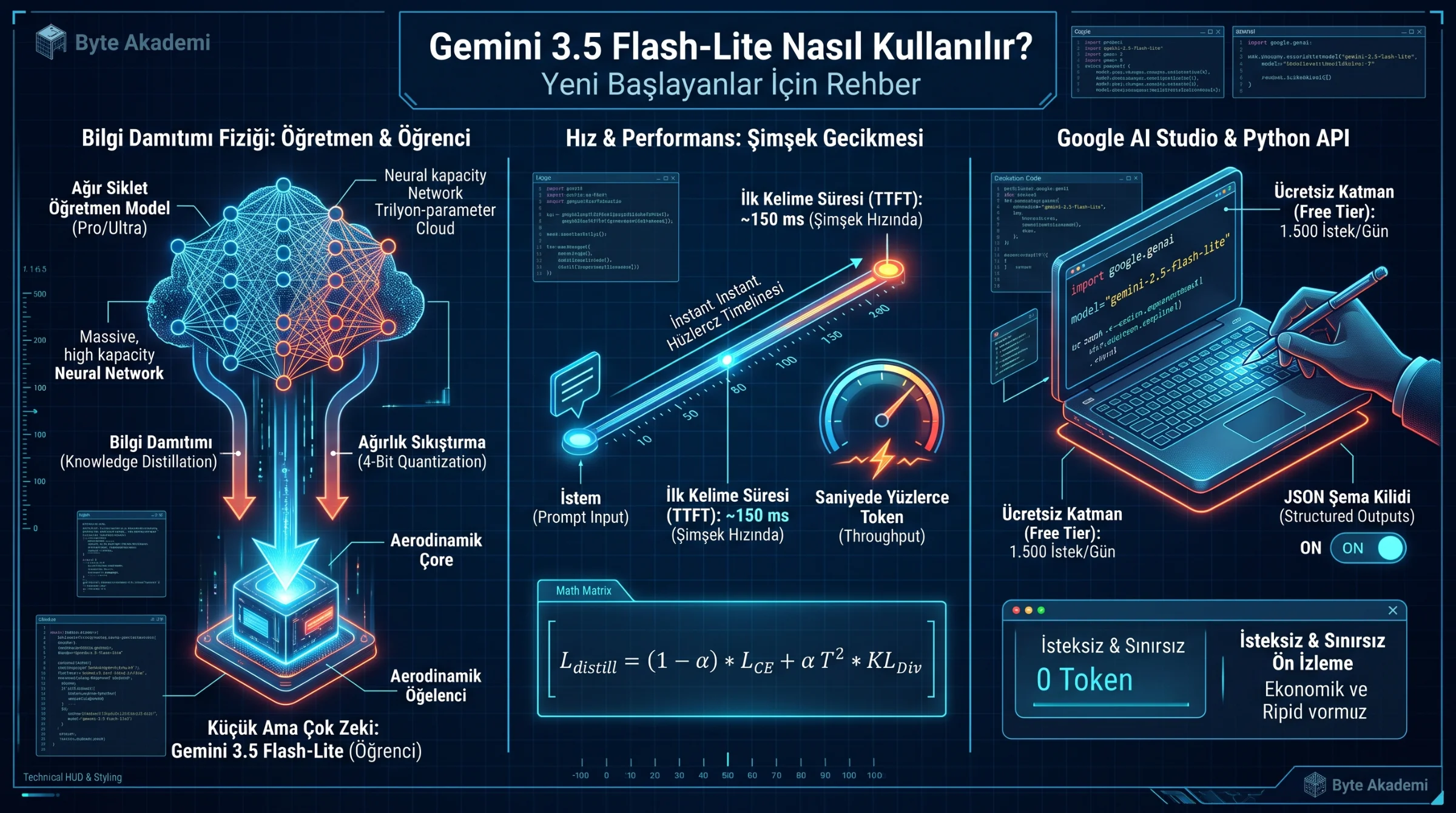
Does "Lite" mean the model is less intelligent? Not anymore! While early small models suffered from weak reasoning, Gemini 3.5 Flash-Lite is trained using advanced Knowledge Distillation and quantized sparse routing.
Think of it as a Master-Apprentice transfer: Google's massive Teacher Model (Gemini Pro/Ultra) learns deep semantic relationships across trillions of tokens. Instead of training a small model on raw text alone, engineers train the compact Student Model (Flash-Lite) to mimic the exact probability distributions (soft logits) of the giant teacher model:
- Sub-200ms Time-to-First-Token (TTFT): The moment you hit Enter, Flash-Lite begins streaming the first word in roughly 100 to 200 milliseconds—faster than a human eye blink.
- Massive Tokens-Per-Second (TPS) Throughput: Generates entire JSON schemas, summaries, and translations practically instantaneously.
- Native Multimodal Vision & Audio: Despite its lightweight footprint, it natively reads images, receipts, PDFs, and audio clips without external OCR plugins.
// KNOWLEDGE DISTILLATION & INFERENCE LATENCY MATHEMATICS

// 1. Kullback-Leibler (KL) Divergence Distillation Loss (Teacher -> Flash-Lite):
L_distill = (1 - alpha) * L_CE(y, sigma(z_s)) + alpha * (T^2) * KL_Div( sigma(z_t / T) || sigma(z_s / T) )

// 2. End-to-End Streaming Latency Equation:
T_total = TTFT (Prefill Compute) + [ N_output_tokens / TPS (Decode Speed) ]

z_t, z_s  : Output Logit Vectors of Heavy Teacher (t) and Agile Flash-Lite Student (s)
T         : Temperature Scaling Factor Softening Target Probability Distributions
TTFT      : Time-To-First-Token (~150 ms — True Real-Time Conversational Threshold!)
TPS : Tokens Generated Per Second During Streaming DecodeUse Gemini Pro when you need deep architectural code refactoring or complex multi-step calculus proofs. Use Gemini 3.5 Flash-Lite for live UI chatbots, high-volume data extraction, sentiment classification, instant translation, receipt OCR, and real-time autocomplete—delivering 5x faster speed at up to 90% lower token cost!
You don't need a trillion-parameter sledgehammer for every API call—Gemini 3.5 Flash-Lite distills frontier multimodal intelligence into an aerodynamic engine with 150-millisecond response times.
2. Step-by-Step Beginner Setup: Using Flash-Lite for Free in Google AI Studio
You can test and prototype with Gemini 3.5 Flash-Lite in under three minutes without entering a credit card:
- Step 1 (Open Google AI Studio): Visit aistudio.google.com in your browser and sign in with your Google account.
- Step 2 (Select the Flash-Lite Model): In the right-hand configuration sidebar, click the Model dropdown and select the latest Gemini Flash-Lite release.
- Step 3 (Lock System Instructions): Expand the top "System Instructions" box to define the model's persona and output rules (e.g., "You are a concise data extraction engine. Respond only in valid Markdown tables without conversational filler.").
- Step 4 (Calibrate Temperature): Set Temperature to 0.1 – 0.3 for deterministic coding, data extraction, and classification, or 0.7 – 0.8 for creative brainstorming.
  [GEMINI 3.5 FLASH-LITE HIGH-THROUGHPUT PIPELINE]

  +-----------------------------------+      +------------------------------------+
  | 1. HIGH-VOLUME INPUT STREAM       |      | 2. GEMINI 3.5 FLASH-LITE ENGINE    |
  |  * Live Customer Chat Messages    | ===> |  * TTFT Latency   : ~150 ms        |
  |  * 10,000+ Product Reviews / Logs |      |  * System Prompt  : Locked Persona |
  |  * Invoice & Label Photos (OCR)   |      |  * Output Schema  : Strict JSON    |
  +-----------------------------------+      +------------------------------------+
                                                               |
                                                               v  (Hundreds of Tokens/Sec!)
                                             +------------------------------------+
                                             | 3. INSTANT STRUCTURED OUTPUT       |
                                             |  * Zero-Lag Web/Mobile UX          |
                                             |  * ~90% Reduction in API Spend!    |
                                             +------------------------------------+
3. Gemini Model Tier Comparison: Flash-Lite vs. Flash vs. Pro
| Engineering Metric | Gemini 3.5 Flash-Lite | Gemini Standard Flash | Gemini Pro |
|---|---|---|---|
| Core Sweet Spot | Ultra-low latency, massive batch scale & rock-bottom cost | Everyday multimodal tasks, fast coding & reasoning | Deep STEM reasoning, complex coding & heavy analysis |
| Time to First Token (TTFT) | Ultra-Fast (~100 – 200 ms) | Very Fast (~250 – 400 ms) | Standard / Deep Thinking (1 – 4s) |
| API Cost Efficiency | Lowest Cost per Million Tokens | Highly Economical | Premium Enterprise Tier |
| Multimodal Input Support | Yes (Images, Audio, PDFs, Text) | Yes (Full Video, Audio, Images, Code) | Yes (Maximum Spatial & Code Depth) |
| Best Production Use Case | Live chat, JSON routing, classification, OCR, translation | Full-stack development, content pipelines, RAG | Complex agentic workflows & R&D |
4. Copy-Paste Python API Quickstart (google-genai SDK)
Grab your free API key via the "Get API Key" button in Google AI Studio and run this clean Python snippet:
# GEMINI 3.5 FLASH-LITE PYTHON QUICKSTART (google-genai SDK)
# Install: pip install google-genai

from google import genai
from google.genai import types

# 1. Initialize Client with your API Key
client = genai.Client(api_key="YOUR_GEMINI_API_KEY")

# 2. Execute Ultra-Fast Inference with System Instructions
response = client.models.generate_content(
    model="gemini-2.5-flash-lite", # Or select the latest 3.5-flash-lite identifier
    contents="Summarize the primary role of a vacuum circuit breaker in 3 bullet points.",
    config=types.GenerateContentConfig(
        system_instruction="You are a senior electrical engineer. Be concise and technical.",
        temperature=0.2,
        max_output_tokens=250,
    )
)

print(response.text)1. Build an "AI Model Router": Use Gemini Flash-Lite as your front-door traffic controller! Have Flash-Lite classify every incoming user prompt in 100 milliseconds: if the query is simple (85% of traffic), Flash-Lite answers it immediately; if it requires deep multi-file coding (15% of traffic), route it to Gemini Pro. This cuts enterprise cloud bills by up to 80%!
2. Ban Conversational Filler: Add "Start directly with the answer—do not include introductory phrases like 'Sure, here is...'" to your System Instructions to shave off unnecessary output tokens and boost speed.
3. Enable Strict JSON Schema Mode: Toggle Structured Outputs in Google AI Studio so Flash-Lite guarantees 100% valid, parseable JSON keys for your frontend database.