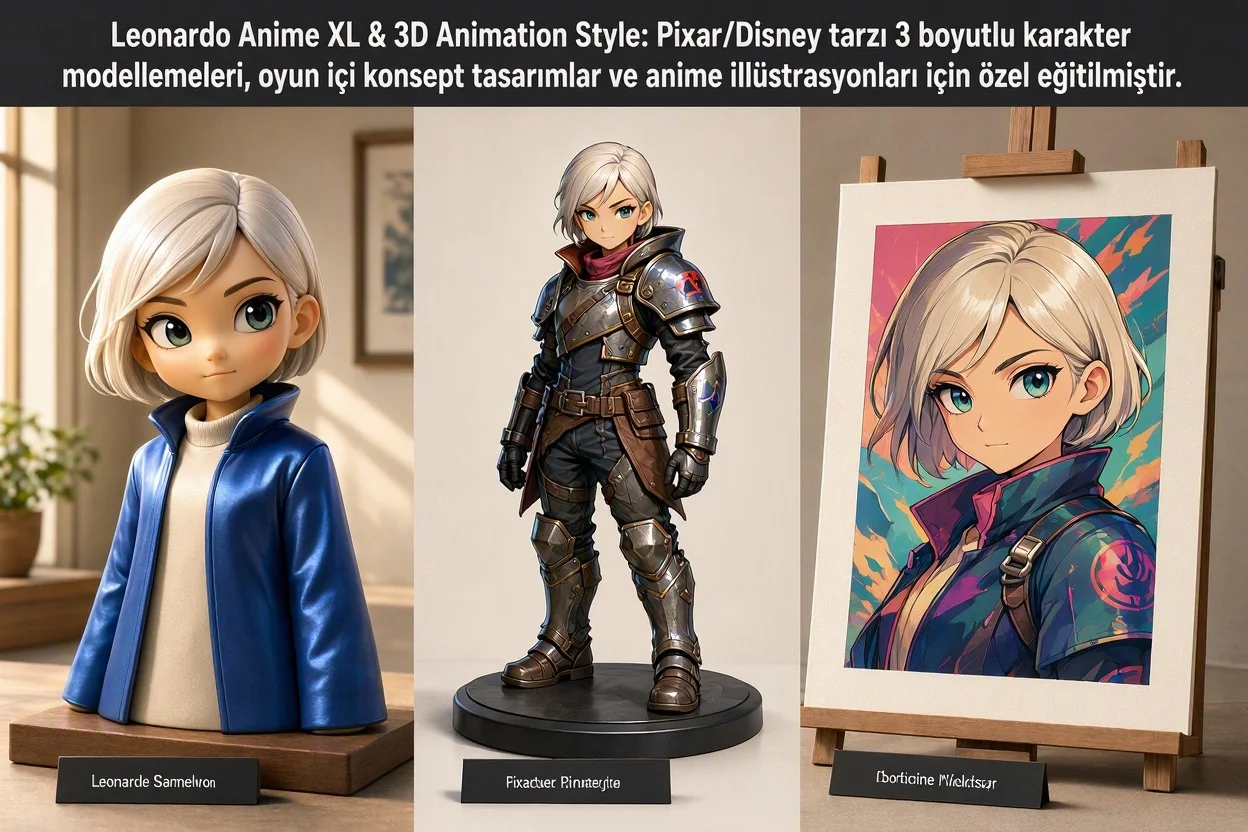
Hello there, fellow world-builder! Have you ever dreamed of developing your own indie video game, illustrating a graphic novel, launching a 3D animated YouTube channel, or bringing a character in your head to life with the unmistakable warmth of a Pixar / Disney film or a Makoto Shinkai anime masterpiece? Traditionally, creating a single production-ready 3D character meant weeks of digital sculpting in ZBrush, retopologizing polygon meshes in Blender, unwrapping UV maps, and waiting hours for ray-traced renders.
Yet when you ask a standard photorealistic AI model for "a cute 3D knight" or "a cyberpunk anime protagonist," you often end up with an eerie, uncanny-valley hybrid with muddy shading and broken proportions. Why? Because models trained on raw camera photographs do not understand the laws of stylized art! To solve this, the engineering team at Leonardo.Ai built two specialized creative engines from the ground up: Leonardo Anime XL and 3D Animation Style. Grab your favorite drink, and let's explore how to command these two engines like a veteran art director!
1. Photorealistic Light vs. Stylized Light Physics: Cel-Shading & Pixar RenderMan Secrets
What makes your brain look at an image and instantly recognize within milliseconds: "That's a Japanese anime frame!" versus "That's a 3D Pixar movie still!"? The secret lies in the mathematical behavior of light and shadow across surfaces:
- Leonardo Anime XL & Stepped "Cel-Shading" Physics: In traditional 2D animation, light does not fade smoothly from bright to dark. Instead, artists use Cel-Shading (Toon Shading)—splitting shadows into crisp, hard-edged color steps bounded by razor-sharp ink linework. Leonardo Anime XL separates crisp vector-like contour lines from flat cel-shaded shadow blocks, finishing the frame with atmospheric post-processing like Ufotable-style bloom, chromatic aberration, and volumetric Tyndall light shafts.
- 3D Animation Style & Stylized Subsurface Scattering (SSS): In Pixar's RenderMan and Disney's Hyperion render engines, characters never look like hard plastic toys. When backlit, their cheeks, ears, and noses glow with warm peach translucency while clothing displays individual knitted wool fibers. 3D Animation Style strips away harsh realistic skin blemishes and replaces them with soft micro-roughness gradients, oversized expressive iris catchlights, and tactile PBR cloth/hair grooming.
// STYLIZED RENDERING PHYSICS: CEL-SHADING (ANIME XL) vs. PIXAR BRDF (3D ANIMATION)

// 1. Leonardo Anime XL — Quantized Stepped Cel-Shading Equation:
I_cel = Color_Base * Step_Function( max(0, N . L), Threshold_Shadow, Threshold_Highlight ) + I_Rim_Glow

// 2. 3D Animation Style — Stylized Subsurface & Soft Microfacet BRDF:
R_3D(v, l) = k_d * (Subsurface_Warmth) + k_s * [ D_GGX(alpha_soft) * F_Fresnel * G ] / (4 * (N . v) * (N . l))

N . L            : Dot Product Between Surface Normal and Light Vector
Step_Function    : Quantizes Smooth Gradients into Crisp 2-Tone Anime Shadow Bands
I_Rim_Glow       : High-Contrast Backlit Edge Highlight Along Hair and Armor
alpha_soft : Stylized Micro-Roughness Giving 3D Characters a Soft, Tactile FinishWhen a photorealistic AI model tries to draw oversized anime or Disney eyes on a realistic human skull, the result looks creepy (the Uncanny Valley). Because Anime XL and 3D Animation Style are trained natively on stylized head-to-body proportions, simplified nasal bridges, and expressive brow rigs, every character feels naturally appealing and emotionally alive.
While photorealistic engines mimic camera lenses, Leonardo Anime XL and 3D Animation Style engineer the physics of imagination—combining stepped cel-shaded lighting with Pixar-grade stylized subsurface scattering.
2. Leonardo Anime XL: From Makoto Shinkai Skies to Cyberpunk Mecha Concept Art
Built on the SDXL backbone and fine-tuned across curated high-resolution anime key visuals, light novel illustrations, and 2D game art, Leonardo Anime XL excels across three creative domains:
- Atmospheric "Shinkai" Skies & Environmental Storytelling: Generates towering sunset cumulonimbus clouds, rain-slicked Neo-Tokyo neon reflections, and floating sakura petals with authentic depth-of-field blur.
- Dynamic Foreshortening & Action Poses: Handles extreme camera angles—such as a blade thrust directly toward the lens or mid-air martial arts leaps—without breaking limb geometry.
- Hard-Surface Mecha & Fantasy Armor: Renders intricate mechanical joints, glowing plasma conduits, and ornate fantasy weaponry with clean ink line-weights.
3. 3D Animation Style: Building Your Own Pixar Movie & Isometric Game Universe
When your project calls for tactile three-dimensional volume, selecting 3D Animation Style turns your browser into a cloud render farm:
- Pixar / Disney / DreamWorks Character Appeal: Micro-facial expressions, knitted fabric fuzz, leather stitching, and volumetric hair strands.
- Isometric 3D Game Assets & Dioramas: Generates 45-degree isometric rooms, fantasy potion bottles, treasure chests, and UI weapon icons ready for Unity or Unreal Engine.
- Blind-Box Vinyl Toys & Stop-Motion Claymation: Easily shifts between glossy Pop Mart / Funko vinyl collectible aesthetics and fingerprint-textured clay animation.
  [GAME & ANIMATION ASSET PIPELINE: FROM PROMPT TO PRODUCTION]

  +-----------------------------------+      +------------------------------------+
  | 1. CREATIVE TARGET & PROMPT       |      | 2. ENGINE & STYLE CALIBRATION      |
  |  * 3-View Character Turnaround    | ===> |  * [Leonardo Anime XL] -> 2D / Cel |
  |  * Transparent Isometric Game Icon|      |  * [3D Animation]      -> Pixar 3D |
  |  * Cinematic Key Visual Frame     |      |  * Alchemy ON + Transparency PNG   |
  +-----------------------------------+      +------------------------------------+
                                                               |
                                                               v  (Character Reference + 4K Upscale)
                                             +------------------------------------+
                                             | 3. PRODUCTION-READY 4K OUTPUT      |
                                             |  * Unity / Unreal / Blender Ready  |
                                             |  * Storybooks, Webtoons & YouTube  |
                                             +------------------------------------+
4. Engine Comparison Matrix: Leonardo Anime XL vs. 3D Animation Style
| Production & Art Metric | Leonardo Anime XL (2D / 2.5D Engine) | 3D Animation Style (Pixar / 3D Engine) |
|---|---|---|
| Dimensional Aesthetic | 2D Cel-Shading, Anime Key Visuals, Manga & 2.5D | Full 3D Volume, Pixar RenderMan & Blender Cycles Look |
| Lighting & Shading Model | Hard-Edged Stepped Shadows, Crisp Ink Outlines, Bloom | Soft Global Illumination, Warm Subsurface Scattering (SSS) |
| Primary Industry Use Cases | Webtoons, Visual Novels, Anime Wallpapers, Concept Art | 3D Brand Mascots, Children's Books, Isometric Game UI |
| Best Alchemy Preset Pairing | Anime, Illustration, Vibrant | 3D Render, Creative, Dynamic |
| Transparent PNG Compatibility | Ideal for 2D Character Sprites & Stickers | Unbeatable for Isometric 3D Game Props & Icons! |
| Optimal Guidance Scale (CFG) | 7.0 – 8.5 (For razor-sharp line art) | 6.5 – 8.0 (For smooth 3D lighting roll-off) |
5. Exclusive Copy-Paste Prompt Recipes (Pixar, Anime & 3-View Character Sheets)
Copy and test these three production-engineered prompt templates—including the game industry's favorite 3-View Character Turnaround Sheet trick:
// RECIPE 1 — [3D ANIMATION STYLE]: Pixar/Disney Emotional Character & Micro-Textures
"A heartwarming 3D Pixar-style animated movie frame of a curious young inventor girl with oversized round brass goggles resting on her messy auburn hair, [CHARACTER]
wearing a knitted olive-green sweater with visible fuzzy wool fibers and leather tool belt, [TEXTURE LOCK]
holding a tiny glowing clockwork mechanical bird in her cupped hands inside a cozy cluttered attic workshop, [ACTION/SCENE]
warm golden-hour sunbeams streaming through a dusty round window, soft subsurface scattering on her freckled cheeks, [PIXAR LIGHTING]
expressive big emerald eyes with crisp catchlights, rendered in Pixar RenderMan and Blender Cycles, 8k."

// RECIPE 2 — [LEONARDO ANIME XL]: Makoto Shinkai & Ufotable Masterpiece Key Visual
"Masterpiece anime key visual illustration by Makoto Shinkai and Ufotable, [STYLE LOCK]
a lone cyber-samurai standing on the edge of a wet neon-lit skyscraper roof in futuristic Neo-Tokyo at twilight, [SUBJECT/SCENE]
holding a katana with glowing cyan plasma edge, wind blowing his tattered dark cloak and silver hair, [DYNAMIC MOTION]
breathtaking background of towering cumulonimbus clouds lit by a vibrant magenta and amber sunset, [ATMOSPHERE]
crisp cel-shaded shadows, volumetric Tyndall light rays, floating glowing cherry blossom petals, 8k anime wallpaper."

// RECIPE 3 — [GAME DEV SECRET]: 3-View Character Turnaround Sheet in One Generation
"Professional 3D game character design turnaround reference sheet of a stylized armored dwarf blacksmith, [SHEET COMMAND]
showing three full-body views side-by-side: front view, side profile view, and back view, standing in neutral A-pose, [3-ANGLE LOCK]
consistent proportions and armor details across all angles, stylized Overwatch and Fortnite 3D art style, [GAME STYLE]
clean neutral dark grey studio background, even flat studio lighting, Unreal Engine 5 asset sheet, 8k."1. The "T-Pose / A-Pose" Trick for Image-to-3D Mesh Converters: Want to convert your 2D Leonardo render into an actual rotatable `.fbx` or `.obj` 3D mesh for Blender or 3D printing? Add "full body standing in symmetrical A-pose, arms slightly away from body, isolated on plain white background" to your prompt so AI 3D-mesh extractors capture clean limb geometry!
2. One-Click Transparent Game Inventory Icons: Toggle Transparency ON in the left sidebar, select 3D Animation Style, and prompt "Isometric 3D game icon of a glowing legendary mana potion bottle in ornate gold filigree frame." You get a clean transparent PNG ready to drop straight into Unity!
3. Lock Your Character Across 50 Scenes: Upload your favorite generated Pixar or Anime hero into Image Guidance > Character Reference (Strength: High) to keep their exact facial features and hairstyle consistent across an entire storybook or comic.
6. Frequently Asked Questions (Anime XL & 3D Animation Workflow)
1. Should I turn ON "PhotoReal" when using Anime XL or 3D Animation Style?
No—keep PhotoReal turned OFF! PhotoReal is engineered to inject realistic camera lenses and human skin pores, which will clash with 2D anime linework. Instead, keep Alchemy ON and select the Anime, Illustration, or 3D Render preset.
2. What is the best Negative Prompt to prevent extra fingers in anime and 3D characters?
Paste this clean negative prompt into your settings: photorealistic, real life photo, uncanny valley, bad anatomy, extra fingers, mutated hands, fused fingers, blurry lineart, muddy shading, low resolution, watermark, text, 3d (use only when prompting 2D anime), flat 2d (use only when prompting 3D).