1. What Is the Leonardo.Ai Engine? From Fine-Tuned Checkpoints to the Phoenix Foundation Model
While early text-to-image platforms like Midjourney and DALL-E 3 operated as closed "black boxes" where users typed a prompt and hoped for the best, professional concept artists, game developers, and UI engineers demanded deterministic pixel-level control. Acquired by global design powerhouse Canva to power both its standalone studio and Canva's Dream Lab, Leonardo.Ai has evolved into a premier full-stack generative visual engine.
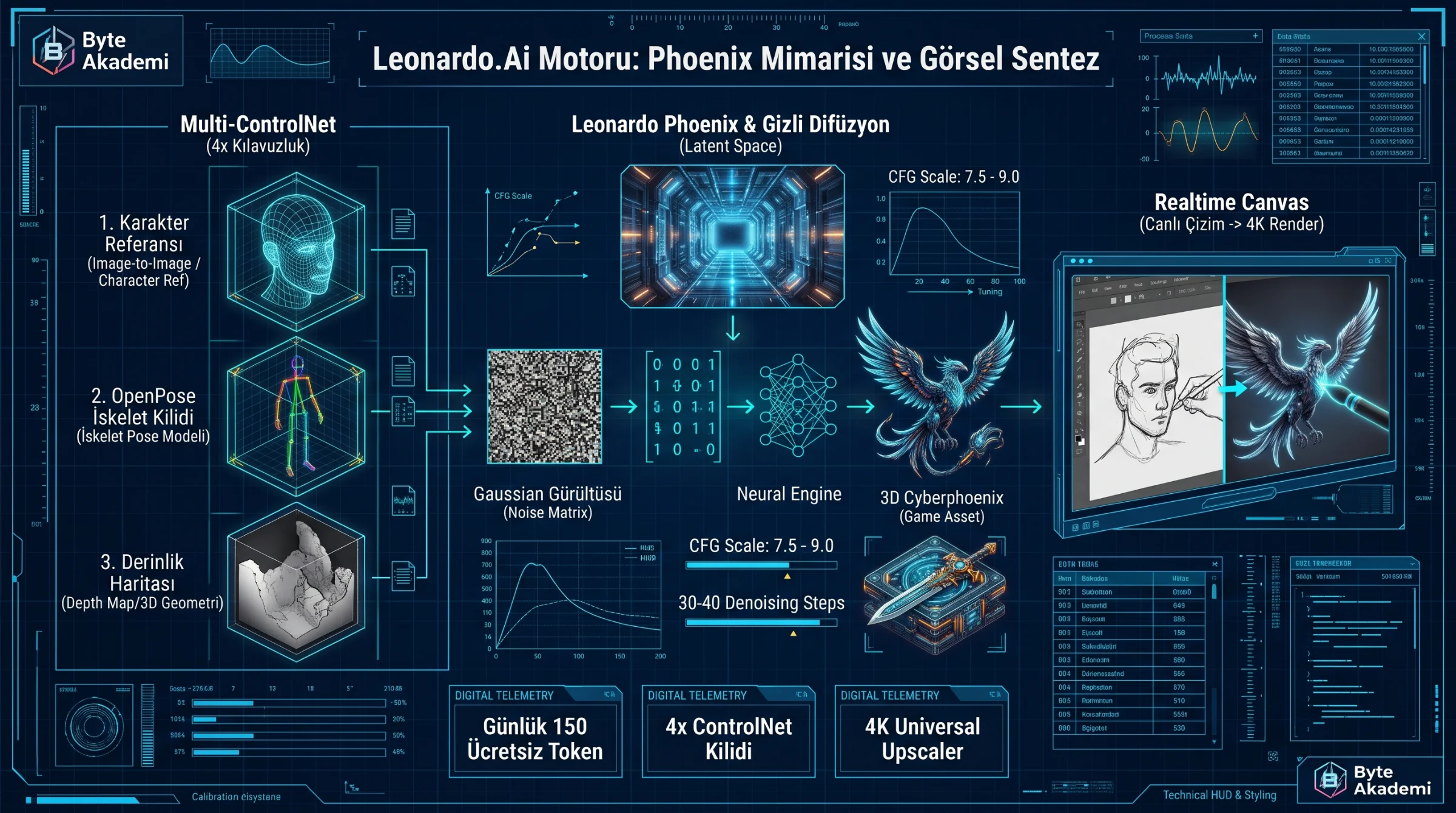
At the core of the platform sits Leonardo Phoenix—a proprietary, ground-up foundational architecture engineered for extreme prompt adherence, coherent in-image typography, and rapid latent-space rendering:
- Latent Space Diffusion & Variational Autoencoders (VAE): Instead of computing heavy diffusion steps across millions of raw RGB pixels, the engine compresses imagery into a lower-dimensional mathematical Latent Space. Combined with adversarial distillation, this enables Realtime Gen—synthesizing high-definition imagery in milliseconds as you type.
- Multi-Head Cross-Attention & Text Rendering: Traditional diffusion models struggle with spatial binding (confusing which object gets which color) and garble written words. Phoenix maps complex spatial tokens and renders crisp, legible English and multilingual typography directly onto signs, logos, and product packaging.
- Multi-ControlNet Image Guidance Pipeline: Allows creators to lock generation geometry by combining up to four simultaneous structural conditioners: Character Reference, Style Reference, Canny Edge, Depth Map, and OpenPose skeletal rigs.
Rather than typing slash commands inside crowded Discord servers, Leonardo.Ai provides a dedicated browser-based node and layer GUI, a generous 150 free daily tokens that reset every 24 hours, live sketch-to-image translation (Realtime Canvas), and native one-click transparent PNG generation for game and web assets.
Leonardo.Ai elevates text-to-image synthesis from slot-machine prompting into a deterministic visual engineering studio governed by multi-ControlNet depth maps, skeletal pose locks, and real-time latent diffusion.
2. Under-the-Hood Mathematics: Guidance Scale (CFG), Denoising Steps, and Seeds
Opening the Advanced Controls panel inside the Leonardo.Ai studio exposes the mathematical variables governing the reverse diffusion process:
- Guidance Scale (CFG — Classifier-Free Guidance): Controls how strictly the neural network obeys your text prompt (scaled from 1 to 20). Setting CFG too low (2–4) produces dreamy, unguided hallucinations; pushing it too high (15+) deep-fries color saturation and introduces severe edge artifacts. The engineering sweet spot sits between 7.0 and 9.0.
- Step Count (Denoising Iterations): Dictates how many solver passes the UNet/DiT backbone takes to refine random Gaussian noise into a clean image. 30 to 40 steps achieves optimal structural convergence.
- Deterministic Seed Locking: Locking a specific Seed integer freezes the initial random noise tensor, allowing you to modify a single lighting or material word in your prompt while preserving the exact camera composition.
// LATENT DIFFUSION & CLASSIFIER-FREE GUIDANCE (CFG) EQUATIONS

// 1. Forward Gaussian Noise Injection:
z_t = sqrt(alpha_bar_t) * z_0 + sqrt(1 - alpha_bar_t) * epsilon

// 2. Classifier-Free Guidance (CFG) Noise Prediction Vector:
epsilon_predicted = epsilon_uncond + w_CFG * ( epsilon_cond(Prompt) - epsilon_uncond )

z_0               : Compressed Latent Representation of Clean Image
z_t               : Noisy Latent Tensor at Timestep 't'
epsilon_uncond    : Unconditional Noise Estimate (Null Prompt)
epsilon_cond      : Conditional Noise Estimate Guided by Text Prompt
w_CFG             : Guidance Scale Multiplier (Optimal Range: 7.0 - 9.0)
3. Core Specialized Models & Real-Time Studio Modules
Leonardo.Ai equips creators with task-specific foundational models and interactive workspaces:
- Leonardo Phoenix (Flagship Foundation Model): Delivers industry-leading prompt adherence, complex multi-subject spatial accuracy, and native text/logo typography rendering.
- Leonardo Kino XL & Vision XL: Tuned for anamorphic widescreen cinematography, photorealistic lighting, automotive design, and architectural visualization.
- Leonardo Anime XL & 3D Animation: Purpose-built for stylized character sheets, isometric game props, and Pixar-grade subsurface scattering renders.
- Flow State (Infinite Style Stream): Enter a simple concept prompt and let Flow State continuously stream dozens of lighting, lens, and aesthetic variations—allowing you to lock in your favorite visual direction with a single click.
- Realtime Canvas (Live Sketch-to-Render): Draw rough geometric shapes or stick figures on the left canvas using basic brush strokes while watching the right viewport transform your doodle into a photorealistic 3D render in real time.
- Universal Upscaler: Hallucinates ultra-fine micro-textures (skin pores, brushed metal grain, fabric weave) while scaling images up to crisp 4K resolution.
  [LEONARDO.AI MULTI-GUIDANCE SYNTHESIS PIPELINE]

  +---------------------------+
  | 1. TEXT PROMPT            | ---+
  |    + Negative Prompt      |    |
  +---------------------------+    |     +------------------------------------+
                                   |     |    LEONARDO PHOENIX / KINO XL      |
  +---------------------------+    +---> |   LATENT DIFFUSION ENGINE (UNet)   |
  | 2. IMAGE GUIDANCE (Max 4) |    |     |  --------------------------------  |
  |  * Character Reference    | ---+     |  [Semantic Vectors + Spatial Lock] |
  |  * Style Reference        |    |     +------------------------------------+
  |  * OpenPose Skeletal Rig  |    |                       |
  |  * Canny Edge / Depth Map | ---+                       v (Alchemy + Universal Upscaler)
  +---------------------------+          +------------------------------------+
                                         | 3. OUTPUT: 4K STUDIO-GRADE ASSET   |
                                         |    (Or 4-Sec MP4 Motion Video)     |
                                         +------------------------------------+
4. Technical Comparison: Leonardo.Ai vs. Midjourney v6.1 vs. DALL-E 3
| Engineering & Workflow Metric | Leonardo.Ai (Phoenix & Alchemy) | Midjourney v6.1 | OpenAI DALL-E 3 (ChatGPT) |
|---|---|---|---|
| Workspace Environment | Full Web Studio GUI + Realtime Canvas + iOS/Android | Discord Bot & Web Alpha | Conversational Chat Interface |
| Free Tier Availability | 150 Free Daily Tokens (Resets Every 24 Hours) | No Free Tier (Paid Subscription Only) | Strictly Limited Daily Free Generations |
| Structural Control (ControlNet) | Up to 4 Simultaneous Locks (Pose + Depth + Style + Char) | Character (--cref) & Style (--sref) Flags | None (Text Prompting Only) |
| Native Transparent PNG Output | Built-in One-Click Transparency Toggle | None (Requires External Background Removal) | None |
| Live Sketch-to-Image (Inpainting) | Millisecond Realtime Canvas Brush Engine | Basic Region Vary Selection | Basic Brush Selection |
| Custom Model Training (LoRA) | Train Custom Datasets on Your Own Products/Art | Not Supported | Not Supported |
5. Copy-Paste Master Prompts & Essential "Negative Prompt" Templates
To eliminate anatomical glitches and muddy lighting, always toggle "Add Negative Prompt" alongside your primary prompt:
// 1. CYBER-ENGINEERING & TECH BLOG HERO BANNER PROMPT (Phoenix / Kino XL):
Prompt:
"Isometric 3D technical cutaway blueprint of an advanced solid-state EV battery pack and glowing copper busbars, holographic telemetry graphs floating in dark space, deep navy blue and electric cyan color palette, octane render, unreal engine 5, ultra-detailed engineering diagram, 8k resolution, sharp focus, cinematic studio lighting."

// 2. ISOLATED TRANSPARENT PNG GAME / UI ASSET PROMPT:
Prompt:
"A futuristic sci-fi plasma helmet with glowing amber visor, brushed titanium texture with carbon fiber accents, isolated on background, isometric game asset, 3d blender render, crisp rim lighting."
(Tip: Enable the 'Transparency' toggle in the left sidebar!)

// 3. UNIVERSAL "NEGATIVE PROMPT" TO BLOCK ARTIFACTS:
Negative Prompt:
"blurry, low resolution, pixelated, deformed hands, extra fingers, mutated limbs, watermark, signature, ugly, oversaturated, burnt contrast, bad anatomy, distorted perspective, text errors, out of frame."1. Lock 100% Character Consistency: Upload your base character portrait into Image Guidance > Character Reference and set strength to High. You can now place that exact facial identity into any angle, outfit, or environment.
2. Seamless 3D PBR Textures (Tiling): For Unreal Engine, Unity, or Blender artists, enable the "Tiling" switch under Advanced Settings and prompt "seamless PBR texture of brushed anodized hexagonal carbon armor" to generate infinitely repeatable surface maps.
3. One-Click Image-to-Motion Video: Click "Generate Motion Video" beneath any finished render and set Motion Strength to 4–5 to transform static artwork into a fluid 4-second cinematic MP4 camera pan.
6. Frequently Asked Questions (Tokens, Commercial Rights & Canva Integration)
1. Are images generated on the free 150-token plan cleared for commercial use?
Under Leonardo.Ai's Terms of Service, images generated on the Free tier are public (visible in the community feed) but may be used in commercial blogs and social media. Upgrading to a paid tier unlocks Private Mode, granting you exclusive, confidential ownership over all generated assets.
2. How does Leonardo.Ai integrate with Canva Pro?
Following Canva's acquisition of Leonardo.Ai, the flagship Leonardo Phoenix model now directly powers Dream Lab inside Canva. While Canva Pro provides effortless access for quick design layouts, using the standalone leonardo.ai web studio unlocks granular multi-ControlNet locks, negative prompting, custom LoRA training, and Realtime Canvas.