Modern processors execute billions of operations per second, but their true utility in automation stems from executing repetitive logic across varying datasets. In Python, a for or while loop translates to a hardware-level pipeline of register increments, memory address scans, and branch-prediction strategies that drive CPU execution.
Rather than treating loops as basic counters, we should examine their system-level dynamics. This includes the Iterator Protocol that parses collections without memory bloat, the range() generator that processes massive ranges on a tiny memory footprint, the CPU-bound stress of infinite while True loops, and Python’s distinctive for-else construct. Moving beyond entry-level iteration examples, this guide analyzes loops from a hardware and compiler viewpoint: from pointer lifecycle mechanics to memory-efficient generators and interrupt structures.
1. The For Loop & The Iterator Protocol
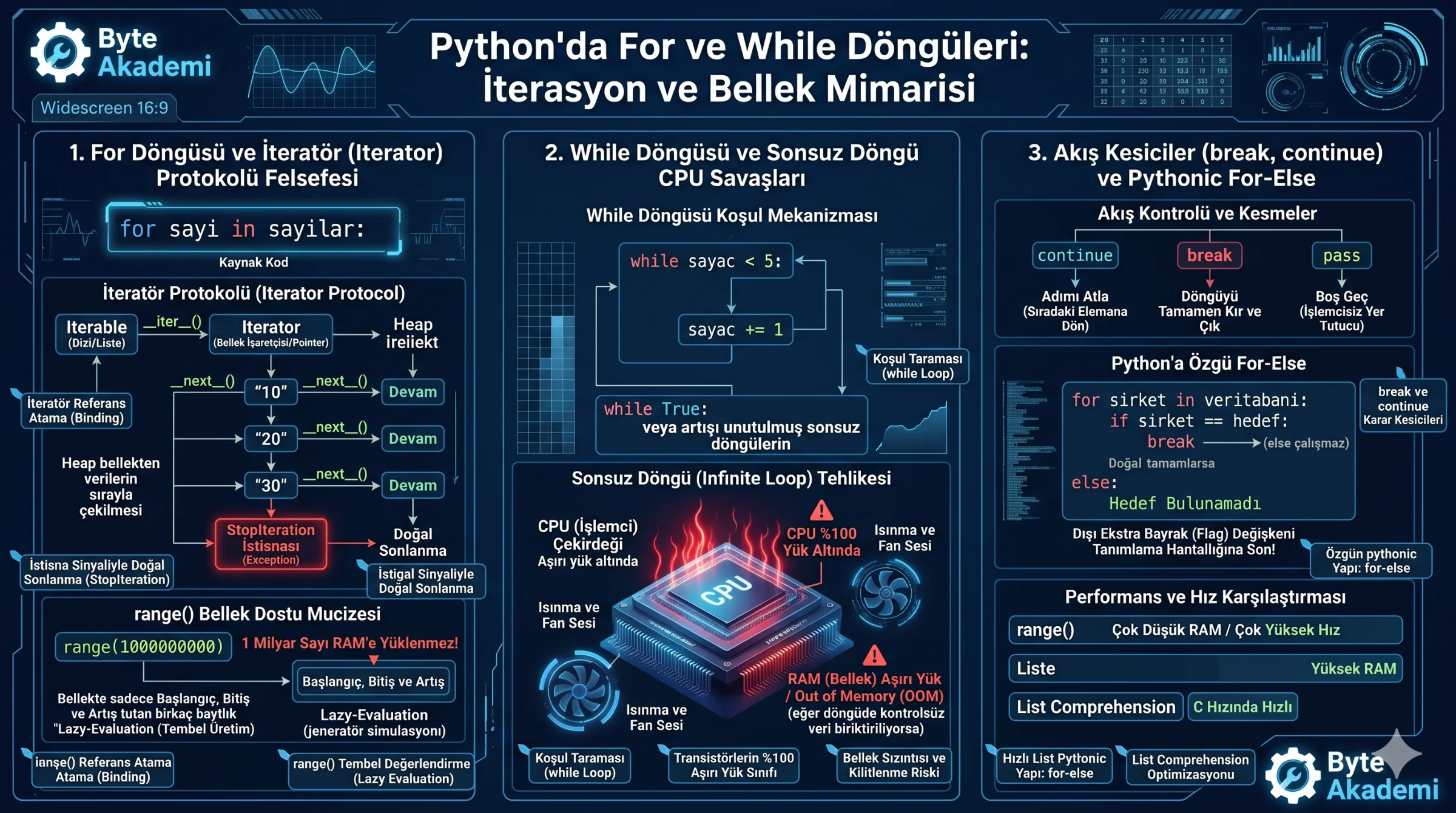
In many languages, for loops are simple index counters. Python, however, implements an explicit **Iterator Protocol**. Every for traversal over an iterable relies on under-the-hood CPython calls:
numbers = [10, 20, 30]
for num in numbers:
    print(num)
The interpreter executes this code through a precise sequence:
- Requesting the Iterator: The interpreter calls the list's
__iter__()method, which returns an iterator object—a stateful memory pointer tracking traversal index state. - Fetching Elements: For each loop step, the interpreter invokes
__next__()on the iterator, retrieving the subsequent object from Heap memory. - Exhaustion & Termination: When no elements remain,
__next__()raises aStopIterationexception. Python's runtime environment catches this exception internally, terminating the loop cleanly without visible errors.
  [PYTHON FOR LOOP SEQUENCE]

  [ Iterable List ] --__iter__()--> [ Iterator Object (Pointer) ]
                                            │
                                      __next__() <-- (Evaluated on every step)
                                            ├─> [ 10 ] (Loop continues)
                                            ├─> [ 20 ] (Loop continues)
                                            └─> StopIteration Exception --> (Loop terminates)
The Memory Efficiency of range(): Running for i in range(1000000000) does not instantiate a billion-integer list in RAM. The range() object is a lazy-evaluation generator that calculates next-in-sequence integers on the fly, consuming only bytes of memory regardless of range scope.
Python loops are not merely repetition constructs; they manage data streams by trapping internal StopIteration exceptions, bridging the CPU-memory bottleneck.
2. While Loops & Infinite Loop CPU Stress
While for loops iterate over bounded datasets, while loops execute indefinitely until a conditional expression evaluates as False:
counter = 0
while counter < 5:
    print(counter)
    counter += 1 # Omitting this increment creates a serious error.
Omitting increment logic or executing a hard-coded while True: loop with un-throttled conditions creates an **Infinite Loop**, triggering immediate hardware effects:
- CPU Core Sinking: A single CPU thread processes the condition and branch instructions back-to-back, driving core utilization to 100%.
- Thermal Spikes: Transistor switching density surges, causing rapid thermal dissipation and audibly forcing system cooling fans to maximum RPM.
- Memory Exhaustion: While non-allocation infinite loops strictly draw CPU cycles, appending data within an un-bounded loop will deplete RAM, triggering the OS Out-of-Memory (OOM) killer.
3. Loop Interrupts: break, continue, and pass
Altering natural iteration flow requires direct control instructions:
- break: Exits the active loop immediately, jumping execution to the first statement beyond loop scope.
- continue: Aborts execution of the remaining loop body for the current step, returning immediately to the next loop evaluation.
- pass: A null-operation placeholder that satisfies Python's indentation requirements without executing operations.
for num in range(1, 10):
    if num == 5:
        continue # Aborts step; does not execute print(5).
    if num == 8:
        break    # Exits loop; prevents print(8) and print(9).
    print(num)
4. The pythonic "Else" Loop Clause
A unique Python syntax pattern is appending else blocks to for or while loops. The else clause executes **only if the loop runs to natural completion without encountering a "break" instruction**:
# Searching datasets without extra flag variables
target = "Byte Akademi"
directory = ["Google", "Meta", "Microsoft"]

for company in directory:
    if company == target:
        print("Match found!")
        break # If break is executed, the else block is bypassed entirely.
else:
    print("Target not found in directory.") # Executes only if loop completes without breaking.
5. Iteration Performance & Memory Matrix
| Loop Architecture | Memory Overhead (RAM) | Execution Performance | Primary Application Case |
|---|---|---|---|
| For over range() | Negligible (constant bytes) | High (Calculated on-the-fly) | Bounded numeric iterations |
| For over Sequence | Linear ($O(N)$ sequence footprint) | High (Sequential memory access) | Traversing pre-loaded data structures |
| Conditional While | Low (Variable state references only) | Moderate (Repeated condition checking) | Conditional-driven iteration |
| while True (Infinite) | Low (Excluding active allocation) | Maximum single-thread CPU draw | Persistent server listening, main game loops |
For data transformation, substitute classic loop appending with **List Comprehensions** like [x * 2 for x in base_list]. They execute optimize bytecode that runs close to native C speeds, bypassing the performance penalties of typical python-level loop appending.