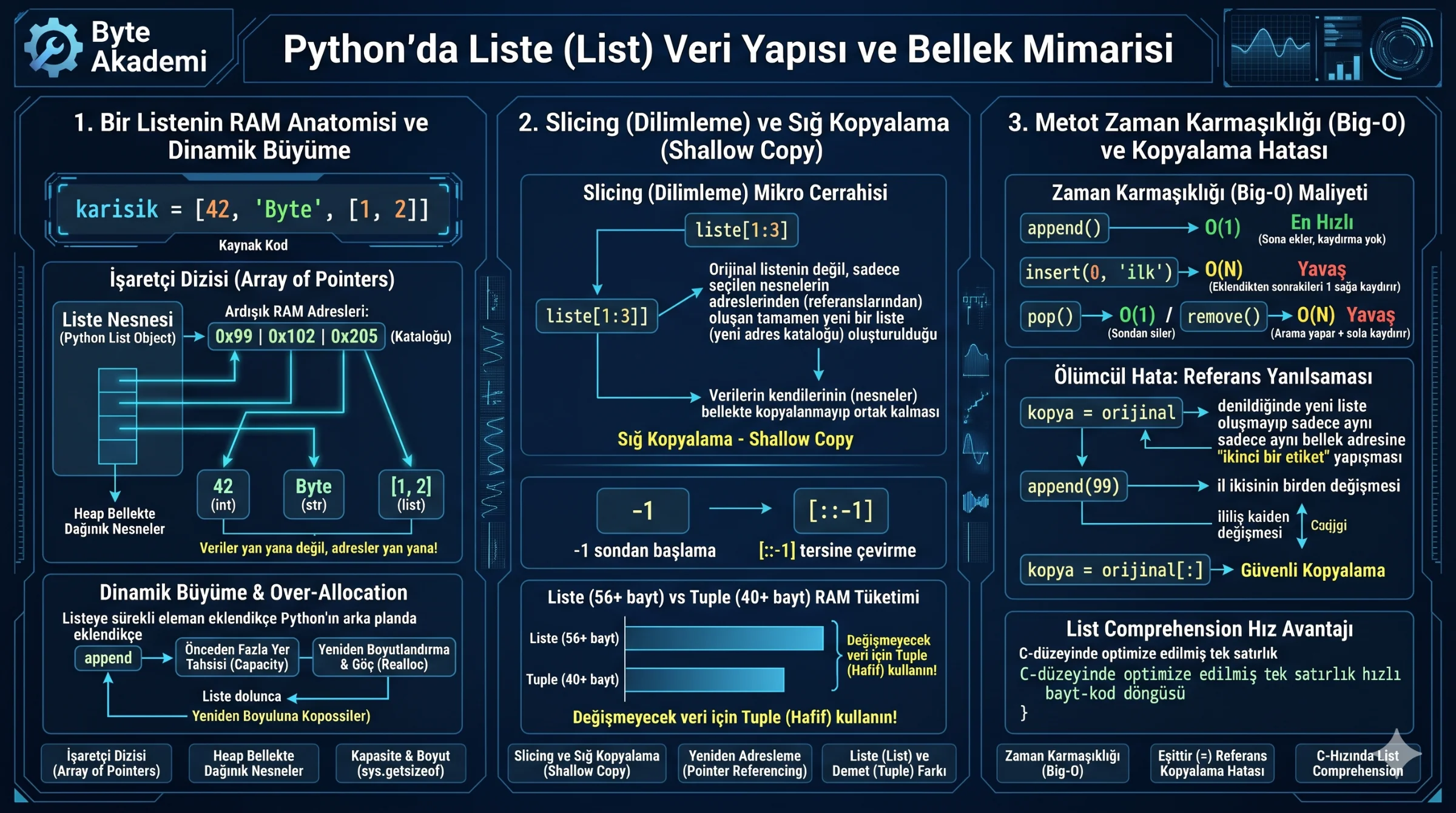
Most introductory programming courses offer the same superficial analogy: "Lists are like shopping carts where you can throw in items in order." While easy to visualize, this is technically inaccurate in Python. Python lists are not contiguous, homogeneous storage containers (like static arrays). Instead, they are dynamic arrays of pointers that store the memory addresses (references) of independent objects scattered across the Heap, automatically scaling their buffer sizes under the hood!
Failing to grasp how a list manages memory addresses in RAM, how CPython manages "over-allocation" during append() calls, and the performance costs of [start:stop:step] slicing can lead to memory bloat and performance bottlenecks in large applications. This guide discards the standard "shopping cart" analogy and analyzes Python lists from a systems architecture perspective: from dynamic memory reallocation to tracking RAM footprints with sys.getsizeof(), the dangers of reference assignment copy errors, and the C-level optimization of **List Comprehensions**.
1. A Python List's RAM Anatomy: Array of Pointers
In statically typed languages like C or Java, declaring an array reserves contiguous, fixed-size memory slots for a single data type. You cannot change their length afterward or mix data types within them.
Python lists, however, provide complete flexibility. A single list can house integers, strings, and other list objects simultaneously (mixed = [42, "Byte Akademi", [1, 2]]). This is possible because:
- The Address Catalog: Python lists do not store objects directly. They store a contiguous array of **memory addresses (pointers)** pointing to PyObjects on the Heap.
- Physical Distribution: The integer 42 and the string "Byte Akademi" exist at entirely different locations in RAM. The list simply maintains their memory addresses side by side. Fetching an item requires following these pointers (pointer dereferencing).
- Over-Allocation & Dynamic Growth: As you
append()items, CPython doesn’t ask the OS for a single memory slot on each insertion. To make appends amortized O(1), the interpreter over-allocates memory beforehand. When that pre-allocated buffer is exhausted, it reallocates a larger block of memory, copying the pointers over.
  [PYTHON LIST MEMORY ANATOMY]

  list = [42, "Byte"]  Allocation:
  [ Python List Object ] ---> [ Contiguous Pointers: 0x99 (Address) | 0x102 (Address) ]
                                         │                            │
                                         ▼                            ▼
                                [ 42 (PyObject) ]            [ "Byte" (PyObject) ]
                                (Address space A)            (Address space B)
Python lists do not store data contiguously; they are dynamic arrays of pointers referencing independent PyObjects on the heap, expanding gracefully as items are appended.
2. Advanced Operations: Slicing Mechanics
While square brackets instiatate lists (numbers = [10, 20, 30]), knowing the memory overhead of your code is vital:
- Overhead and Size: You track item counts with
len(), but RAM footprint must be measured withsys.getsizeof(). A brand-new empty list occupies 56 bytes of RAM to support its C metadata. - The Physics of Slicing:
list[start:stop:step]extracts subsections. Runningsub_list = numbers[1:3]does not clone the actual data; it creates a **brand-new address catalog (shallow copy)**. Both lists continue pointing to the same PyObjects in RAM.
# Precision Slicing
chars = ["a", "b", "c", "d", "e"]

# Negative index (Fetch last item): "e"
print(chars[-1])

# Range extraction (excludes index 4): ["b", "c", "d"]
print(chars[1:4])

# Invert list via step (reversal): ["e", "d", "c", "b", "a"]
print(chars[::-1])
3. Common Methods and Time Complexity (Big-O)
The time complexity of your chosen list methods determines how well your software scales:
| Method | Task | Example | Complexity (Big-O) | Performance Impact |
|---|---|---|---|---|
| append() | Appends item to the end. | list.append(99) |
O(1) (Fast) | Appends to the end with no shifting. |
| insert() | Inserts item at index. | list.insert(0, "first") |
O(N) (Slow) | Requires shifting all subsequent pointers one slot to the right in RAM. |
| pop() | Removes/returns item. | item = list.pop() |
O(1) (end) / O(N) (index) | O(1) for popping from the end; O(N) for popping from the middle. |
| remove() | Finds and deletes value. | list.remove("val") |
O(N) (Slow) | Linear scan to find the value, followed by shifting pointers to close the gap. |
| extend() | Appends an iterable. | list.extend([4, 5]) |
O(K) (Fast) | Extends the list by adding multiple items at once, which is more efficient than loop appends. |
4. Pitfall: The Reference Copy Illusion
Using the assignment operator = to copy a list often introduces bugs in Python programs:
original = [1, 2, 3]
copied = original # NOT A REAL COPY!

copied.append(99)

print(f"Original: {original}") # Output: [1, 2, 3, 99] (Original was modified!)
print(f"Copied:   {copied}")   # Output: [1, 2, 3, 99]
The assignment operator does not generate a new list. It simply binds a **second label** to the original memory address. Modifications via copied will alter original, as they refer to the exact same list object.
Secure Cloning Alternatives:
# Option 1: Copy via Slicing (Shallow)
copy_1 = original[:]

# Option 2: Class instantiation (Shallow)
copy_2 = list(original)

# Option 3: Copy method (Shallow)
copy_3 = original.copy()

# Option 4: Duplicate deeply nested lists safely (Deep Copy)
import copy
deep_copied = copy.deepcopy(original)
5. List Comprehension Optimization
Filtering and transforming lists using iterative for loops that append() on every step is slow in Python. **List Comprehensions** condense these workflows, running much closer to C speed:
# Slow Iterative Loop: 5 Lines
squares = []
for x in range(10):
    if x % 2 == 0:
        squares.append(x ** 2)

# Fast Pythonic Comprehension: 1 Line
squares = [x ** 2 for x in range(10) if x % 2 == 0]
Why are List Comprehensions faster? Because they reduce interpreted loop overhead by bypassing repeated append attribute lookups, leveraging optimized, C-level bytecode internally.
Python lists are not simple storage units. They are dynamic arrays of pointers that manage memory addresses on the Heap, reallocating resources as they grow. Knowing when to use O(1) appends versus O(N) inserts, identifying reference copy pitfalls, and utilizing **List Comprehensions** ensures your code runs efficiently and scales without error.