Imagine managing a massive dataset of 10 million elements. Verifying the existence of or retrieving an item near the end of a standard sequence forces the computer to evaluate every slot from first to last. This process—known as O(N) time complexity—becomes increasingly inefficient as your dataset grows. In contrast, Python provides a specific data structure that performs this lookup in constant time, regardless of whether the collection holds 10 million or 10 billion records. This instant, target-specific lookup is known as O(1) constant time complexity, and its implementation is the Dictionary (dict).
Rather than viewing dictionaries as simple key-value pairs wrapped in braces, we should examine their system-level dynamics. This include the Hash Table architecture that drives the runtime, the hashing algorithms that index memory, the collision resolution strategies that resolve address conflicts, and the 2016 "Compact Dict" redesign that reduced Dictionary memory footprints by up to 40%. Moving beyond entry-level syntax examples, this guide analyzes dictionaries from a systems architecture perspective: from immutable key constraints to tracking RAM footprints, handling hash collisions, and optimizing with dictionary comprehensions.
1. Under the Hood: CPython Hash Table Mechanics
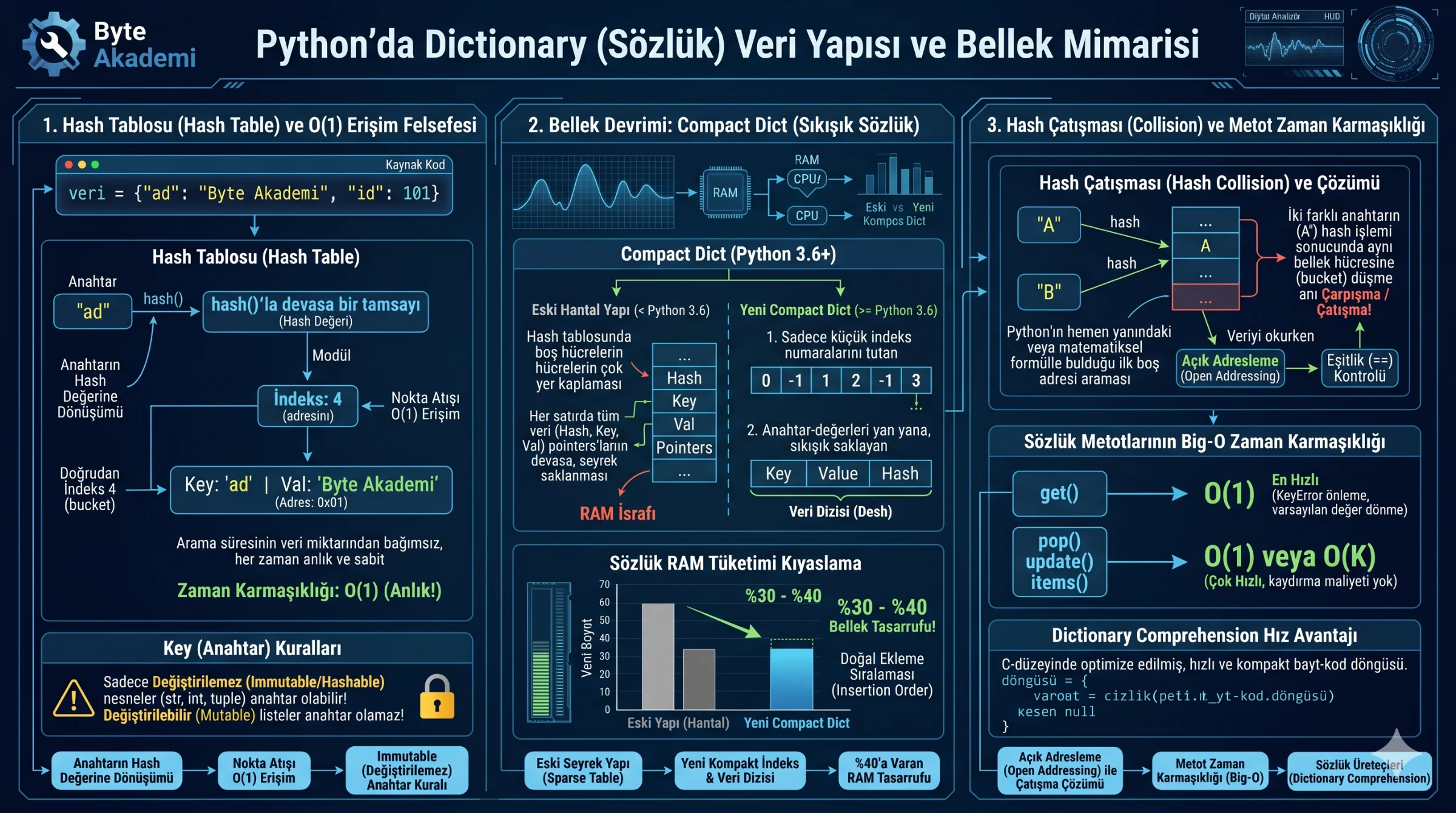
When you declare a dictionary (data = {"name": "Byte Akademi", "id": 101}), CPython doesn’t write these associations sequentially or randomly into RAM. The memory address for every key-value pair is determined by a mathematical process: **Hashing**.
During a dictionary assignment or lookup, CPython executes a precise pipeline:
- Hashing: The interpreter processes the key (e.g., the string
"name") through an internalhash()function, generating a unique, large integer (the hash value). - Index Mapping: The interpreter maps this hash value to an index in the dictionary's physical hash table using modulo arithmetic relative to the table's active capacity.
- Direct Retrieval: When requesting the value for
"name", Python doesn’t search the collection. It hashes the key, calculates the index, and directly accesses that memory address (bucket). This yields a constant lookup time of O(1).
  [PYTHON DICTIONARY HASH TABLE ANATOMY]

  Key "name" ---hash()---> Large Integer ---Modulo---> Index: 4
                                                         │
                                                         ▼
                                                  [ Hash Table ]
                                                  [ 0 ] [ Empty ]
                                                  [ 1 ] [ Empty ]
                                                  [ 4 ] ───> [ Key: "name" | Val: "Byte Akademi" (Address: 0x01) ]
                                                  [ 7 ] [ Empty ]
The Key Immutability Constraint: "Hashable" Requirements. To serve as a dictionary key, an object must be **immutable (hashable)**—such as strings, integers, floats, and tuples. If mutable objects like lists could be used as keys, modifying their contents would change their hash value. CPython would no longer be able to resolve their index, breaking the dictionary's integrity. Consequently, mutable types are excluded from being keys, though any type can serve as a value.
Searching a Python dictionary does not scan data; it evaluates a key’s hash value to make a direct O(1) quantum jump straight to its physical heap address.
2. Memory Redesign: The "Compact Dict" Revolution
Prior to Python 3.6, dictionaries consumed significant RAM because hash tables stored the hash, key pointer, and value pointer together in sparse, oversized matrices. Large portions of the table remained empty to minimize collision rates, resulting in wasted memory.
Python 3.6+ resolved this by introducing **Compact Dictionaries**:
- The Index Array: A dense, lightweight array storing small index integers.
- The Data Array: A separate, tightly packed array storing actual key-value pairs (the dense array) in insertion order.
This separation reduced Dictionary memory overhead by **30% to 40%** while preserving insertion order by default!
3. Common Dictionary Operations and Big-O Complexity
Understanding the computational cost of your dictionary operations is essential for writing high-performance code:
| Operation / Method | Mechanical Purpose | Usage Example | Time Complexity | Performance Characteristics |
|---|---|---|---|---|
| get() | Searches key; returns fallback if missing instead of raising KeyError. | data.get("age", 0) |
O(1) (Fastest) | Safeguards against KeyError exceptions. |
| update() | Updates key-value pairs from another dictionary. | data.update({"age": 28}) |
O(K) (Fast) | More efficient than loop assignments. |
| pop() | Removes key and returns its value. | age = data.pop("age") |
O(1) (Instant) | Deletes and returns the target without index shifting. |
| keys() / values() | Returns a dynamic view of keys or values. | data.keys() |
O(1) (Lightweight) | Avoids copying; returns a dynamic view over existing data. |
| items() | Returns key-value pairs as tuple views. | data.items() |
O(1) (Efficient) | The standard, efficient way to iterate over keys and values. |
4. Managing Hash Collision Conflict Resolution
Even with advanced hashing algorithms, multiple distinct keys (e.g., "keyA" and "keyB") will occasionally hash to the exact same table index. This is known as a Hash Collision.
CPython resolves these index conflicts using an **Open Addressing (Quadratic & Linear Probing)** strategy:
- Detecting Conflict: The interpreter identifies that a target index slot is already occupied.
- Probing: It applies a probing algorithm to search for the next available slot.
- Validation: Once a slot is found, Python writes the data. On lookup, it performs an equality check (
==) to ensure the key at that slot matches the queried key. To keep performance close to O(1), Python automatically resizes and rehashes the entire table when it becomes two-thirds full (66% load factor).
5. Dictionary Comprehension
Generating dictionary datasets using iterative loops that insert keys individually is inefficient in Python. **Dictionary Comprehensions** condense these workflows, running much closer to C speed:
# Slow Iterative Loop: 5 Lines
squares = {}
for x in range(5):
    if x % 2 == 0:
        squares[x] = x ** 2

# Fast Pythonic Comprehension: 1 Line
squares = {x: x ** 2 for x in range(5) if x % 2 == 0}For complex counting and grouping workloads, substitute manual key presence checks with defaultdict or Counter from the collections module. These classes leverage C-level optimizations to minimize lookup overhead and write clean, performant code.