When your PC was brand new, it ran demanding games smoothly and completed rendering tasks effortlessly. Over months and years, however, a loud fan roar began echoing from the chassis even during basic web browsing, accompanied by sudden frame-time stutters and occasional thermal shutdowns. Rather than software bloat or aging silicon, the real culprit is often the degradation of the thin thermal interface layer between your processor (CPU/GPU) and heatsink. Knowing exactly when to replace this compound is critical to maintaining peak system throughput.
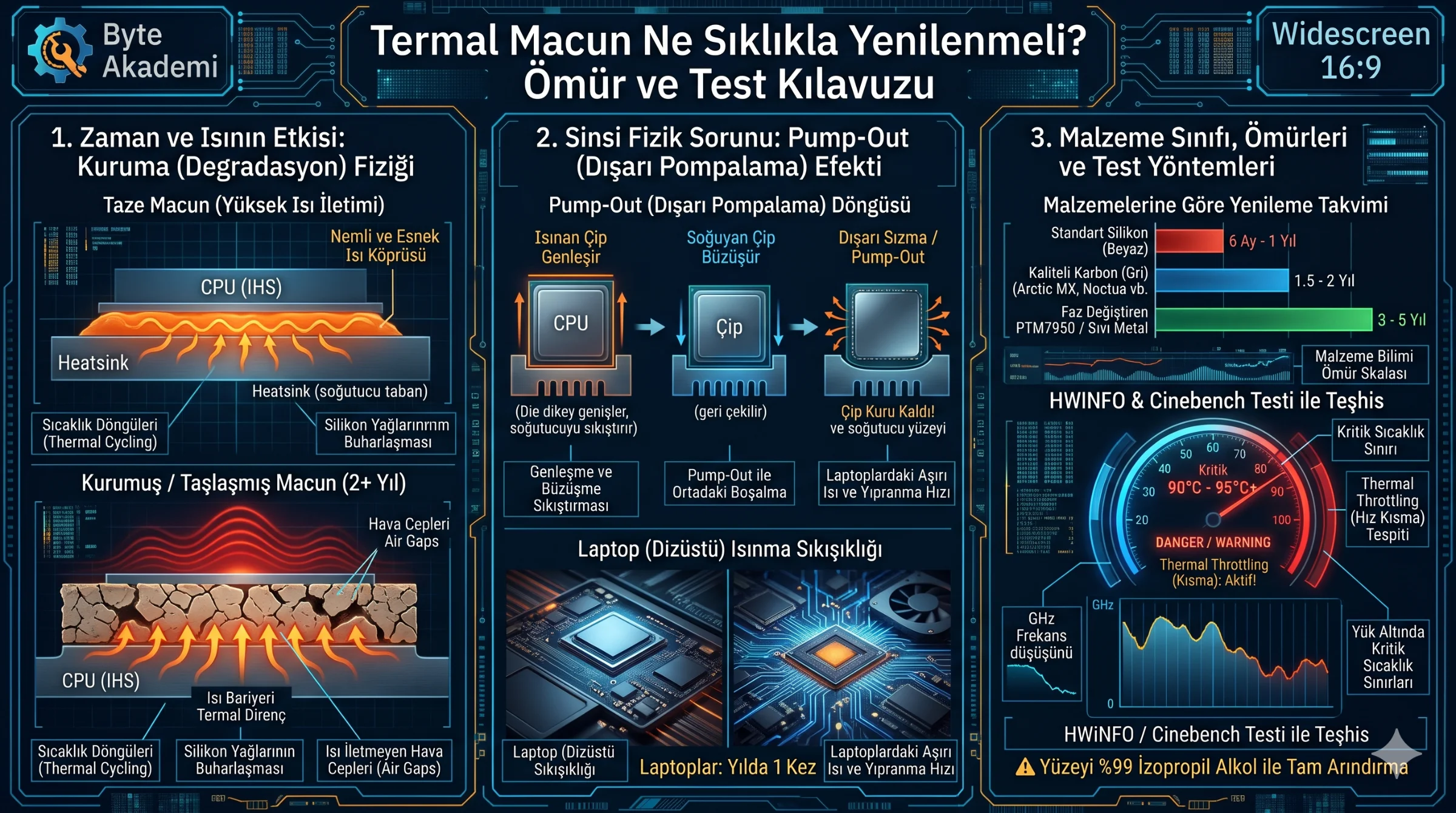
For standard home, office, and light gaming PCs, high-quality silicone or carbon-based thermal pastes (such as Arctic MX-4/6 or Noctua NT-H1/H2) should be replaced every 1.5 to 2 years. If your workstation runs daily heavy rendering, AI training, or marathon gaming sessions—or if you use a compact gaming laptop—shorten this interval to once a year. Phase-change materials (Honeywell PTM7950) and liquid metal compounds last 3 to 5 years. Regardless of the calendar, if load temperatures rise by 10°C–15°C over baseline and trigger Thermal Throttling, immediate replacement is required.
Table of Contents
- 1. Time & Heat: The Physics of Thermal Paste Degradation
- 2. Material Science: Silicone, Carbon, PCM & Liquid Metal Lifespans
- 3. The Hidden Threat: The Mechanical Pump-Out Effect
- 4. Diagnostic Signs: How to Tell When Replacement Is Overdue
- 5. Replacement Schedule & Compound Comparison Matrix
- 6. Applied Diagnostics: Testing Throttling with HWiNFO & Cinebench
- 7. Frequently Asked Questions (FAQ)
Thermal paste does not merely age by the calendar; microscopic expansion and contraction cycles physically squeeze compound toward the edges (Pump-Out), leaving the silicon die center exposed.
1. Time & Heat: The Physics of Thermal Paste Degradation
Thermal paste bridges microscopic surface imperfections between the processor's Integrated Heat Spreader (IHS) and the cooler coldplate. Compounds combine thermally conductive microparticles (aluminum, zinc, or carbon oxides) suspended in liquid silicone carrier oils. Across thousands of heating and cooling cycles (thermal cycling), these carrier oils slowly evaporate via outgassing. As the paste dries and shrinks, microscopic insulating air gaps form, spiking thermal resistance and trapping heat on the silicon die.
  [THERMAL PASTE LIFECYCLE & HEAT TRANSFER]

  Year 0-1.5 (Fresh & Pliable):
  [ Cooler Coldplate ] <=== Rapid Heat Flow === [ Processor IHS ]
  [    (Microscopic voids completely sealed with conductive compound)    ]

  Year 2+ (Dried & Cracked):
  [ Cooler Coldplate ] <=/= Blocked Heat Flow == [ Processor IHS ]
  [               (Carrier oils evaporated; material shrunk and brittle)              ]
2. Material Science: Silicone, Carbon, PCM & Liquid Metal Lifespans
- Entry-Level Silicone Pastes (1–3 W/mK): Inexpensive white compounds dry out rapidly under sustained heat, typically requiring replacement every 6 to 12 months.
- High-Performance Carbon/Oxide Pastes (8.5–14 W/mK): Enthusiast compounds like Arctic MX-6 or Noctua NT-H2 resist drying and maintain peak performance for 1.5 to 2 years.
- Phase-Change Materials (PTM7950): Solid at room temperature, these industrial pads liquefy above 45°C to fill micro-voids without drying out or pumping out, lasting 3 to 5 years.
- Liquid Metal (70+ W/mK): Gallium-indium-tin alloys never dry out and last 3 to 4+ years, though they require strict electrical insulation precautions and periodic inspection against copper alloy bonding.
3. The Hidden Threat: The Mechanical Pump-Out Effect
Even before drying out, thermal paste can fail due to the Pump-Out Effect. As a processor heats under load and cools at idle, the silicon die and heatsink expand and contract at slightly different rates. This microscopic flexing physically squeezes low-viscosity paste outward toward the edges of the chip—leaving the hottest central hotspot bare and causing sudden temperature spikes, especially on direct-die laptops and GPUs.
4. Diagnostic Signs: How to Tell When Replacement Is Overdue
- Elevated Idle Temperatures: CPU idle temperatures exceeding 50°C (or GPU idle above 45°C) in a well-ventilated room indicate degraded thermal transfer.
- 90°C+ Load Spikes at 100% Fan Speed: If fans spin at maximum RPM yet CPU temperatures hit 90°C–95°C+ immediately under load, the thermal bridge has failed.
- Clock Speed Drops (Thermal Throttling): Observing boost frequencies drop sharply during gaming or rendering confirms the chip is sacrificing speed to survive heat buildup.
5. Replacement Schedule & Compound Comparison Matrix
| Usage Profile / Device | Compound Class | Typical Load Temp | Recommended Interval | Primary Degradation Factor |
|---|---|---|---|---|
| Light Office / Web Desktop | Standard Silicone (2–4 W/mK) | 60°C - 70°C | Every 2 Years | Gradual carrier oil evaporation |
| Regular Gaming Desktop | High-Viscosity Carbon (8–14 W/mK) | 70°C - 82°C | Every 1.5 – 2 Years | Thermal cycling & mild pump-out |
| Heavy Render / 3D / AI Rig | Industrial Carbon / PTM7950 | 80°C - 90°C | Once a Year (PCM: 3 Yrs) | High wattage density & drying |
| Gaming Laptop (Direct-Die) | High-Viscosity Paste / PTM7950 | 85°C - 95°C | Once a Year (PCM: 3-4 Yrs) | Aggressive direct-die pump-out |
| Extreme Overclocking | Liquid Metal (70+ W/mK) | 60°C - 75°C | Every 3 – 4 Years | Copper alloy bonding & corrosion |
6. Applied Diagnostics: Testing Throttling with HWiNFO & Cinebench
  [THERMAL BOTTLENECK DIAGNOSTIC PROTOCOL]

  1. Launch HWiNFO64 in "Sensors Only" mode and record 5-minute idle "CPU Tdie" temps.
  2. Run a 10-minute Cinebench R23 multi-core stress test at 100% CPU load.
  3. Evaluate metrics:
     • Idle Temp > 50°C              --> Suspect compound degradation
     • Load Temp > 92°C              --> Thermal bridge failure
     • "Thermal Throttling: Yes"     --> Immediate repaste required!

  Result: Replacing dried compound typically drops load temps by 10°C–16°C
          and restores full sustained boost clock frequencies.
7. Frequently Asked Questions (FAQ)
Can I apply fresh thermal paste directly on top of old dried paste?
Never. Dried paste acts as a thermal insulator; layering new compound over old crust traps air pockets and worsens heat transfer. Always clean both surfaces completely using 99% isopropyl alcohol (IPA) and a lint-free microfiber cloth before applying fresh paste.
What is the shelf life of an opened syringe of thermal paste?
Stored tightly capped at room temperature away from direct sunlight, quality thermal paste syringes last 3 to 5 years. If oil separation occurs upon squeezing onto a paper towel, discard the tube.
Why do laptops require thermal paste replacement more frequently than desktops?
Laptops mount heatsinks directly onto bare mobile silicon dies (Direct-Die) without a thick desktop IHS lid, operating routinely near 90°C–95°C. Intense thermal cycling accelerates pump-out, making annual repasting (or switching to Honeywell PTM7950) essential.