If your PC has drifted from its peak performance, you encounter stuttering and FPS drops during intensive workloads, your cooling fans run constantly at high RPMs, or your system simply shuts down under moderate use, you are likely dealing with a hidden culprit. Many users mistake these symptoms for software bloat, malware, or aging hardware. In reality, the issue is often that the tiny amount of thermal interface material (TIM) between your processor (CPU/GPU) and heatsink has dried out and hardened, trapping heat and throttling your system.
Indirectly, yes. Modern processors (CPUs/GPUs) include safeguard features that throttle performance (Thermal Throttling) or trigger an abrupt shut down (Thermal Shutdown) when temperatures reach critical limits (typically 95°C–105°C) to prevent immediate catastrophic burnout. However, operating at high thermal limits on a regular basis accelerates silicon electromigration—gradually degrading internal circuitry. It also strains BGA solder joints and adjacent motherboard capacitors, which can significantly shorten your components' lifespan and lead to permanent hardware failure.
Table of Contents
- 1. Microscopic Voids: The Critical Role of Thermal Interface Materials
- 2. Heat Transfer Physics: What Happens When Pastes Dry
- 3. Behind the Safeguards: Permanent Degradation Mechanisms
- 4. Safeguards in Action: How Throttling & Shutdowns Protect Hardware
- 5. Thermal Compound Performance Degradation Timeline
- 6. Applied Physics: Calculating Thermal Transfer Losses
- 7. Frequently Asked Questions (FAQ)
Dried thermal paste rarely causes instant hardware burnout; instead, the persistent thermal stress degrades microscopic silicon traces and fractures BGA solder joints, silently shortening your hardware's lifespan.
1. Microscopic Voids: The Critical Role of Thermal Interface Materials
To the naked eye, the processor's Integrated Heat Spreader (IHS) and the heatsink's contact plate appear perfectly flat. Microscopic inspection, however, reveals a landscape of peaks, valleys, and imperfections. When these surfaces are clamped together, millions of microscopic air pockets remain trapped between the metal surfaces.
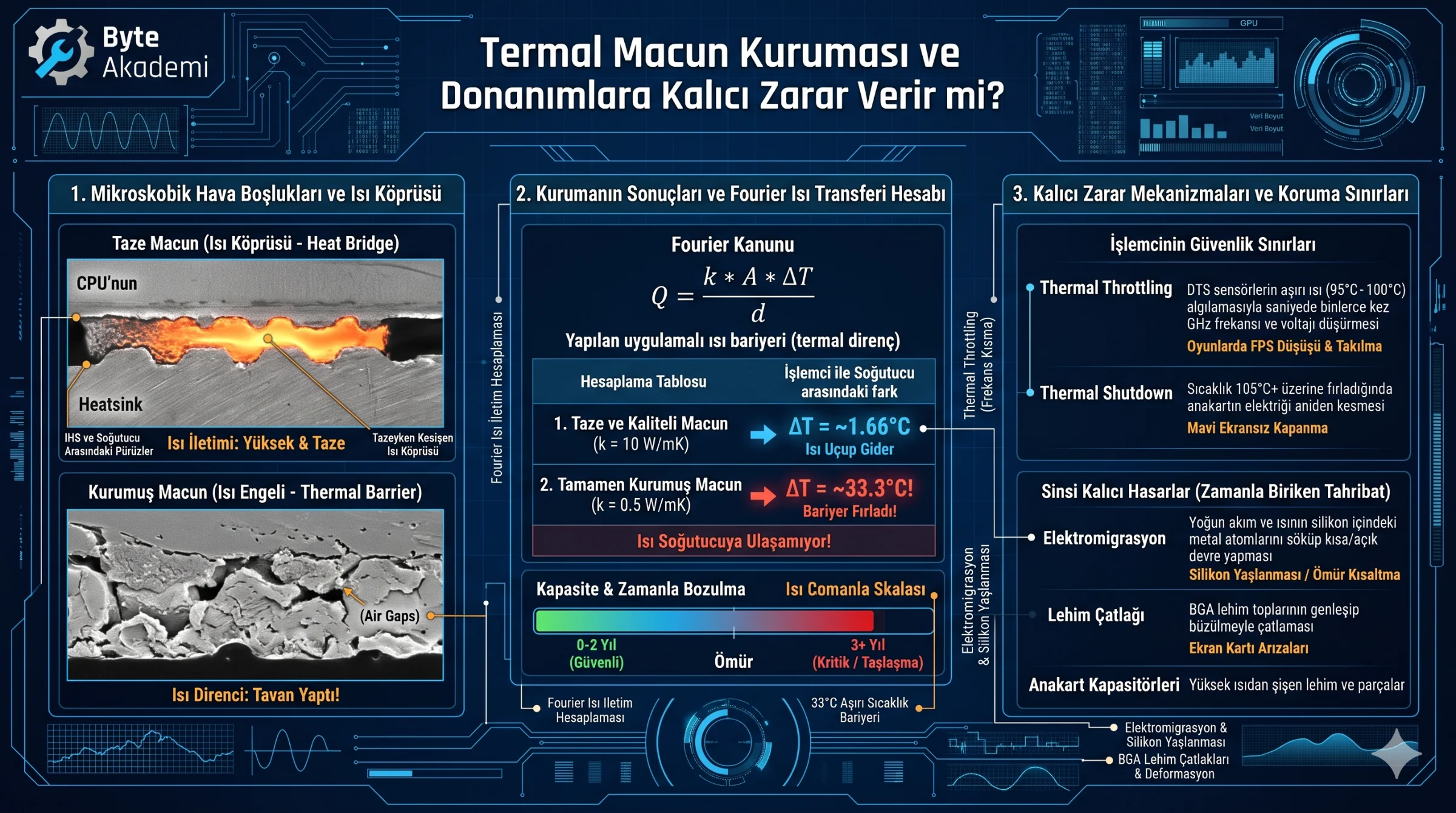
Air is a poor thermal conductor, with a thermal conductivity of roughly 0.026 W/mK. Without an interface material, heat cannot cross these tiny air gaps, causing the silicon to overheat almost instantly. Thermal paste fills these microscopic voids, replacing trapped air with a far more effective **thermal bridge** to facilitate efficient heat transfer.
  [MICROSCOPIC HEAT TRANSFER PATHWAYS]

  Fresh Compound (High Heat Transfer):
  [ Heatsink Baseplate ] ─────────────────────────
     ~~~~~ Thermal Paste (Fills microscopic gaps) ~~~~~
  [ Integrated Heat Spreader (IHS) ] ─────────────

  Dried Compound (High Thermal Resistance):
  [ Heatsink Baseplate ] ─────────────────────────
     ▓▓▓ Hardened Paste ▓▓▓   [  AIR GAP  ]   ▓▓▓  <--- Bloacked; heat remains trapped!
  [ Integrated Heat Spreader (IHS) ] ─────────────
2. Heat Transfer Physics: What Happens When Pastes Dry
Over time, the silicone oil and other liquid carriers within the paste evaporate under high operating temperatures, a process known as outgassing. What remains is a dry, crumbling, or hardened layer of metal or ceramic oxides that has lost its flexibility and its ability to transfer heat. This drastically increases **Thermal Resistance**:
- Conductivity Drop: High-quality fresh thermal paste typically has a thermal conductivity rating between 8.5 W/mK and 14 W/mK. When the paste dries and crumbles, its effective heat transfer capability drops significantly.
- Thermal Blockage: Unable to escape to the heatsink, thermal energy builds up on the silicon die, causing temperatures to spike from idle states to over 95°C+ in seconds under load.
3. Behind the Safeguards: Permanent Degradation Mechanisms
While modern hardware prevents instant burnout by throttling or shutting down, prolonged exposure to high temperatures causes gradual, irreversible damage:
- Silicon Electromigration: High operating temperatures increase the likelihood of electromigration—where high-density electron flow physically displaces metal atoms in the chip's microscopic connections over time. This gradually leads to open circuits or shorts, effectively aging the silicon and shortening the chip's functional lifespan.
- Thermal Fatigue and Solder Joint Failures: Computers go through regular heating and cooling cycles, causing materials to expand and contract. The high thermal cycles associated with dried-out paste place stress on the tiny Ball Grid Array (BGA) solder joints beneath the CPU or GPU. Over time, this stress can cause solder joints to crack, a common cause of graphics card failures that require complex reballing repairs.
- Adjacent Component Strain: Heat that is not properly dissipated from the processor spreads through the motherboard, increasing the operating temperatures of nearby VRMs and capacitors. Capacitors are sensitive to heat; their operational lifespan is often halved for every 10°C increase in temperature.
4. Safeguards in Action: How Throttling & Shutdowns Protect Hardware
A system with dried-out thermal paste will exhibit specific defensive behaviors under heavy loads:
- Thermal Throttling: When Digital Thermal Sensors (DTS) on the chip detect temperatures reaching critical thresholds (such as 100°C), the hardware reduces its clock speed (GHz) and core voltage. This drops FPS and causes stuttering as the processor sacrifices performance to lower its temperature.
- Thermal Shutdown: If temperatures continue to rise despite throttling and exceed safe limits (typically 105°C–110°C), the motherboard's Super I/O controller immediately cuts power to prevent immediate physical damage, resulting in an abrupt shut down without warning.
5. Thermal Compound Performance Degradation Timeline
| Thermal Paste Condition | Boştaki Sıcaklık | Yük Altındaki Sıcaklık | CPU/GPU Frekans Durumu | Fiziksel / Kalıcı Risk Seviyesi |
|---|---|---|---|---|
| Fresh / High-Quality | 30°C - 45°C | 65°C - 80°C | Max Boost / Unconstrained | None (Safe operational envelope) | 40°C - 50°C | 80°C - 90°C | Minor throttling under sustained loads | Very Low (Gradual performance loss) |
| Severely Dried / Hardened (3+ Years) | 55°C - 65°C | 95°C - 100°C+ | Severe Throttling (30%–50% loss) | Moderate (Accelerated electromigration) |
| Degraded & Clogged Heatsink | 65°C+ | 100°C - 105°C+ | Frequent Shutdowns | High (Lehim çatlakları ve VRM arızaları riski) |
6. Applied Physics: Calculating Thermal Transfer Losses
Using Fourier’s Law of Heat Conduction (Q = (k * A * ΔT) / d), we can calculate how much harder it is for heat to reach the cooler:
Consider a processor outputting 150 Watts of heat (Q), with a 30mm x 30mm contact area (A = 0.0009 m²) and an interface thickness of 0.1mm (d = 0.0001 m).
  [HEAT TRANSFER EFFICIENCY LOSS]

  1. Fresh, High-Quality Paste (k = 10 W/mK):
     ΔT (Temperature Difference) = (Q * d) / (k * A)
     ΔT = (150 * 0.0001) / (10 * 0.0009) = 0.015 / 0.009 = ~1.66°C
     The temp difference is only 1.66°C; heat transfers rapidly.

  2. Dried, Degrading Paste (k = 0.5 W/mK):
     ΔT = (150 * 0.0001) / (0.5 * 0.0009) = 0.015 / 0.00045 = ~33.3°C!

  Engineering Verdict: When thermal paste dries out, heat faces a 33°C greater barrier
                       (thermal resistance) to reach the heatsink. This explains why a CPU
                       stalls at 95°C+ even with a capable cooler.
7. Frequently Asked Questions (FAQ)
How often should I replace thermal paste?
For typical use, high-quality silicone-based thermal pastes (such as Arctic MX-4/6 or Noctua NT-H1) should be replaced every 1.5 to 2 years. If your PC operates 7/24 under heavy workloads like rendering, mining, or hosting servers, annual maintenance is recommended. Liquid metal setups last longer but carry application risks.
Can I use household items like toothpaste as a temporary substitute?
No. Common household "substitutes" like toothpaste dry out almost instantly, and once they do, the remaining residue acts as a heat barrier rather than a conductor. Furthermore, the moisture and acids in these substances will corrode the CPU IHS and heatsink, potentially causing permanent damage.
Does it matter if I use cheap, generic thermal paste?
While generic "white" or low-grade pastes won't instantly destroy your hardware, they typically offer poor thermal conductivity (1–2 W/mK). This means your components will run hotter under load, and the paste will dry out much faster, requiring frequent replacement. Investing in quality paste helps extend the life of your hardware and prevents overheating issues.