When assembling a new workstation or upgrading an existing PC, trying to economize your budget often leads to a common oversight: "I'll start with a single 16 GB RAM stick now, then add another 16 GB later for 32 GB." While logical on paper, this decision often causes a bottleneck once you launch an intensive game or complex render. Even with high-end processors and graphics cards, you may see lower frame rates and sudden stuttering compared to identical setups. This invisible bottleneck is not due to your RAM's capacity, but the limited **data lanes on your motherboard otoyolları**.
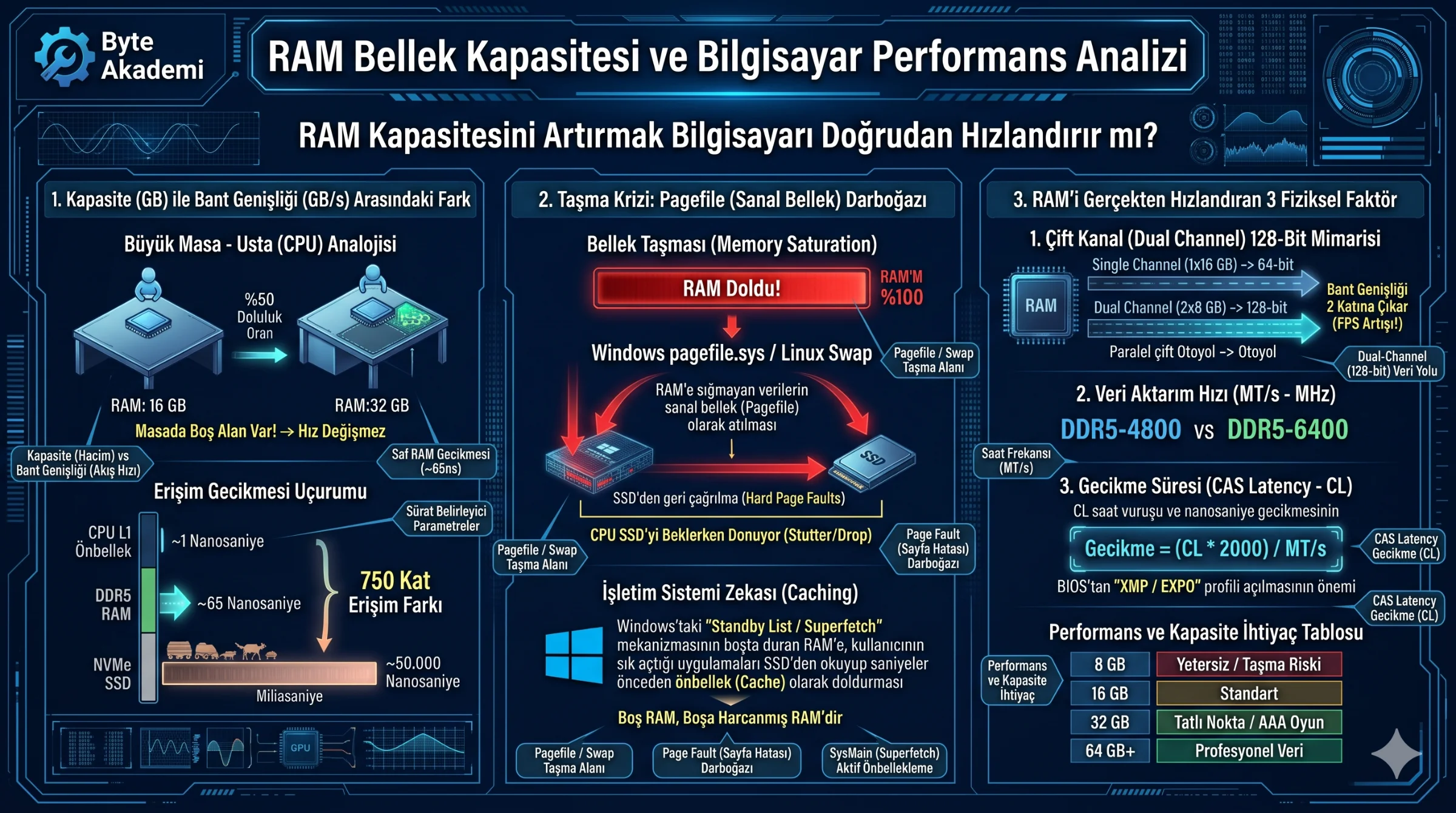
Dual-channel configurations double the memory bus width and bandwidth. A single-channel (1x16 GB) RAM stick limits the CPU's memory controller to a **single 64-bit highway**, capping data transfer rates around 38–45 GB/s. Dual-channel (2x8 GB) RAM, however, allows the processor to access two separate memory modules simultaneously and in parallel. This widens the bus to **128-bit (2x64-bit)**, doubling theoretical bandwidth to 76–90 GB/s. This extra bandwidth ensures the CPU doesn't stall while waiting for data, which stabilizes 1% low frame rates, increases gaming performance by 15% to 30%, and significantly improves multitasking responsiveness.
Table of Contents
- 1. Highway and Lane Physics: How Memory Channels Work
- 2. Starving the Processor: CPU Impact of Single-Channel Memory
- 3. Hardware Topologies: The Physical Difference of 64-Bit vs. 128-Bit
- 4. The DDR5 Sub-Channel Misconception: Are Two 32-Bit Channels True Dual-Channel?
- 5. Single-Channel vs. Dual-Channel RAM Technical Comparison Matrix
- 6. Applied Engineering Analysis: Memory Bandwidth and Latency Calculations
- 7. Frequently Asked Questions (FAQ)
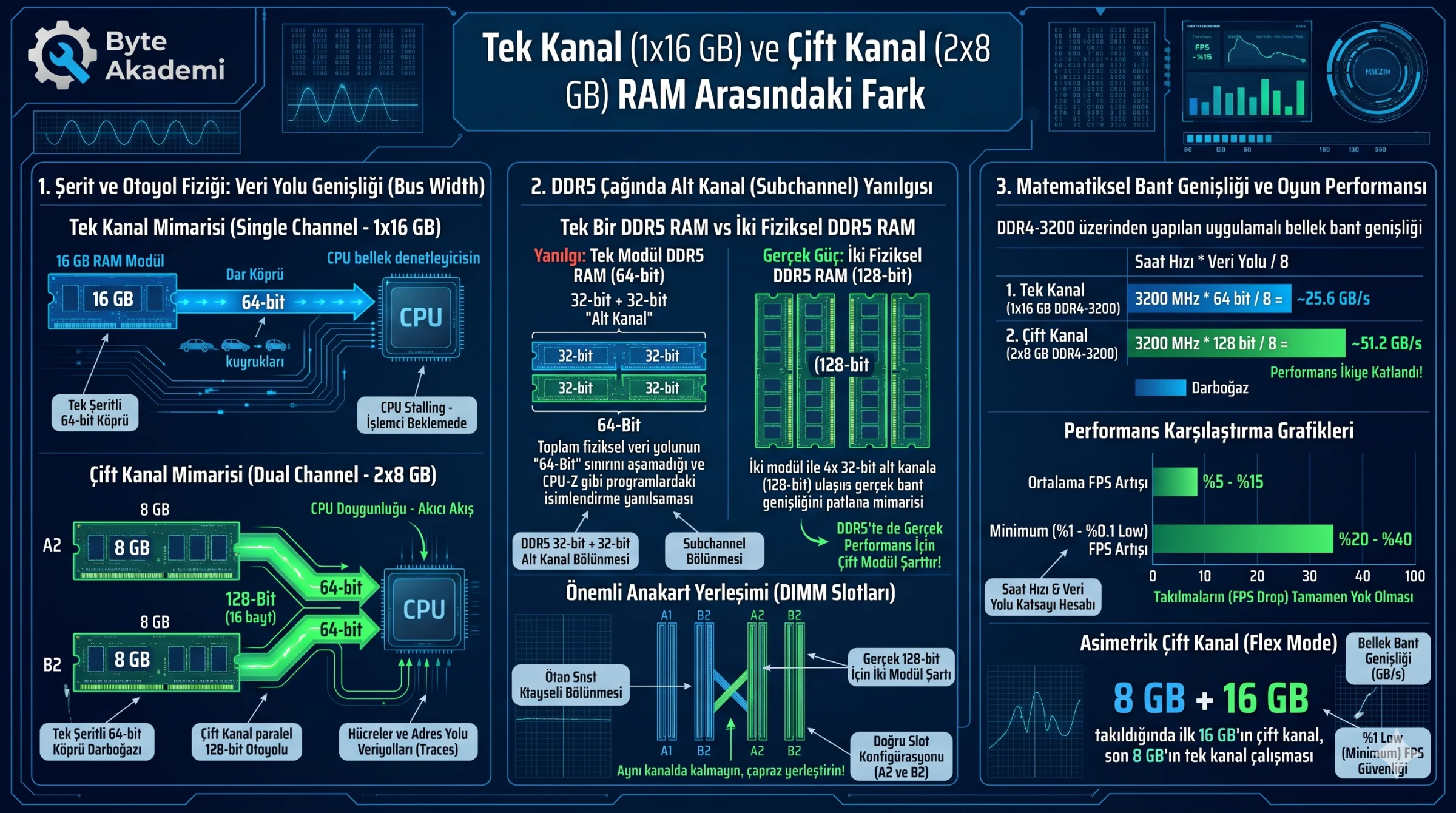
Operating on a single 16 GB stick constrains your system's memory traffic to a single-lane bridge; utilizing 2x8 GB runs the same capacity across dual parallel pathways, doubling bandwidth.
1. Highway and Lane Physics: How Memory Channels Work
Data transfers within a computer can be compared to moving crowds from a stadium (Storage/SSD) to high-rise offices (the CPU/Processor). RAM acts as the temporary transit and staging station between these two hubs.
Operating a single-channel (1x16 GB) RAM stick is like funneling all this traffic through a narrow, single-lane bridge. No matter how fast the destination (the CPU) is, data will queue up once the 64-bit bridge reaches its physical capacity. Using dual-channel (2x8 GB) RAM, on the other hand, builds a second, completely independent bridge alongside the first (2x64-bit = 128-bit). This enables the CPU's Integrated Memory Controller (IMC) to send simultaneous "read" and "write" commands to two separate modules, doubling the volume of data processed in the same timeframe.
  [SINGLE vs. DUAL-CHANNEL MEMORY PATHWAYS]

  Single-Channel (1x16 GB) RAM Architecture:
  [ 16 GB RAM Module ] ======= (64-bit Single Highway - ~45 GB/s) ======> [ CPU Memory Controller ]

  Dual-Channel (2x8 GB) RAM Architecture:
  [ 8 GB RAM Module A ] ═══════ (64-bit Highway A) ═══════┐
                                                          ├─> [ CPU Memory Controller (128-bit) ]
  [ 8 GB RAM Module B ] ═══════ (64-bit Highway B) ═══════┘
2. Starving the Processor: CPU Impact of Single-Channel Memory
A modern CPU can process billions of operations per second, but requires a constant stream of new instructions and data. If it cannot find this data in its ultra-fast L1, L2, or L3 caches (a cache miss), it must fetch it from system RAM.
A single-channel memory interface can "starve" the processor by failing to feed its high-speed cores quickly enough through a 64-bit path. This forces CPU cores to stall while waiting for data. These wait times, or latency, can cause frame-time spikes and gaming stutter. You may also notice GPU utilization dropping below 99% because the CPU cannot calculate frame data quickly enough to keep the graphics card fully loaded.
3. Hardware Topologies: The Physical Difference of 64-Bit vs. 128-Bit
The "bit" designation on motherboard traces refers to the number of parallel, high-speed copper pathways routing signals between the CPU socket and the RAM slots (DIMMs).
- The 64-Bit Boundary: In traditional single-channel configurations (such as DDR4 and older), a CPU connects to a single memory module via 64 parallel traces, transferring 64 bits (8 bytes) of data per clock cycle.
- The 128-Bit Dual Pipeline: Inserting two matched modules into the correct slots (typically slots 2 and 4) engages Dual-Channel mode. This activates another 64 traces, allowing the IMC to operate a 128-bit (16-byte) bus, doubling the data transferred per cycle.
4. The DDR5 Sub-Channel Misconception: Are Two 32-Bit Channels True Dual-Channel?
The transition to DDR5 introduced a common misunderstanding: "I installed a single DDR5 RAM stick, and utility tools say 'Dual-Channel' is active, so I don't need a second module." While technically correct, this is a misconception in practice.
DDR4 modules use a single 64-bit data bus, whereas DDR5 splits a single module into **two independent 32-bit sub-channels** (32-bit + 32-bit = 64-bit). This change improves data handling flexibility, but the total physical bus width remains 64-bit. Consequently, a single DDR5 module cannot match the performance of a true 128-bit dual-channel configuration. For optimal throughput, you still need **two physical DDR5 modules** to expand the bus to 4x32-bit (128-bit, plus ECC error correction bits).
5. Single-Channel vs. Dual-Channel RAM Technical Comparison Matrix
| Technical Parameter | Single-Channel (1x16 GB DDR4/DDR5) | Dual-Channel (2x8 GB DDR4/DDR5) | Mühendislik / Performans Sonucu |
|---|---|---|---|
| Bus Width | 64-Bit (DDR5: 2x 32-bit subchannels) | 128-Bit (DDR5: 4x 32-bit subchannels) | Doubles the data transferred per clock cycle. |
| Memory Bandwidth (Theoretical) | ~38.4 GB/s (DDR4-4800) | ~76.8 GB/s (DDR4-4800) | Doubles the potential data transfer rate to the processor. |
| Average Gaming FPS | Lower / Constrained (GPU remains underutilized) | 5% to 15% Higher | Resolves CPU-bound bottlenecks in games like CS2 or Valorant. |
| 1% and 0.1% Low (Minimum) FPS | Frequent, sudden frame-time drops | 20% to 40% Higher and More Stable | Significantly reduces micro-stuttering during intense in-game events. |
| Multitasking Flow | Prone to lag (data queues up on one channel) | Highly Responsive (Parallel task execution) | Allows for much smoother background tasking, streaming, or rendering. |
| DRAM CPU Access Latency | Higher (due to queue bottlenecks on the bus) | Optimized | Shorter wait states for the processor. |
6. Applied Engineering Analysis: Memory Bandwidth and Latency Calculations
The impact of dual-channel routing can be calculated using a standard DDR4-3200 memory interface:
Bandwidth Formula: Bandwidth (MB/s) = Clock Frequency (MHz) * Bus Width (Bits) / 8
  [BANDWIDTH AND LATENCY PENALTY CALCULATIONS]

  Scenario 1: Single-Channel 1x16 GB DDR4-3200 (64-bit)
  Throughput = 3200 MHz * 64 bits / 8 = 204,800 Mbit/s -> 25,600 MB/s (~25.6 GB/s)

  Scenario 2: Dual-Channel 2x8 GB DDR4-3200 (128-bit)
  Throughput = 3200 MHz * 128 bits / 8 = 409,600 Mbit/s -> 51,200 MB/s (~51.2 GB/s)

  Engineering Verdict: Using identical memory chips, a 2x8 GB configuration
                       reaches 51.2 GB/s, while a 1x16 GB setup caps at 25.6 GB/s.
                       This difference in throughput is the primary reason for CPU
                       stretching and frame drops under heavy workloads.
7. Frequently Asked Questions (FAQ)
Can I achieve dual-channel speed by pairing a 16 GB module with an 8 GB module?
To some extent, yes, through Intel and AMD’s **Asymmetric Dual-Channel (Flex Mode)**. This technology configures the 8 GB module and the first 8 GB of the 16 GB module to operate in dual-channel (128-bit), while the remaining 8 GB on the larger stick runs in single-channel (64-bit). However, using matched pairs (kits) is always recommended to avoid timing (CL) mismatches and potential blue-screen instability.
Does installing 4 RAM sticks (e.g., 4x4 GB or 4x8 GB) quadruple memory channels?
No, it still operates as a 128-bit dual-channel interface. Consumer CPUs (such as AM5 or LGA1700) only feature 2 physical memory channels. Populating four slots simply places two modules on each channel (A1/A2 and B1/B2) without expanding the bus width to 256-bit. In fact, four-stick configurations can strain the IMC, making it more difficult to run high-speed overclock profiles like XMP or EXPO.
Which motherboard slots should I use to enable dual-channel mode?
If you have four slots and want to install two RAM modules, don't place them in adjacent slots. For most motherboards, you should use the **2nd and 4th slots (labeled A2 and B2)**. Placing them side-by-side on the same channel limits them to single-channel (64-bit) operation. Always refer to your motherboard’s markings or manual for optimal placement.