Whether assembling a custom workstation, upgrading an existing rig, or troubleshooting a sudden Blue Screen of Death (BSOD), users frequently encounter the same barrier: a fragmented list of technical specifications and incompatible bus standards. Questions like "Why do games stutter despite having a flagship processor?" or "Why is my 7,000 MB/s NVMe SSD running at half speed?" arise from viewing hardware components as isolated price tags rather than interconnected links in a high-speed electrical pipeline.
Computer hardware comprises the physical, electronic, and electromechanical components that receive input data, process binary electrical signals (0s and 1s) across billions of silicon transistors, store states temporarily or permanently, and render outputs. The core architecture centers around the Motherboard, interconnecting the CPU, RAM, GPU, NVMe Storage, and Power Supply Unit (PSU).
Table of Contents
- 1. Inside the Silicon: How Hardware Components Communicate
- 2. Central Processing Unit (CPU): Transistors & Cache Physics
- 3. Motherboard & PCIe Lanes: The System Highway
- 4. RAM: Capacitor Refresh Cycles & Volatile Memory
- 5. Graphics Processing Unit (GPU): Parallel Compute & AI
- 6. Storage Architecture: 3D NAND Cells & NVMe Protocol
- 7. Power Supply (PSU) & Thermal Engineering
- 8. Hardware Component Technical Comparison Matrix
- 9. Applied Analysis: Calculating PCIe Bandwidth Bottlenecks
- 10. Frequently Asked Questions (FAQ)
The true performance of a computer architecture is never dictated by its fastest component, but by the narrowest data bus bottleneck between memory and processing units.
1. Inside the Silicon: How Hardware Components Communicate
Inside a computer chassis lies a high-density printed circuit network. No single component functions autonomously. The instant you click a mouse, a 5V electrical pulse travels across copper motherboard traces, triggers an Interrupt Request (IRQ) via the chipset, instructs the CPU to fetch binaries from an NVMe SSD into DRAM, executes arithmetic operations, and dispatches frame buffers over PCIe lanes to refresh millions of display pixels—all synchronized by billions of clock cycles per second.
  [HARDWARE DATA & BANDWIDTH HIERARCHY]

  [ NVMe SSD ]  --->  [ System RAM ]  --->  [ CPU L3/L2/L1 Cache ]  --->  [ CPU Execution Cores ]
  (7,000 MB/s)        (50,000 MB/s)         (500,000+ MB/s)               (1,000,000+ MB/s)
  Cold Storage        Active Workspace      Ultra-Fast Scratchpad         Arithmetic Logic Center
2. Central Processing Unit (CPU): Transistors & Cache Physics
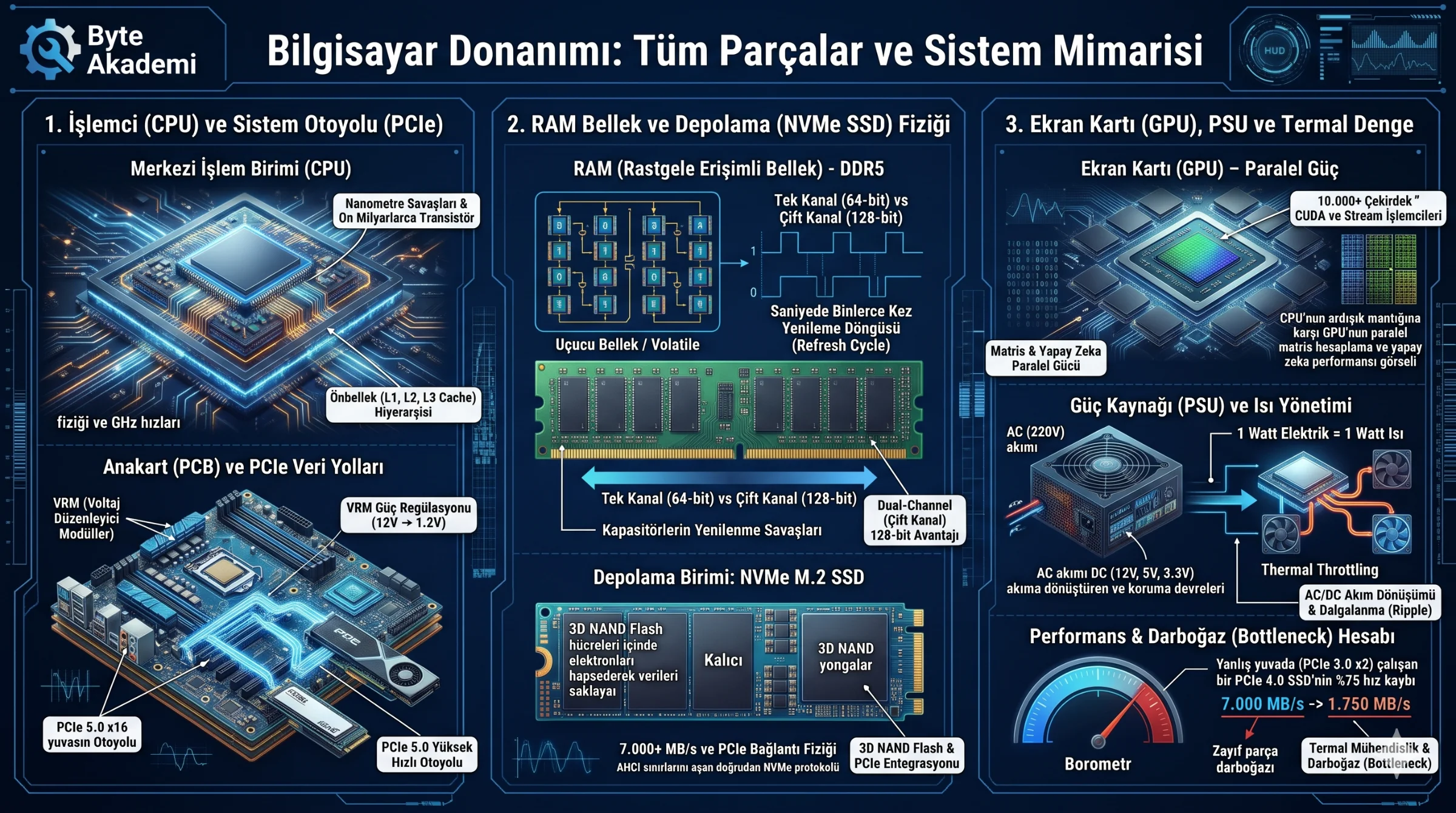
Fabricated from purified silicon wafers, a modern CPU die houses tens of billions of microscopic transistors acting as nanoscale electrical switches. While clock speeds (GHz) measure pulse frequency, real-world throughput depends heavily on Instructions Per Clock (IPC) and SRAM cache hierarchies (L1, L2, L3) that prevent the processor from stalling while waiting on slower system RAM.
3. Motherboard & PCIe Lanes: The System Highway
The motherboard is a multi-layer fiberglass and copper PCB routing power and high-speed differential signals. Its Voltage Regulator Modules (VRMs) step down 12V PSU rails into clean ~1.2V core voltages, while PCIe (Peripheral Component Interconnect Express) lanes provide dedicated point-to-point serial links—delivering up to 64 GB/s unidirectional bandwidth on a PCIe 5.0 x16 slot.
4. RAM: Capacitor Refresh Cycles & Volatile Memory
Modern DDR5 RAM stores each data bit inside microscopic cells composed of one transistor and one tiny capacitor. Because capacitors leak electrical charge within milliseconds, memory controllers execute thousands of refresh cycles per second. Cutting power drains these capacitors instantly, explaining why RAM is strictly volatile memory.
5. Graphics Processing Unit (GPU): Parallel Compute & AI
Whereas a CPU relies on 8 to 24 complex cores optimized for sequential logic, a GPU deploys over 10,000 streamlined cores (CUDA / Stream Processors) engineered for massive parallel matrix multiplication. Backed by high-bandwidth VRAM (GDDR6X/GDDR7) exceeding 1 TB/s, GPUs power real-time 4K ray tracing and deep learning workloads.
6. Storage Architecture: 3D NAND Cells & NVMe Protocol
Unlike legacy mechanical HDDs constrained by spinning magnetic platters, NVMe M.2 SSDs trap electrons inside 3D NAND floating-gate transistors. By bypassing legacy SATA/AHCI bottlenecks and communicating directly over CPU PCIe lanes, NVMe drives achieve sequential read speeds exceeding 7,000 to 14,500 MB/s.
7. Power Supply (PSU) & Thermal Engineering
The PSU converts 110V/220V Alternating Current (AC) into regulated +12V, +5V, and +3.3V Direct Current (DC) rails with minimal voltage ripple. Simultaneously, per thermodynamics, every Watt consumed by silicon dissipates as 1 Watt of heat—requiring copper heatpipes or liquid cooling loops to prevent thermal throttling at 100°C.
8. Hardware Component Technical Comparison Matrix
| Component | Primary Engineering Role | Typical Bandwidth | Data Persistence | Key Selection Metric |
|---|---|---|---|---|
| CPU | Sequential logic & arithmetic | 500+ GB/s (L3 Cache) | None (Registers) | IPC, Core Count, L3 Cache Size |
| DDR5 RAM | Volatile active workspace | 45 - 85 GB/s | Volatile | Capacity (GB), MT/s Speed, CAS Latency |
| GPU | Parallel rendering & AI tensors | 500 - 1,000+ GB/s (VRAM) | Volatile (VRAM) | Shader Count, VRAM Capacity & Bus Width |
| NVMe M.2 SSD | Non-volatile OS & file storage | 3.5 - 14.5 GB/s (PCIe 4/5) | Non-Volatile | Random IOPS, TBW Endurance, DRAM Cache |
| Motherboard | Power delivery & bus routing | 64 GB/s (PCIe 5.0 x16) | BIOS/UEFI Firmware | VRM Phase Design, Socket, M.2 Slot Lanes |
| PSU | AC-to-DC conversion & protection | Continuous DC Regulation | None | 80+ Efficiency, ATX 3.1 Compliance, Ripple |
9. Applied Analysis: Calculating PCIe Bandwidth Bottlenecks
Installing a 7,000 MB/s PCIe 4.0 x4 NVMe SSD into a secondary chipset M.2 slot wired for PCIe 3.0 x2 creates an immediate hardware bottleneck:
  [BANDWIDTH BOTTLENECK CALCULATION]

  PCIe 3.0 Single Lane (x1) = ~985 MB/s
  PCIe 3.0 x2 Slot Ceiling  = 2 * 985 MB/s = 1,970 MB/s Theoretical Max

  Result: Your 7,000 MB/s SSD caps at ~1,750 MB/s real-world throughput, wasting 75% of its speed!
10. Frequently Asked Questions (FAQ)
Does adding more RAM automatically make a computer faster?
Only if your current workload saturates existing RAM capacity. Once capacity exceeds active demand, adding extra gigabytes yields zero FPS or speed gains; however, preventing SSD pagefile swapping eliminates severe system stuttering.
Can dried thermal paste permanently destroy a processor?
Modern silicon includes hardware thermal trip sensors that throttle clock speeds or shut down the system around 100°C–105°C before instant burnout occurs, though prolonged heat accelerates silicon electromigration.
Why does Dual-Channel (2x8 GB) outperform Single-Channel (1x16 GB) RAM?
Dual-channel configurations double the memory bus width from 64-bit to 128-bit, doubling theoretical memory bandwidth and boosting CPU-bound frame rates by 15% to 25%.