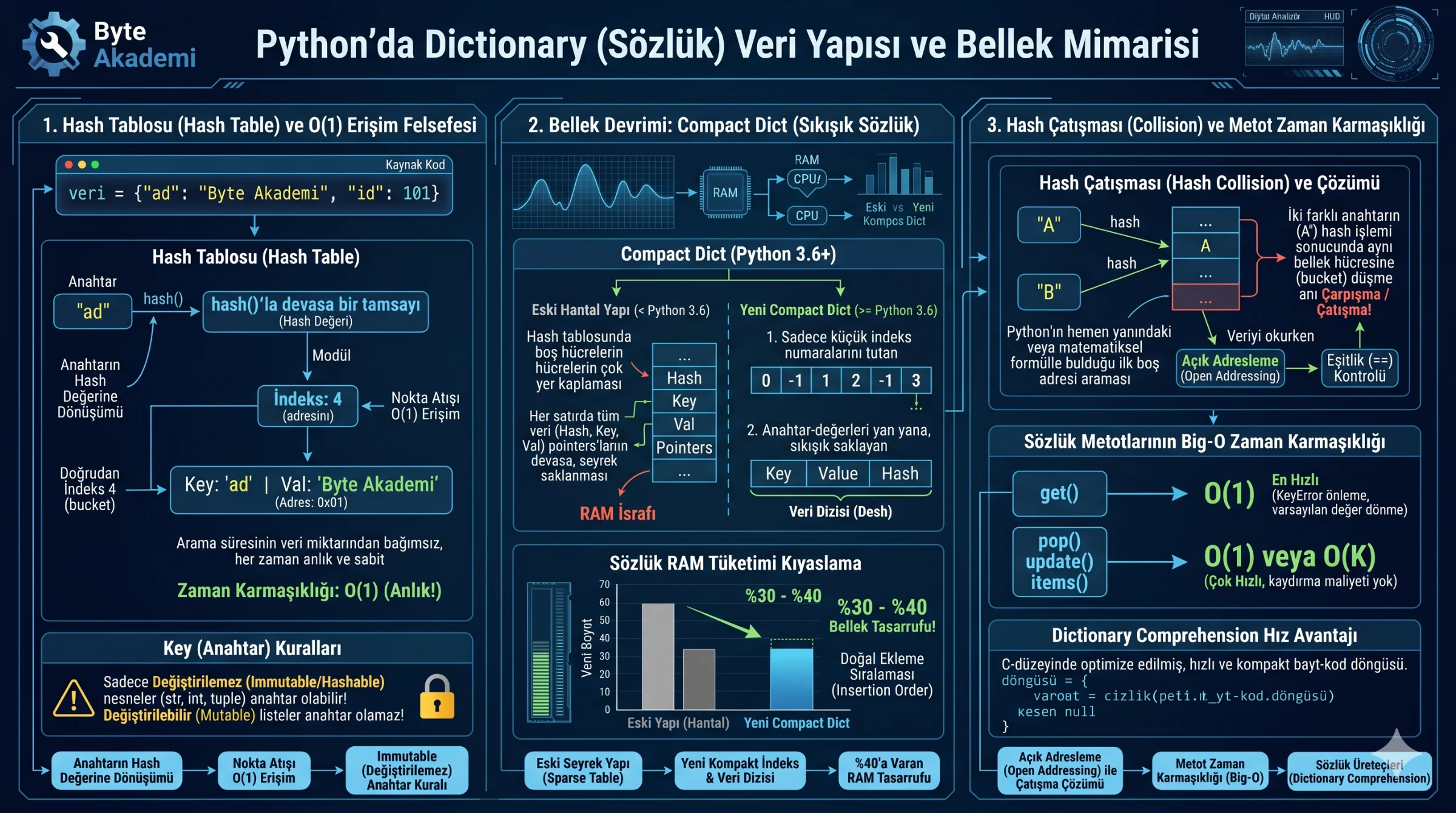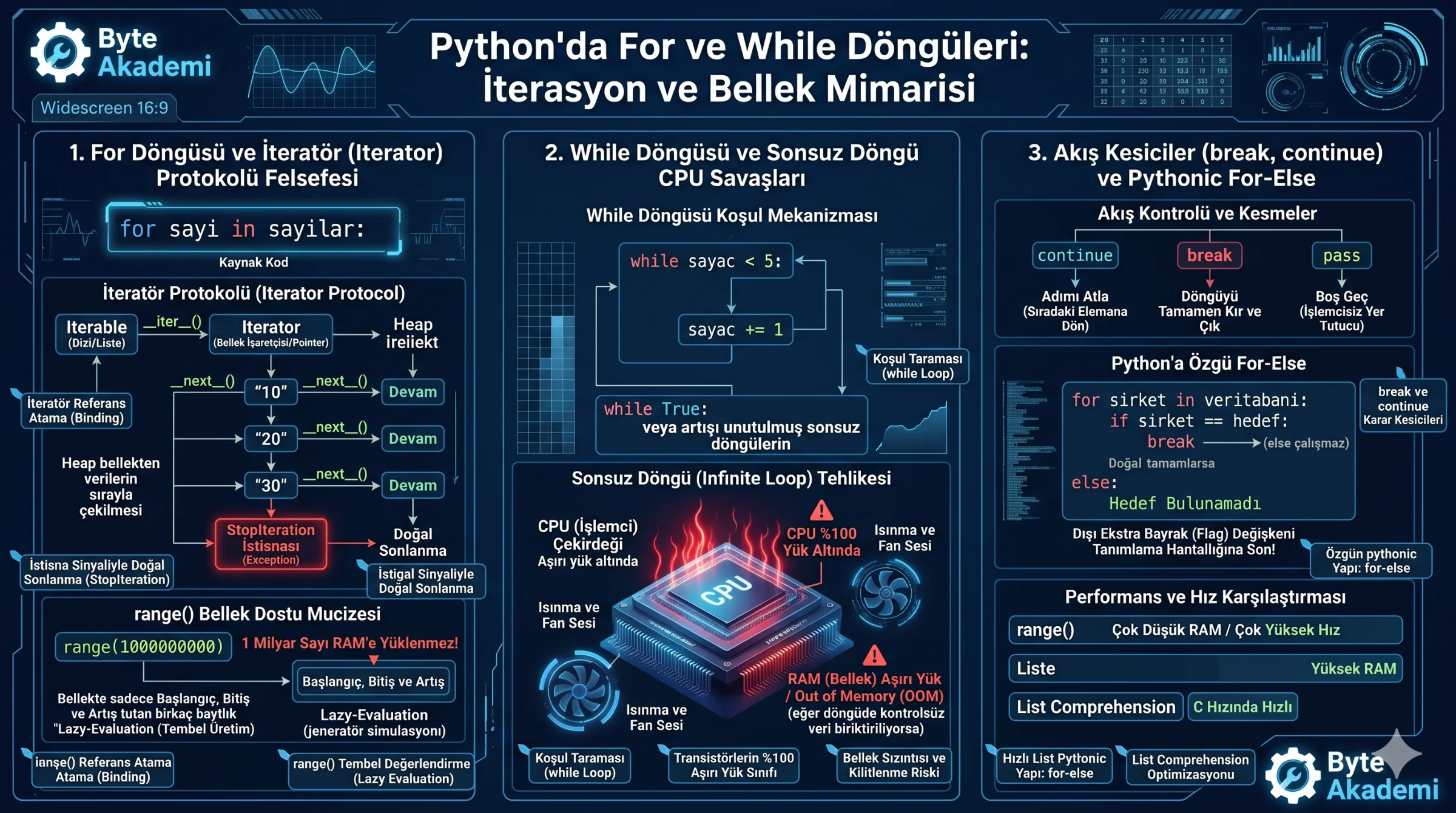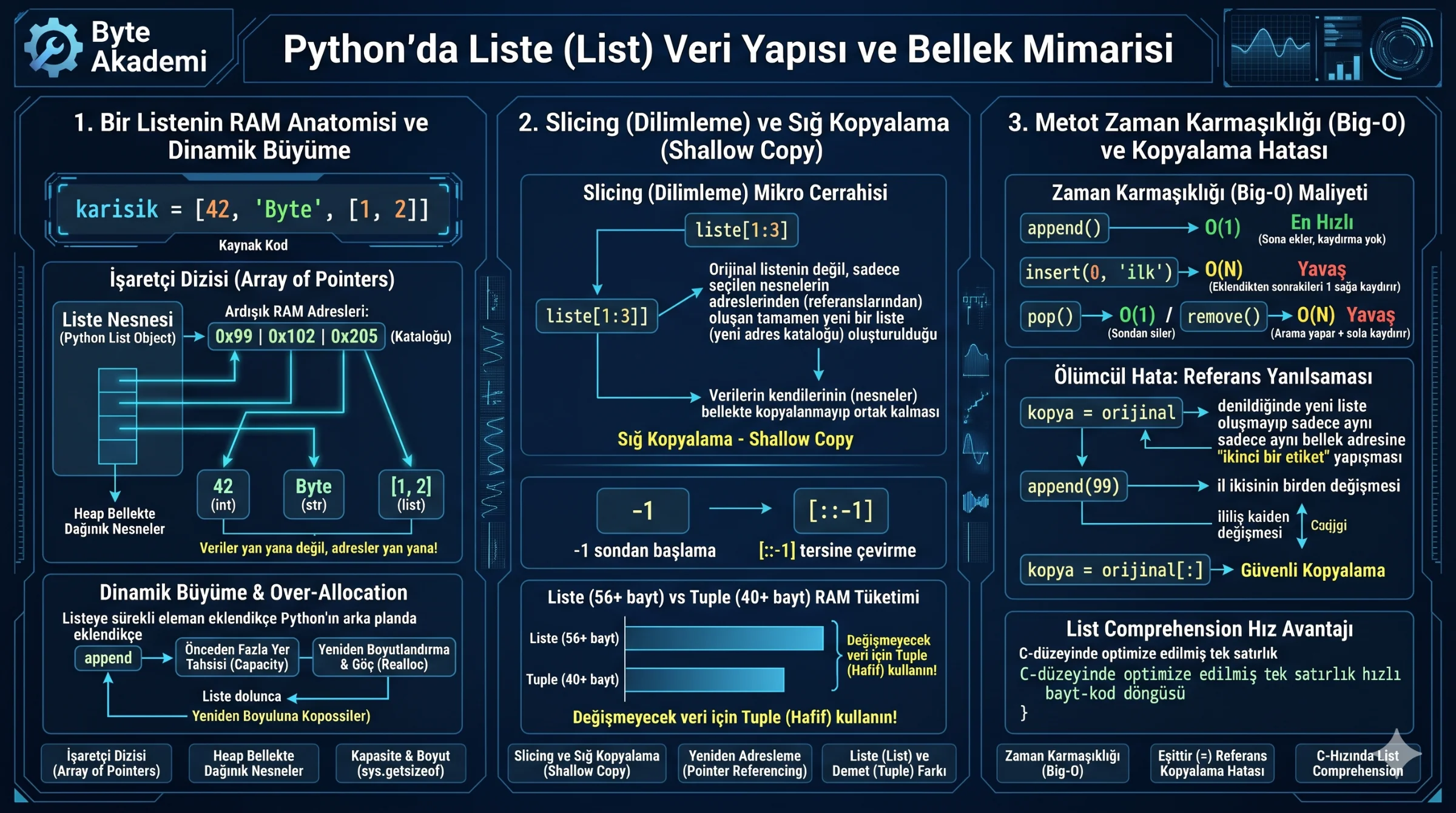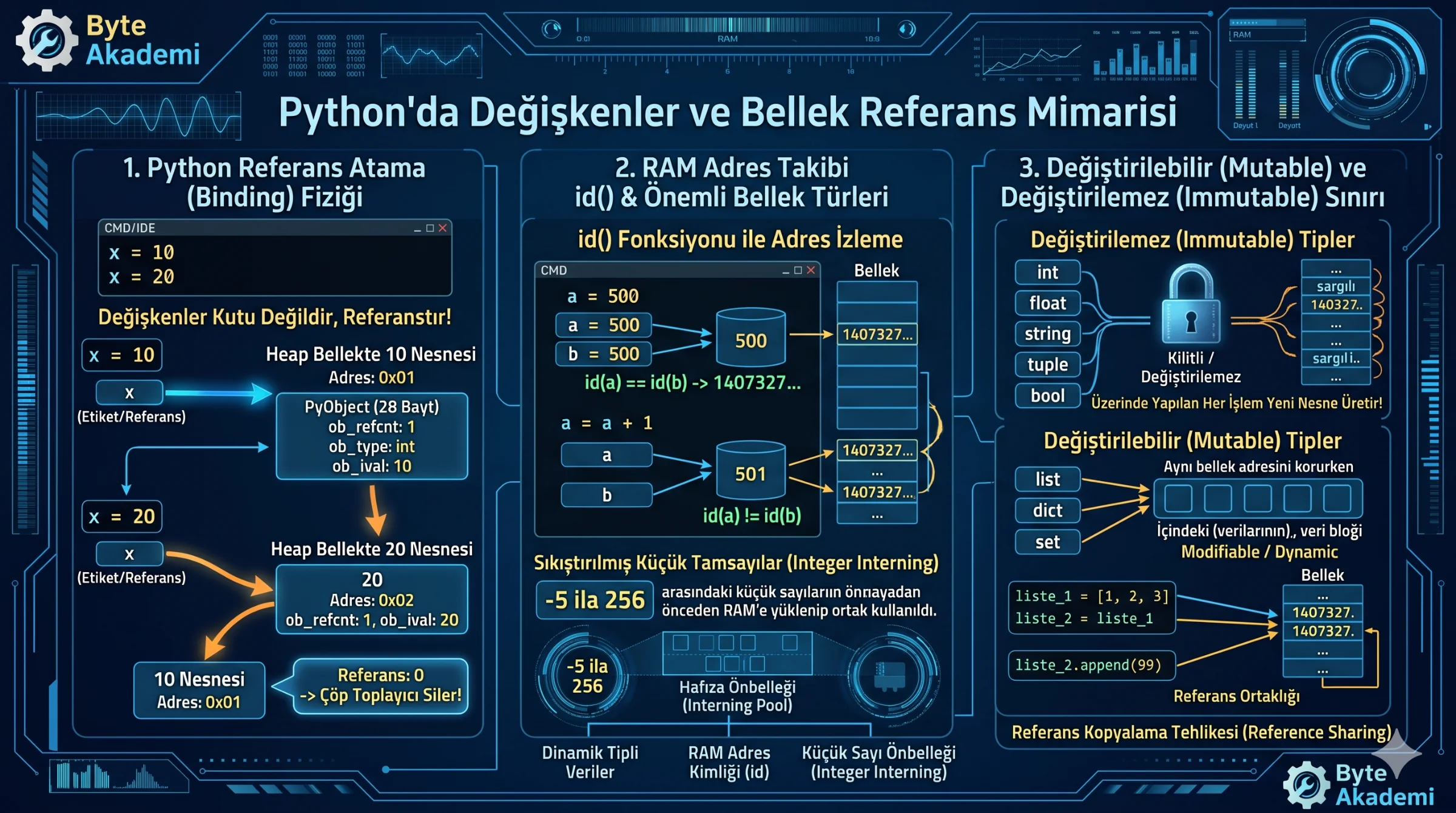
Traditional programming courses almost universally rely on the same simplified analogy: "Variables are like boxes where you store your data." In the context of Python, this is fundamentally inaccurate. In Python, variables are not physical storage containers (memory boxes) enclosing values. Instead, they are labels, tags, or references (names) bound to autonomous objects that inhabit the heap memory (RAM)!
Failing to grasp how even the smallest integer or string addresses transistor states, how Python dynamically infers data types, and the strict rules of "immutability" can lead to silent memory leaks and elusive runtime bugs in complex systems. In this guide, we discard the conventional "box" analogy. We will explore Python's **reference binding mechanism**, monitor RAM addresses using the id() function, analyze the structural divide between **Mutable and Immutable** data, and dissect CPython's PyObject heap structures from a computer architect's perspective!
1. The True Physics of Python Variables: Reference Binding
In statically-typed languages like C, C++, or Java, declaring a variable (such as int x = 10;) reserves a specific 4-byte (32-bit) physical address on the stack. Reassigning x = 20 overwrites the data inside that same physical address; the memory location itself never changes.
In Python, however, executing x = 10 initiates a completely different three-stage lifecycle:
- Object Instantiation: Python first allocates a standalone integer object carrying the value 10 on the Heap. This is not a raw 4-byte value, but a rich 28-byte PyObject containing a reference counter and type descriptor.
- Memory Addressing: This heap object is assigned a unique physical RAM address (e.g.,
0x7ffee23b1ab0). - Reference Binding: The variable name
xis simply a label (reference) bound to that specific memory address.
When you reassign x = 20, Python does not overwrite the value 10. It allocates a brand-new integer object with the value 20 elsewhere on the Heap, and redirects the x label to point to this new address. The orphaned 10 object—having its reference count drop to zero—is subsequently swept from RAM by Python’s Garbage Collector.
  [PYTHON REFERENCE BINDING LIFECYCLE]

  x = 10  Instantiation:
  [ x (Label) ] ----------> [ Heap Integer Object '10' (Address: 0x01) ] (Ref Count: 1)

  x = 20  Reassignment:
  [ x (Label) ] ──┐         [ Heap Integer Object '10' (Address: 0x01) ] (Ref: 0 -> Flagged for Garbage Collector)
                  └-------> [ Heap Integer Object '20' (Address: 0x02) ] (Ref Count: 1)
Variables in Python do not store data like boxes; they are dynamic, reference-based tags bound to independent objects on the memory heap.
2. Monitoring RAM Addresses with id()
You can observe this behavior directly in the Python interpreter using the id() function, which returns the unique integer memory address of an object:
# Binding two labels to the same object
a = 500
b = 500

print(f"a's Address: {id(a)}") # e.g., 140732715096368
print(f"b's Address: {id(b)}") # e.g., 140732715096368 (Identical!)

# Reassigning 'a'
a = a + 1

print(f"New a's Address: {id(a)}") # e.g., 140732715096400 (ADDRESS CHANGED!)
print(f"b's Address:     {id(b)}") # e.g., 140732715096368 (b's address remains unchanged)
Incrementing a did not modify the 500 object in place; it rebound the a label to a brand-new integer object (501) at a different address, while b continues to reference the 500 object.
3. Mutable vs. Immutable Types
The behavioral divide in Python is dictated by whether an object is modifiable after allocation:
- Immutable Types:
int,float,string,tuple,bool. Their values cannot be altered once allocated. Operations that seem to modify them actually generate new objects and redirect references. - Mutable Types:
list,dict,set. These can alter their contents without changing their physical memory address on the Heap.
Consider the typical pitfall this creates with mutable variables:
# Declaring list references
list_1 = [1, 2, 3]
list_2 = list_1 # Binding both labels to the exact same list object

# Appending to the second reference
list_2.append(99)

print(f"list_1: {list_1}") # Output: [1, 2, 3, 99] (Both changed!)
print(f"list_2: {list_2}") # Output: [1, 2, 3, 99]
Since list_2 = list_1 copies the memory address (reference) rather than the data, list modifications via list_2 immediately impact list_1, as they are labels on the exact same mutable object.
4. Datatype Quick-Reference
| Datatype | Mechanical Purpose | Python Syntax Example | Memory Property |
|---|---|---|---|
| Integer (int) | Unbounded whole numbers | age = 28 |
Immutable |
| Float (float) | 64-bit floating-point decimals | temp = 36.6 |
Immutable |
| String (str) | Unicode character sequences | site = "Byte Akademi" |
Immutable |
| Boolean (bool) | Logical True / False |
is_active = True |
Immutable |
| List (list) | Ordered, dynamic sequences | numbers = [10, 20, 30] |
Mutable |
| Dictionary (dict) | Key-value hash mapping | user = {"id": 101, "name": "Can"} |
Mutable |
5. PEP 8 Variable Naming Standards
To write readable, standardized Python, variables must adhere to the official **PEP 8** style guidelines:
- Use Snake Case: Variable names must be lowercase with words separated by underscores (e.g.,
user_login_count = 5, not camelCase variants likeuserLoginCount). - Characters & Numbers: Names must start with a letter or an underscore, never a digit (e.g., use
value_3, not3_value). No special characters (!, @, $, %) are permitted. - Reserved Words: Do not shadow internal syntax keywords (e.g., do not name variables
if,class, ordef, as this triggers Syntax Errors).
Declaring variables is about mapping pointers to Heap memory address spaces. Recognizing CPython’s reference binding model, PyObject packaging, and the mutable/immutable division will secure your code and prevent memory leaks and debugging errors in production.