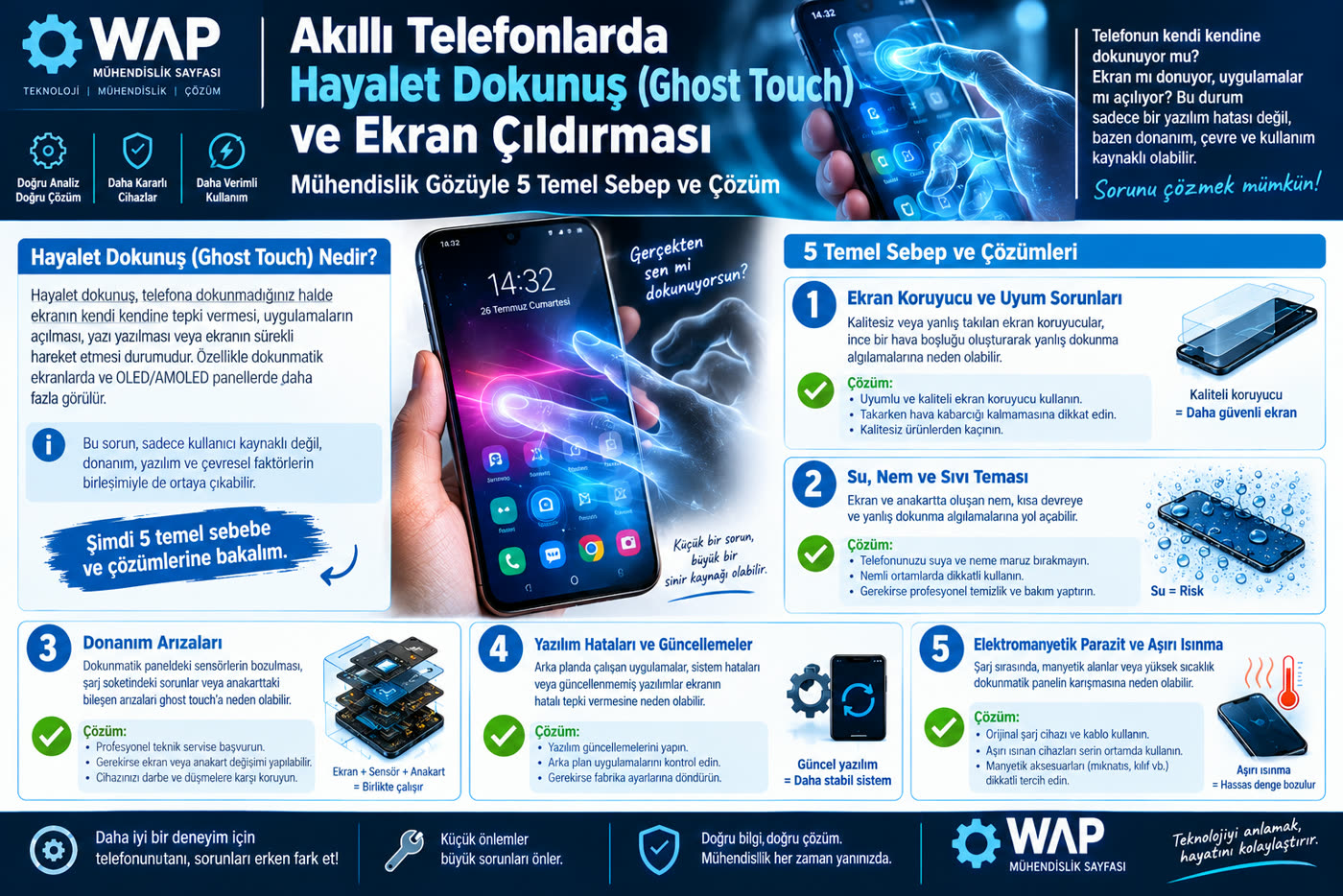
Have you ever seen your phone open apps on its own, type random letters on the keyboard, or ignore your taps entirely while it sits on the table or charges? This problem, which users describe as "the screen going crazy" and which is known in the literature as "Ghost Touch", is usually mistaken for a software bug. Yet from an electrical and electronics engineer's point of view, a display panel is a sensitive sensor lab that measures voltage, dielectric constant and capacitance changes at a microscopic level.
The capacitive touchscreens (capacitive digitizers) used in modern smartphones detect electrostatic deviations at the picofarad (pF) level created by the conductivity of a human finger. When uncontrolled electrical noise, voltage fluctuation or mechanical pressure enters this delicate loop from outside, the panel inevitably misbehaves. Let's set aside the superficial advice found elsewhere and dig into the hardware root causes of this fault, along with step-by-step fixes.
The capacitive digitizer layer determines finger coordinates by reading microscopic voltage differences. Electrical interference leads to ghost touches.
1. Low-Quality Chargers and AC Ripple Voltage
Among the devices that come into my workshop, the number-one culprit behind erratic touch behavior is, without exception, a poor-quality charger. A smartphone's charging circuitry (especially on devices with tight current tolerances) needs a perfectly filtered supply when converting high voltage from the outlet into direct current (DC).
Cheap, no-name adapters lack adequate inductor and capacitor filtering. Noisy alternating current coming from the mains (AC ripple) flows through the charging cable straight into the phone's chassis and the motherboard's ground plane. The parasitic static charge that builds up on the ground line leaks directly into the screen's digitizer sensors. The panel mistakes this electrical noise for finger touches and starts opening random windows on the screen.
If your phone acts on its own only while it is plugged in, the fault is not in the phone's hardware; your adapter is leaking current into the chassis. Unplug the device immediately. To solve the problem, use an original certified charger (or a quality GaN charger with strong regulation and filtering).
2. Mechanical Stress and Parasitic Capacitance (Tempered Glass & Cases)
Thick, low-quality screen protectors, or ones that trapped microscopic air bubbles during installation, disturb the insulating balance (dielectric constant) between the glass and the touch layer. The electrostatic charge that builds up on the surface through friction has nowhere to discharge.
On top of that, rigid silicone or rugged armor cases that squeeze the device too tightly apply mechanical torsion to the inner display through the corners of the frame. This physical pressure flexes the conductive traces along the edge of the screen (the ITO lines), causing the digitizer controller to generate signals continuously. If the screen returns to normal as soon as you remove the case and peel off the screen protector, the problem is this mechanical pinching.
3. Surface Conductivity: Moisture, Invisible Grease and Oxidation
Capacitive screens respond not only to skin but to any conductive liquid layer on the surface. Sweat on your hands, high relative humidity in the room, or a microscopic film of grease from kitchen steam stuck to the screen creates a constant capacitive bridge across the display surface.
More dangerous still is light liquid exposure the device may have suffered in the past. Even if the liquid never reaches the screen, once it seeps onto the motherboard through the speaker or charging port, it starts microscopic corrosion and oxidation on the pins of the touch controller chip (Touch IC). These leakage currents send a constant stream of phantom touch commands to the panel. Cleaning the phone's surface with isopropyl alcohol and a microfiber cloth is the first step; but if there is internal oxidation, the motherboard needs to be dried out professionally.
Touchscreen Fault Diagnosis Table
| Symptom | Likely Hardware Source | First Engineering Action |
|---|---|---|
| Phantom taps only while charging | Unfiltered adapter / AC ripple leakage | Replace the charger and cable with originals |
| Random taps along the edges | Case pressure / faulty tempered glass | Remove the case and screen protector and test bare |
| One strip of the screen does not respond at all | Broken ITO conductive trace / flex damage | Inner display or digitizer replacement is required |
| Discoloration and taps in the middle of the screen | Internal pressure from a swollen battery | Replace the battery immediately (fire hazard) |
4. Kernel Lockups and Driver Conflicts
Not every hardware fault has to come from a physical impact. The coordinate data collected by the touch panel is processed by the input driver in the Linux kernel (the Android kernel) and passed on to the operating system.
When a faulty app that causes a severe memory leak in the background pins the CPU cores at 100% load, the I/O bus gets congested. The driver layer cannot synchronize the incoming data, so the touchscreen stops responding or replays earlier touches in rapid succession after a delay. Restarting the device, installing driver patches via Settings > System > Software Update, or performing a clean factory reset clears these software bottlenecks.
5. The Hidden Physical Disaster: Flex Cables and Swollen Batteries
When you drop your device on a hard surface, an intact outer glass does not mean the internal hardware survived. The conductive Indium Tin Oxide (ITO) grid beneath the screen can develop microscopic cracks on impact. Likewise, if the connector of the flexible flex cable that links the screen to the motherboard shifts out of its socket by even a tenth of a millimeter, data loss begins on the signal line.
Finally, the most insidious and overlooked danger: a swollen lithium-ion battery. Batteries that have reached the end of their life or have overheated produce gas through chemical reactions and swell. With no room to expand inside the housing, the battery presses directly against the back of the display panel with enormous micro-pressure. When ghost touches begin together with fading or yellowing in the middle of the screen, the battery is the culprit, and if ignored it carries a real risk of physical rupture or explosion.
Does your phone go haywire while charging, or is one area of the screen completely unresponsive? Tell us your device model and the details of the fault in the comments, and let's analyze its hardware root cause together!