When you type https://www.byteakademi.tr/ into your browser's address bar, how many times have you actually looked closely at that tiny padlock icon on the left? For most of us, that padlock is just a green or gray interface icon that gives us the feeling of "okay, the site is safe." Yet within the first 50 milliseconds after you press 'Enter', one of the most advanced mathematical verifications in the world takes place between your client (your computer or phone) and our web server: the TLS cryptographic handshake.
If this invisible digital shield didn't work, every line you read, every form you fill in and every button you click could be watched as "cleartext" all along the line, from the Wi-Fi router of the café you're connected to all the way to your provider's fiber exchanges, and could be altered by someone intercepting the traffic (Man-in-the-Middle, MITM). So, taking byteakademi.tr as an example, what exactly does this security certificate guarantee, how does the asymmetric encryption behind it work, and most importantly, does "HTTPS" always mean 100% innocence? Let's pull back the curtain.
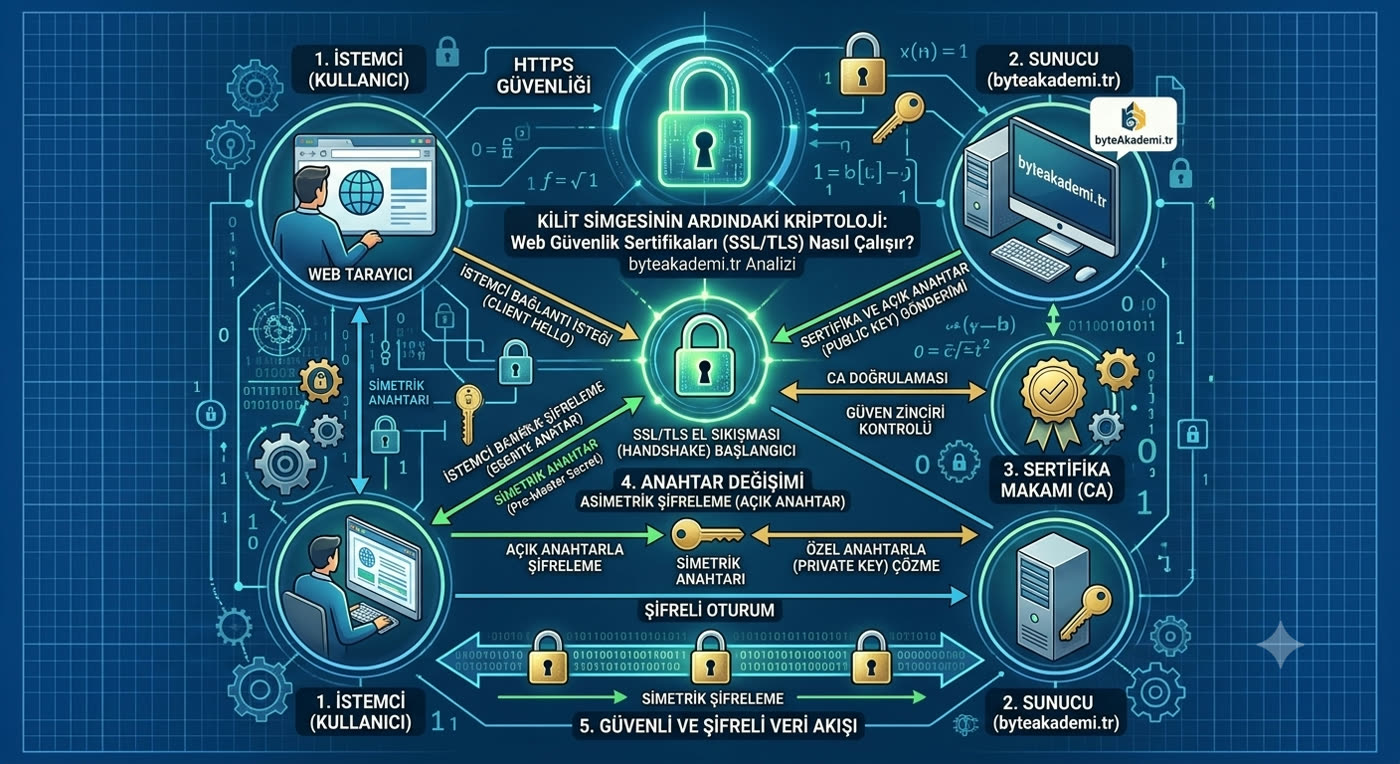
An SSL/TLS certificate locks the data packets between client and server inside a tunnel of strong asymmetric and symmetric encryption.
1. Origins and Cryptographic Foundations: The Hybrid Dance of Asymmetric and Symmetric Encryption
The most common misconception in web security is assuming that the entire data transfer relies on a single encryption method. In reality, the system blends two different methods in a hybrid fashion, a perfect engineering compromise between speed and security:
- Asymmetric Encryption (Authentication & Key Exchange): Our site's server holds two keys: a public key that is open to the whole world, and a private key that stays locked in the server's secure vault. When your browser locks data with the public key, no supercomputer on earth can open that lock; the only thing that can unlock it is the private key on our server.
- Symmetric Encryption (Transmission Speed): Asymmetric math (RSA or ECC) is very taxing on the processor. That is why, on first contact with the server, your browser uses the asymmetric method to securely establish a shared "session key" (AES-256). After that first moment, all the article text and images flowing to you are encrypted at lightning speed with this symmetric key.
- Chain of Trust (CA): So how does your browser know that the public key it is talking to really belongs to `byteakademi.tr`? This is where Certificate Authorities (CAs) come in. Our certificate has been digitally signed by an international authority that is pre-registered as trusted in your operating system's root store. Verifying that signature proves the certificate is not fake.
2. Technical Analysis: What Happens Within 1 RTT When You Visit byteakademi.tr?
In modern web architecture, the old and clunky SSL 2.0/3.0 and TLS 1.0/1.1 protocols have been abandoned entirely in favor of the modern TLS 1.3 standard. The moment you connect to our site, this handshake cycle takes place in the background:
[Client] → Client Hello (Supported Cipher Suites + Key Share) → [Server]
[Server] → Server Hello (Chosen Cipher + Certificate + Digital Signature) → [Client]
⇒ Verification Successful! Session Key Generated (AES-GCM-256). Encrypted Data Flow Started.
In the older TLS 1.2 architecture, this dialogue took at least 2 round trips (2-RTT) between server and browser, while TLS 1.3 cuts it to a single round trip (1-RTT), or even zero round trips (0-RTT / resumption) if you have visited before. In other words, security went up while the site's connection latency was brought down to mere milliseconds.
Web Communication Protocols: Security and Performance Matrix
| Protocol Type | Encryption Level | Handshake Latency | Current Security Status |
|---|---|---|---|
| HTTP (Port 80) | None (Cleartext) | 0 RTT (No encryption) | INSECURE (All packets can be sniffed) |
| TLS 1.2 (Legacy HTTPS) | Strong (RSA / DHE / AES) | 2 RTT (~100-200 ms overhead) | Acceptable, but legacy cipher suites are weak |
| TLS 1.3 (Modern HTTPS) | Maximum (ECDHE + ChaCha20/AES-GCM) | 1 RTT / 0 RTT (Fast Start) | CURRENT STANDARD (Perfect Forward Secrecy - PFS) |
3. Conclusion and an Engineering Warning: The Padlock Fallacy
Let's underline a very important truth here: The padlock icon in your browser does not show that a website is "ethical and honest"; it only shows that the "line" between you and the server is encrypted.
Today, scammers who set up fake banking sites for phishing can also obtain a free Domain Validated (DV) SSL certificate and put that padlock in the address bar. The certificate tells you this: "You are definitely talking to the server shown on the screen right now, and nobody can get in between." But the certificate cannot know whether the owner of that server has good intentions; telling the difference depends on the user's digital literacy.
Engineering Verdict: When you browse `https://www.byteakademi.tr/`, the modern TLS encryption in use keeps your data fully protected from third parties. Web security is not just a padlock icon; it is an unbroken cryptographic chain that stretches from the client all the way to the certificate authority.
- IETF RFC 8446: "The Transport Layer Security (TLS) Protocol Version 1.3" (Official Internet Standards Bulletin).
- NIST SP 800-52 Rev. 2: "Guidelines for the Selection, Configuration, and Use of Transport Layer Security (TLS) Implementations".
- CA/Browser Forum: "Baseline Requirements for the Issuance and Management of Publicly-Trusted Certificates".
- ITU-T X.509 Standard: "Information technology - Open Systems Interconnection - The Directory: Public-key and attribute certificate frameworks".
Have you ever opened the certificate details on the sites you visit to see which certificate authority (CA) or which TLS version is being used? Let's discuss any interesting security vulnerabilities you've come across in the comments below!